

Paid social teams often treat a green Lighthouse score as proof that a landing page is ready to scale. That assumption is wrong. A polished desktop report can coexist with a frustrating mobile experience, especially when a visitor arrives from Meta or TikTok, opens a pre-sell page on a mid-range phone, and taps a button while JavaScript is still competing for attention.
The practical question isn't how to make a page look impressive in a lab. It's how to remove the delays that interrupt a mobile buyer's momentum. That means using real-user data, prioritizing the first visible content and the key interaction, and making platform trade-offs with conversion impact in mind.
Table of Contents
- Why Lab Scores Lie About Mobile Conversions
- The Non-Linear Math of Speed and Revenue
- High-Impact Quick Wins for Landing Pages
- Platform-Specific Constraints and Advantages
- Testing and Monitoring Workflows in the Wild
- When to Hand Off to Developers and Vendors
Why Lab Scores Lie About Mobile Conversions
A perfect desktop lab score is an unreliable proxy for paid social performance. Lighthouse gives you a controlled snapshot, but cold traffic arrives with different devices, networks, browsers, consent states, ad parameters, and third-party scripts. A page that feels immediate on a fast development laptop may still render slowly on mobile or pause when a buyer taps Learn More or Add to Cart.
Field data exposes that gap. Google's current Core Web Vitals baseline uses Largest Contentful Paint at 2.5 seconds or less, Interaction to Next Paint at 200 milliseconds or less, and Cumulative Layout Shift at 0.1 or less, with performance evaluated at the 75th percentile separately for mobile and desktop. The benchmark is explained in GreatFrontEnd's web performance interview guide, which also highlights the shift from First Input Delay to INP as the current interactivity metric.
The page can look ready while the interface is stuck
LCP tells you when the main visible content appears. CLS tells you whether the layout moves while the page loads. INP asks a different question: after the visitor interacts, how quickly does the page respond with a visual update?
That distinction matters on advertorials and listicles. A visitor may see the hero image, headline, and product section, then tap a sticky call-to-action. If a consent manager, analytics bundle, quiz widget, or chat tool is monopolizing the main thread, the tap can appear to do nothing. The page looks loaded, but the buyer experiences hesitation at the exact point where intent should turn into action.
Practical rule: Test the interaction that matters commercially, not only the page's initial paint.
INP replaced the older responsiveness metric because a single early interaction didn't capture the full pattern of responsiveness across a visit. A page can pass an initial input check and still perform badly when users open a variant selector, expand product details, dismiss a pop-up, or move from a pre-sell page toward checkout.
Separate the mobile audience from the desktop average
Don't combine mobile and desktop results into one blended score. Desktop users can hide mobile problems, particularly when a report uses a median or a high-powered test device. Review the 75th percentile for mobile, then segment by landing page, browser, device class, campaign, and geography where the sample supports it.
That process gives a growth team a more useful diagnosis:
- High LCP: The first meaningful content is arriving too late. Inspect the hero image, server response, render-blocking CSS, and font delivery.
- High INP: The page loads but interaction work is too heavy. Inspect event handlers, hydration, third-party scripts, and large JavaScript bundles.
- High CLS: The visitor sees content move. Reserve space for images, embeds, banners, and dynamic offers before those elements load.
The implementation details behind server-side rendering can also clarify why the initial response and the amount of browser work matter. For a technical explanation, the devPulse server side rendering insights provide useful context without reducing performance to a single score. For a practical checklist covering the broader measurement process, review Landra performance optimization tips.
A DTC team should treat lab testing as pre-launch QA, not as the final verdict. The final verdict comes from field data that reflects the people clicking the ads.
The Non-Linear Math of Speed and Revenue
Speed doesn't produce a neat, linear return. The first improvements often matter more than later refinements because a page that's slow at the beginning creates friction before the visitor has built any commitment. Removing a large delay from the first screen can help more than polishing an already fast page by a small amount.
Portent's analysis, documented in Deloitte's Milliseconds Make Millions report, found that pages loading in 1 second achieved about a 39% conversion rate, compared with 34% at 2 seconds and 29% at 3 seconds. In its e-commerce benchmark, the average conversion rate was 3.05% at 1 second and 0.67% at 4 seconds, with conversion declining by roughly 0.3% for each additional second of load time.
These figures aren't a promise for every store. They show why prioritization matters. If a page takes several seconds to become useful, the team should fix the largest bottleneck before spending time on small code-level refinements that users may never notice.
Small delays can matter at scale
A Google and Think with Google study found that improving mobile load time by 0.1 seconds increased conversion rate by 10.1%, while the average lift was 8% for retail sites and 10% for travel sites. The figures appear in this analysis of page speed and conversion impact.
The commercial implication is straightforward. Paid acquisition sends more visitors into the same experience, so a delay that seems minor in a single session can affect the efficiency of the entire campaign. If the page receives high-intent traffic, a slow first screen wastes the work already done by the ad, audience targeting, creative, and offer.
Mobile also deserves independent scrutiny. Google's mobile benchmark reports that bounce probability increased by 123% as load time moved from 1 to 10 seconds, as documented in Google's mobile page speed benchmarks. That isn't a reason to chase an arbitrary score. It's a reason to ask which delay prevents a visitor from seeing, understanding, or acting on the offer.
Prioritize the revenue bottleneck
Use the conversion path to decide what to fix first:
- The ad click to first meaningful content: If the hero section arrives late, reduce its image weight, font dependency, and render-blocking work.
- The first scroll: If the page becomes heavy after the hero, remove unnecessary sections, embeds, and decorative effects that don't support the buying argument.
- The primary interaction: If taps lag after the page appears, profile JavaScript and third-party code rather than compressing another image.
- The move toward checkout: Confirm that sticky bars, product selectors, forms, and cart actions respond predictably on mobile.
A page can be technically fast while still losing revenue through a slow or confusing interaction. Conversely, a page may carry editorial content that takes time to read, but the first screen and navigation actions can still feel responsive. Measure the steps that determine whether the visitor continues.
The right performance sprint doesn't make every resource smaller. It removes the delay that blocks the next commercial action.
That distinction helps growth teams defend performance work with stakeholders. Instead of asking for a vague “faster site,” ask for a specific improvement to the paid landing-page journey, then connect the change to field metrics and conversion behavior.
Here's a useful explainer on the relationship between speed and user response:
High-Impact Quick Wins for Landing Pages
The fastest wins usually come from removing work the visitor doesn't need before seeing or using the page. A full rebuild is rarely the first move. Start with the landing-page template, the above-the-fold assets, and the scripts that compete with the primary action.
Start with field data, then fix the worst metric
Open PageSpeed Insights and your browser performance tools, but don't begin by chasing every warning. Check real-user Core Web Vitals first, identify the failing metric on mobile, and inspect the landing pages that receive paid traffic.
A practical sequence looks like this:
- Audit the mobile field profile. Compare LCP, INP, and CLS for the actual landing-page URLs. Separate mobile from desktop before making decisions.
- Inspect the first viewport. Identify the largest visible element, usually the hero image, headline block, product render, or video poster.
- Remove render blockers. Check CSS, fonts, tag managers, consent tools, and scripts that execute before the visitor can see useful content.
- Retest the primary interaction. Tap the main call-to-action, open the key accordion, and test any selector or form that affects the purchase path.
- Verify the change in the field. A better local or lab result isn't enough if real mobile users still experience the same delay.
Resize the hero before compressing everything
A hero asset often arrives at a size intended for a large desktop display even though most paid-social visitors see it inside a much smaller mobile viewport. Resize it to the largest display size the template needs, then compress it and choose a suitable modern format such as WebP when browser support and image quality allow.
Don't use a single oversized image for every context if the platform can serve responsive variants. Add explicit dimensions or aspect-ratio rules so the browser reserves space before the asset arrives. That protects CLS and prevents the headline or call-to-action from jumping while the visual loads.
Images aren't the only source of weight. Autoplay video, animated backgrounds, decorative sliders, custom fonts, and review widgets can each compete with the content that makes the offer understandable. If an element doesn't help the visitor decide whether to continue, delay it or remove it.
Defer scripts that don't earn the first render
Third-party tools often enter through marketing requests rather than engineering decisions. Chat, heatmaps, recommendation engines, social embeds, review badges, and multiple tracking pixels may all be useful, but they don't all need to execute before the first content appears.
Classify each script by its job:
- Required for the first action: Keep it early, but make sure it's as small and non-blocking as the platform permits.
- Required after consent or interaction: Load it only after the relevant event.
- Useful for measurement but not rendering: Defer it until the page is usable and preserve the measurement needed for campaign analysis.
- Installed but unowned: Remove it or assign an owner who can justify its continued cost.
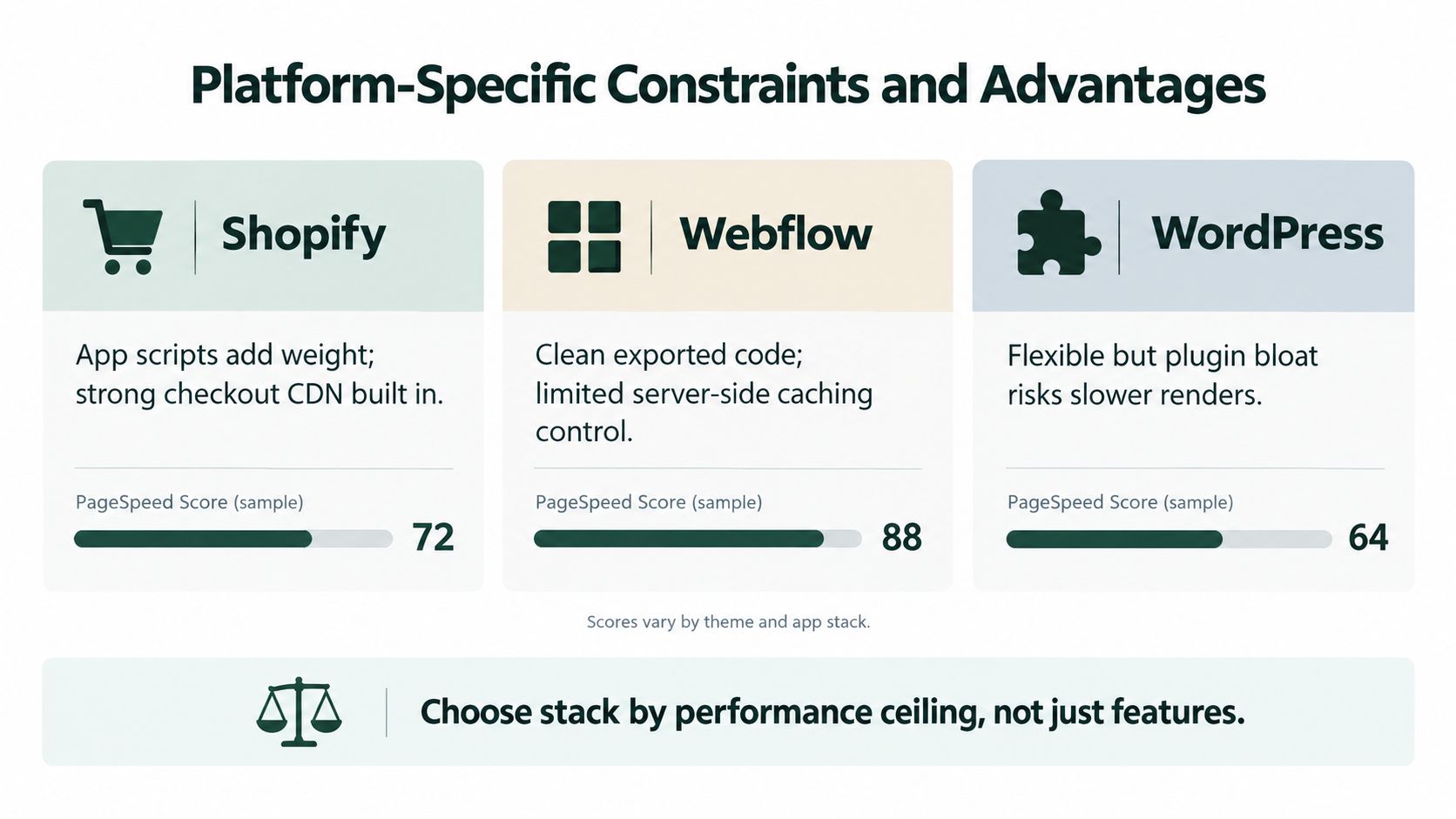
On Shopify, inspect app embeds and theme snippets rather than assuming an app is harmless because it has no visible block. In Webflow, audit custom code and integrations alongside the exported assets. In raw HTML, control is greater, but the team still needs a disciplined loading strategy.
For page structure, mobile spacing, and visible-content decisions, use Landra's mobile landing page guide as a practical reference. The principle is simple: load what creates understanding and action first, then load enhancements around that core experience.
Platform-Specific Constraints and Advantages
The fastest page is often the one the platform makes easy to publish and difficult to overload. Shopify, Webflow, and raw HTML can all support strong landing-page experiences, but they expose different performance trade-offs. The right choice depends on how much control the team needs, how closely the page must connect to commerce functions, and how many people will maintain it after launch.
Shopify keeps commerce close, but apps add friction
Shopify gives DTC teams a direct path to products, cart behavior, checkout, themes, and store operations. That convenience is valuable for a pre-sell page that must pass product context or cart actions into the existing storefront.
The risk sits in the theme and app ecosystem. Each app can add snippets, scripts, network requests, event listeners, or visual components. Removing an app from the admin panel may not remove every leftover asset from the theme, and a performance issue can remain invisible until a visitor reaches a specific template.
Shopify teams should audit:
- Theme-level JavaScript and unused sections.
- App embeds and snippets that load sitewide.
- Review, subscription, upsell, and personalization widgets.
- Hero images delivered through the chosen theme.
- Sticky bars and cart interactions on lower-powered phones.
The best Shopify workflow keeps the pre-sell page visually focused and limits the number of app-driven elements that appear before the visitor reaches the product decision.
Webflow gives design control with a different ceiling
Webflow can produce clean, structured marketing pages without requiring a custom application stack. It suits teams that need visual editing, brand control, and a page that remains separate from the most complex parts of a commerce theme.
The trade-off is control over the server and delivery layer. Teams can optimize assets, reduce custom code, simplify interactions, and manage page structure, but they may have less influence over server-side caching behavior than they would with a fully controlled HTML deployment. Custom scripts added for analytics, personalization, or animation can also undermine the cleanliness of the base page.
Use Webflow when the editorial and design workflow matters, then establish rules for custom code. Every animation, embed, and integration should have an owner and a reason to exist on a paid landing page.
Raw HTML maximizes control, not responsibility
An HTML export can be an effective choice for a dedicated advertorial or listicle because it strips away much of the platform surface area. The team can control markup, assets, script loading, caching configuration through its hosting setup, and the exact elements included in the page.
That control creates operational duties. Someone must maintain the export, update product information, handle analytics, preserve accessibility, manage forms or cart handoffs, and verify that a new tracking requirement hasn't introduced a regression. Raw HTML is a performance advantage only when the publishing process remains disciplined.
Choose the stack by its performance ceiling and maintenance reality, not by its feature list alone.
For a broader perspective on matching platform architecture to organizational needs, this guide for SaaS founders and CTOs offers useful decision-making context. DTC teams can apply the same logic by documenting who owns infrastructure, integrations, content changes, and production QA.
The comparison also affects tool selection. When evaluating advertorial tools vs Instapage, look beyond templates and editing features. Check how the output is delivered, which scripts are added, whether the page can live within the current commerce workflow, and how easily the team can produce a clean variant without starting a development queue.
Testing and Monitoring Workflows in the Wild
Performance work fails when teams treat launch as the finish line. A page may ship cleanly, then accumulate a new pixel for a campaign, a chat widget for customer support, a review component for social proof, and a pop-up for email capture. Each addition can alter rendering, interaction, layout stability, or network contention.
The sustainable answer is a two-part workflow. Use synthetic testing to catch obvious regressions before publication, then use Real User Monitoring to understand what visitors experience after the page is live.
Use synthetic tests as a release gate
Synthetic tools are useful because they provide repeatable conditions. Run the same landing page through a mobile profile before and after a change, inspect the waterfall, and record the result alongside the release notes.
Test more than the home page. Paid social traffic often lands on a specific advertorial, offer page, or campaign variant that has a different asset mix from the storefront. Test the exact URL used in the ad, including redirects, consent behavior, query parameters where relevant, and the route toward the primary action.
A useful pre-launch checklist includes:
- First render: Does the headline and main visual arrive without waiting for optional tools?
- Layout stability: Do banners, images, fonts, and embedded content reserve space?
- Interaction: Does the first tap produce a visible response without a pause?
- Network pressure: Does the page remain usable when non-critical requests are delayed?
- Variant parity: Did a new test version add heavier assets or more scripts than the control?
Synthetic testing won't reproduce every real visitor, so use it to block preventable mistakes rather than to declare universal performance.
Let RUM reveal the segments that averages hide
RUM connects performance data to production traffic. Segment the results by mobile and desktop, landing page, browser, device class, campaign, and geography where practical. Then compare performance with commercial events such as scroll depth, button engagement, checkout starts, and purchases.
Avoid relying on a single sitewide dashboard. A fast storefront can obscure a slow campaign page, and a good desktop result can conceal an interaction problem on mobile. Look for clusters. If one template has high INP while other pages remain stable, inspect its interactive components. If LCP worsens only for one creative variant, check the asset rather than changing the entire theme.
Don't add a monitoring script without considering the monitoring script's own cost. Select a measurement setup that gives the team actionable information and load it in a way that doesn't block the first useful content.
Keep a change log tied to business outcomes
Record what changed, why it changed, and which pages and campaigns it affected. Note the relevant field metrics before and after deployment, then review conversion behavior over a reasonable period rather than reacting to a single noisy session.
This creates a feedback loop between marketing and engineering. A designer can see that a heavier hero treatment affected mobile LCP. A developer can see that a deferred widget didn't remove the measurement the campaign needs. A paid media manager can decide whether a creative test is worth the added page complexity.
Monitoring matters because performance is a property of the live system, not a permanent feature of the original build.
When to Hand Off to Developers and Vendors
Marketers can remove obvious weight, resize images, clean up campaign variants, and question unnecessary scripts. They shouldn't spend weeks trying to solve infrastructure problems with template edits. The handoff point arrives when the remaining bottleneck requires control over the server, application runtime, data layer, or deployment process.
Server-side rendering is one example. If the page depends on substantial browser work before meaningful content appears, a developer may need to change how content is generated and delivered. That decision affects routing, caching, personalization, data fetching, and deployment. It isn't a safe copy-and-paste fix for a marketing team.
Escalate the problems that require system access
Ask developers or a specialist vendor to investigate when you see:
- Slow server response: The first byte arrives late across multiple tests, suggesting an issue beyond image compression or client-side JavaScript.
- Heavy application work: The browser spends substantial time parsing, compiling, or executing code before interactions respond.
- Database bottlenecks: Product, offer, inventory, or personalization data arrives slowly because the application is making inefficient queries.
- Caching limitations: The page repeats expensive work for visitors who should receive a cached response.
- Complex hydration or rendering: The visible page arrives, but the browser must reconcile a large interactive application before buttons work.
- Platform-level restrictions: The commerce or CMS stack prevents the team from changing headers, delivery behavior, or script execution order.
A good brief makes the handoff efficient. Include the exact URL, campaign context, affected device segment, field metric, synthetic waterfall, recent changes, and the business action that is being delayed. “The page feels slow” gives a vendor permission to sell a broad rebuild. “Mobile INP is failing on the product selector after the latest app release, and the add-to-cart action pauses after the tap” gives an engineering team a testable problem.
Don't pay for a rebuild before proving the bottleneck
A new platform may help, but migration carries its own risks. Redirects, analytics changes, template differences, tracking gaps, checkout handoffs, and content rework can create new problems while the original bottleneck remains. First isolate whether the issue comes from assets, scripts, layout, server delivery, application code, or a vendor integration.
Then define the smallest change that can validate the hypothesis. If removing a third-party widget improves the relevant field metric and leaves the conversion path intact, the team has evidence. If it doesn't, move to the next layer rather than escalating based on a score alone.
Performance ownership should remain shared. Marketers decide which interactions and campaign pages matter. Developers diagnose the systems that deliver them. Vendors can help with specialized rendering, caching, and monitoring, but they should receive a precise brief and a clear acceptance test.
Landra generates editable advertorials, listicles, and pre-sell pages from a product or brand URL, with mobile-first outputs that can publish to Shopify, Webflow, a hosted Landra URL, or HTML. Visit Landra to create a campaign page, review the structure inline, and choose a delivery format that fits your performance workflow.