
The cheapest landing page builder is the one with the lowest cost per conversion that passes speed checks and covers your 90-day traffic and page forecast. Entry prices run from $0 to about $37 a month, but plan pages may not show how a visit cap, branding restriction, or slower load time affects campaign costs.
A low signup price can rise when ads exceed a visit cap or the plan requires an upgrade. Slow pages can also cost conversions. Compare the monthly fee and likely upgrade with the revenue the page can generate: cost per conversion puts those expenses on the same basis. A free page may suit early testing, while a commercially usable page must also meet your speed and traffic needs.
Table of Contents
- Cheapest Landing Page Builder Options at a Glance
- True Monthly Cost at Three Traffic Levels
- Hidden Costs and Publishing Limits to Check
- How Page Speed Turns Into Lost Revenue
- When the Lowest Sticker Price Is the Best Value
- How to Test a Cheap Builder in One Week
- Choose the Cheapest Builder That Passes Your Test
Cheapest Landing Page Builder Options at a Glance
On paper, the cheapest landing page builder is a free tier or a general builder under $20 a month. Specialist campaign tools cluster around $29 to $37 a month. Each category hides a different limit, and that limit, not the headline fee, decides whether the plan survives the next 90 days.
| Option type | Typical sticker price | Limit that bites first | Often excluded from price | Best fit |
|---|---|---|---|---|
| Free tier, general website builder | $0 | Platform branding, few pages, low visit caps | Custom domain, analytics, A/B tests | Validating an idea with near-zero traffic |
| Low-cost general builder | Under $20 per month | Page count and visit caps on lower plans | Custom domain, branding removal, integrations | One brochure-style landing page |
| Specialist landing page builder | About $29 to $37 per month | Visit caps and page limits on the entry plan | Overage upgrades, testing features, migration | Campaign pages with conversion tracking |
| Pre-sell page generator (for example, Landra) | Check the vendor's current plan page | Monthly generation and storage limits by plan | Extra generations once the monthly cap is used, plus your own hosting if you export | DTC advertorials and listicles for paid social |
Free tiers are honest about being free and dishonest about being finished. Branding stays on the page, the custom domain usually does not, and analytics or tests sit on a paid tier. Fine for a concept with almost no traffic. Useless as a media-buying URL.
Low-cost general builders cover one brochure-style page. Page count and visit caps arrive before design limits do. Domain connection, logo removal, and the integrations a store actually needs often sit one plan up.
Specialist builders are built for campaign pages and conversion tracking. The entry plan is where visit caps and page limits live. Rankings that quote roughly $29 to $37 a month often skip overage, testing, branding removal, and the work of moving pages later, which is the gap Hackceleration's builder comparison leaves open for anyone running paid traffic.
Pre-sell generators price by monthly generations and stored pages, not by a template library. Treat any third-party price as stale. Read the vendor's pricing page for the plan that matches how many advertorials and listicles you will publish.
For a Shopify catalog, the page also has to fit the storefront you already pay for. A CRO roadmap for Shopify merchants is a useful check on offer, proof, and page job before you pick software.
The table answers one question first. Which category covers the traffic and the page count you will realistically run over the next 90 days? A cheap category is only cheapest for the traffic it covers.
True Monthly Cost at Three Traffic Levels
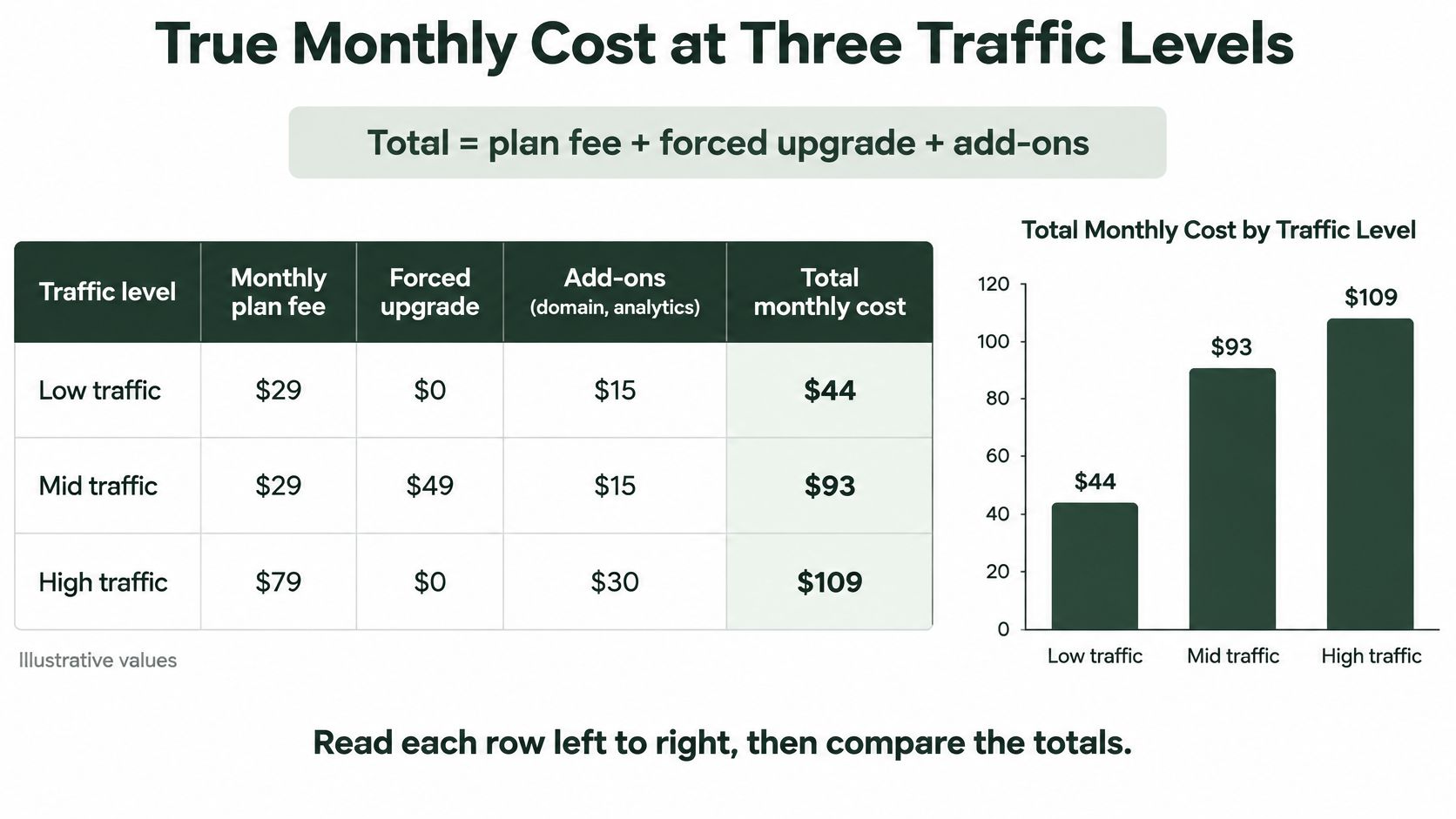
At 1,500 visits, the $29 plan costs less. Send 20,000 or 60,000 visits, and its required upgrade changes the comparison: Plan A costs $79 a month, while Plan B stays at $37. These are hypothetical plan examples, not vendor quotes. Total monthly cost = plan fee + required upgrade + add-ons.
| Scenario (monthly visits) | Plan A monthly cost | Plan A per 1,000 visits | Plan B monthly cost | Plan B per 1,000 visits |
|---|---|---|---|---|
| Validation, 1,500 visits | $29 | $19.33 | $37 | $24.67 |
| Paid-social test, 20,000 visits | $79 (upgraded) | $3.95 | $37 | $1.85 |
| Scale-up, 60,000 visits | $79 (unlimited) | $1.32 | $37 | $0.62 |
Plan A charges $29 a month up to 2,000 visits, then requires its unlimited $79 plan. Plan B costs $37 a month, includes a 100,000-visit cap, and has no page-count limit. Neither total includes a domain or analytics seat, so add those costs if your setup requires them.
The formula you can rerun
Add the monthly plan fee, any forced upgrade, and required extras such as a domain, analytics, or testing tool. Divide that total by monthly visits, then multiply by 1,000. The result is cost per 1,000 visits.
- Validation, 1,500 visits. Plan A costs $29, or $19.33 per 1,000 visits. Plan B costs $24.67 at the same traffic level. The lower-priced entry plan is the cheaper fit while visits remain below its cap.
- Paid-social test, 20,000 visits. Plan A's upgrade raises its rate to $3.95 per 1,000 visits, compared with Plan B's $1.85. At this traffic level, Plan A costs more than twice as much per 1,000 visits, and the higher monthly fee persists while you remain on that tier.
- Scale-up, 60,000 visits. Plan A reaches $1.32 per 1,000 visits, while Plan B costs $0.62. Plan B remains below its visit cap; Plan A stays at $79 a month.
Practical rule: Compare the fee for the tier your forecast requires, not just the signup price. A low entry fee can be the better value below its cap, but the upgrade can reverse the result.
Use your own expected monthly visits to repeat the calculation, and include likely page variants as well as traffic. If one presell page may become three audience versions, check whether the plan supports that page count. The builder fee is only one part of the campaign budget, alongside how much e-commerce websites cost to design and maintain the store those pages lead into. A higher software fee may be easier to absorb than rebuilding pages mid-campaign.
Hidden Costs and Publishing Limits to Check
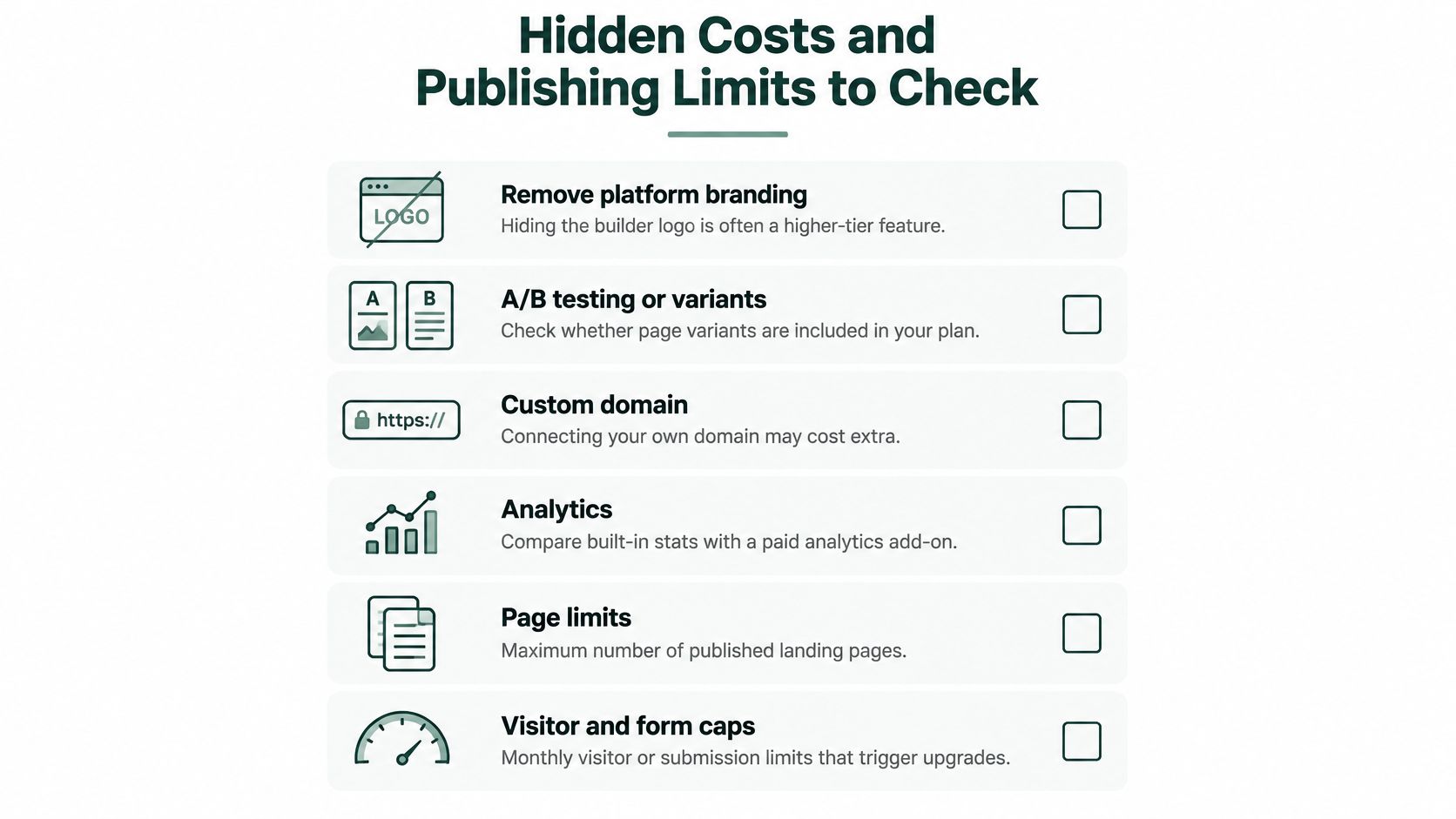
A low monthly fee can hide limits that force an upgrade or slow campaign changes. Check these terms against the traffic, publishing route, and team you expect to use:
- Remove platform branding. Confirm whether hiding the builder's logo requires a higher tier. If the plan keeps branding on the page, decide whether that suits your campaign before sending paid traffic.
- A/B testing or variants. Check whether your plan lets you duplicate pages for tests, not only edit a single page. Otherwise, compare the cost of upgrading with the effort of running variants elsewhere.
- Tracking scripts and tag managers. Verify that the plan supports the pixel, server-side tag, and consent tools you need. Paid add-ons belong in the monthly total.
- Team seats. Check how many people can work in the account. If a designer and media buyer need access, extra seats may add a recurring charge or slow edits if they share one login.
- Export and ownership. Find out whether you can take the page with you if you leave. If not, factor in the work and cost of rebuilding it before treating the low fee as a long-term saving.
- Storefront integrations. Confirm whether a Shopify or similar connection requires a separate plan or app, in addition to the builder fee.
Where the page lives changes the bill
| Publishing option | Likely extra cost | Time to first live page | Cost to iterate |
|---|---|---|---|
| Builder-hosted URL | Often included; check branding and visit caps | Minutes | Low; edit and duplicate in place |
| Custom domain | Domain fee plus any plan upgrade | Hours to a day | Low once connected |
| Shopify page | Requires a Shopify storefront plan; may need an app | Same day if the store already exists | Medium; theme and app updates |
| Webflow page | Paid site plan, plus CMS if used | Hours to a day | Medium; design tool needed for changes |
| HTML export | Usually free to export; you host and maintain it | Minutes to export, longer to host | High; each change needs a developer or manual edit |
A builder-hosted URL can get a page live quickly, but check for branding and visit caps before scaling traffic. A custom domain adds a domain fee and may require a plan upgrade. Shopify or Webflow can make sense if you already pay for the site plan, though theme or app updates may add work to each test. HTML export can avoid a builder-hosting fee, but hosting and ongoing edits remain your responsibility.
Choose the route that fits the stack you already use. Some generators, Landra included, publish to Shopify, a hosted URL, Webflow, or HTML. The relevant comparison is the extra cost of that route, not automatically the price of another builder.
Mobile rendering deserves a separate check before you raise spend. MarketingProfs' summary of landing-page benchmarks reports that 82.9% of visitors were on mobile, while desktop conversion was 12.1% compared with 11.2% on mobile. Those figures describe visitor share and conversion rates by device; they do not show that a builder caused the gap. They do make the published mobile experience important to test. Open the live URL on a phone and check that text, forms, and calls to action are readable and usable before scaling traffic.
The same benchmark reports median conversion rates of 11.1% for pages written at a fifth- to seventh-grade reading level and 5.3% for college-level copy. Its channel averages were 19.3% for email and 11.3% for Google paid search. These are benchmark results, not guarantees for a particular campaign or proof that a builder changes conversion. Use them as context for checking whether your chosen template supports readable copy and whether the live page works for the traffic source you plan to buy.
How Page Speed Turns Into Lost Revenue
A cheap builder can cost more than its monthly fee if its published page loads slowly. Check Google's Core Web Vitals at the 75th percentile, the standard used in Google's mobile page-speed benchmarks.
| Metric | Good at 75th percentile | Common causes of failure |
|---|---|---|
| Largest Contentful Paint (LCP) | 2.5 seconds or less | Oversized hero images, slow fonts and scripts |
| Interaction to Next Paint (INP) | 200 milliseconds or less | Heavy chat widgets, review carousels and tag managers |
| Cumulative Layout Shift (CLS) | 0.1 or less | Late-loading banners, embeds and images without set dimensions |
A worked month of lost orders
Use an example to price the risk. At 20,000 monthly visits and a 4.2% e-commerce conversion rate, the page produces 840 conversions. Keywords Everywhere's landing-page stats roundup cites Portent's estimate of a 4.42% conversion decline for each additional second during the first five seconds after a click. It also reports that 53% of visitors leave when a page takes more than three seconds to load.
Apply the per-second decline multiplicatively: after two additional seconds, the relative loss is about 8.8%. That takes the conversion rate from 4.2% to roughly 3.83%, or about 74 fewer conversions. At $25 contribution per conversion, the estimated monthly loss is $1,850. Compare that with the plan-fee difference: the slower page costs far more than a $29 gap. This is an estimate based on the cited benchmarks, not a guaranteed outcome for every page.
Test the published URL on a throttled mobile connection with PageSpeed Insights. A builder demo may be cached, use fewer scripts, and run on a different CDN.
Page weight depends on what the page contains. A one-screen offer page has fewer potential bottlenecks than a content-heavy presell page with reviews, editorial sections, and tracking scripts. Compress the hero image, remove unnecessary third-party scripts, and set image dimensions before increasing paid traffic. For practical checks, see these mobile performance tips from Landra. They apply regardless of which builder publishes the HTML.
When the Lowest Sticker Price Is the Best Value
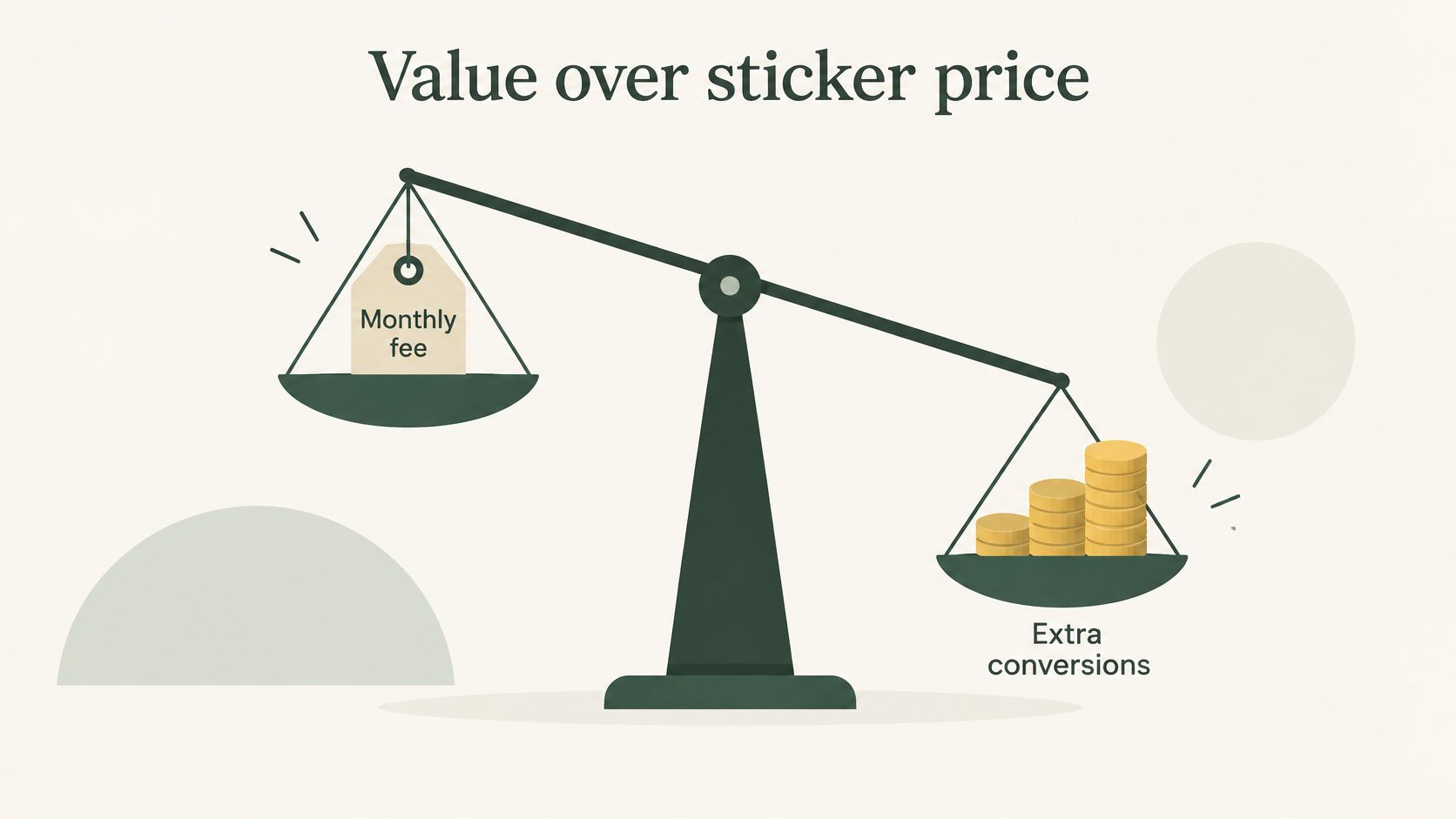
A low monthly fee is the best value when the conversions it lets you test and capture are worth more than the upgrade. Unbounce's 2024 Conversion Benchmark Report analyzed more than 41,000 landing pages, 464 million visitors, and 57 million conversions in the year ending July 23, 2024. Its all-industry median was 6.6%, with SaaS at 3.8% and entertainment at 12.3%. E-commerce had a 4.2% median; the report's benchmark figures give context, not a target every offer should meet.
What a tenth of a point is worth
At 20,000 visits, a page converting at 4.2% produces 840 conversions. A 0.1-percentage-point lift means 20 additional conversions: 20,000 × 0.001. To price those conversions, use your own contribution margin. For example, if each conversion contributes an assumed $25, the lift is worth $500 a month, calculated as 20 × $25. Replace that assumption with your actual contribution per conversion.
Against a $50 monthly gap between a $29 entry plan and a $79 upgrade, two extra conversions at that assumed contribution cover the difference. The decision is therefore whether the higher plan helps produce at least two additional conversions, or supports a test the entry plan cannot run. If it does neither, the lower fee keeps more value.
| Situation | Cheapest plan wins? | What to watch |
|---|---|---|
| Validating one offer under about 2,000 visits a month | Yes | Check the page cap and whether you can export the page if you outgrow it |
| Low-price impulse product with a self-explanatory offer | Often | Page speed may matter more than editorial depth |
| Paid social scaling past the entry plan's visit cap | No | Compare the upgrade price with the entry fee |
| High-AOV considered purchase that needs a warm-up advertorial | No | A conversion lift on the warm-up page can outweigh the fee gap |
| Testing three or more audience angles | Depends | Duplication and variant limits determine the real cost |
Under about 2,000 visits, an entry plan can be a sensible place to validate one offer. You are paying for a page to learn from, not necessarily a full testing system. Check export access before a working offer makes the plan's cap restrictive.
A low-price impulse product with a clear offer can stay on the cheaper plan if the page loads well and communicates the offer without extra content. A slow hero image can erase the savings by costing conversions.
Paid social beyond the visit cap changes the calculation. Price the plan you will need at your expected traffic level, rather than deciding from the entry price alone.
A high-AOV considered purchase may justify a warm-up advertorial and a higher fee. Estimate the value of any additional conversions using your contribution margin, then compare it with the plan gap. The benchmark offers context, but your own traffic and conversion results determine whether the upgrade pays.
Three or more audience angles require workable duplication and variant limits. If the plan prevents you from creating separate versions, it adds time and restricts the test. The cheaper option is good value only if its limits still let you run the experiment you need.
How to Test a Cheap Builder in One Week
A low plan fee only matters if the published page converts at a reasonable cost. Compare two builders on one offer, one traffic source, and identical page content. In Google's Vodafone example, a 31% improvement in Largest Contentful Paint corresponded with 8% more sales, 15% more leads per visit, and 11% more cart views per visit, as summarized in this Core Web Vitals write-up. Track the plan fee, setup time, and any conversion value lost to slower loading alongside the results.
- Choose one offer, one traffic source, and two builders. Keep the scope fixed so differences in results are easier to attribute.
- Build the same page on each. Match copy, images, proof, and analytics tags. The builder should be the main variable.
- Publish each page on its production route. A builder-hosted demo does not represent the URL your ads will send visitors to.
- Check both pages on mobile before buying traffic. Use PageSpeed Insights for LCP and CLS, and a throttled mobile lab test for Total Blocking Time as a proxy for interactivity. INP is field data, so a new page may have no INP result yet. Record any available field data, but do not treat a blank INP result as a failed test.
- Run both variants for the same fixed period, three to five days. After the run, check whether each has roughly 1,000 sessions. If either falls short, treat the result as directional rather than declaring a reliable winner.
- Record bounce rate, checkout or lead rate, and cost per visit. A faster page matters commercially only if it improves completed actions or reduces the cost of getting them.
- Calculate cost per conversion for each builder. Add the plan fee, upgrade cost if needed, and estimated value of lost conversions, then divide by completed conversions. Recalculate with your own traffic and contribution per conversion.
- Duplicate the stronger page for a second audience angle. Log the work time. Slow duplication adds an operating cost even when the subscription is inexpensive.
Keep the offer, hero, and audience unchanged during the run; changing them makes the comparison harder to interpret. For test setup details, use this guide to planning landing page A/B tests, and apply the same protocol to both builders.
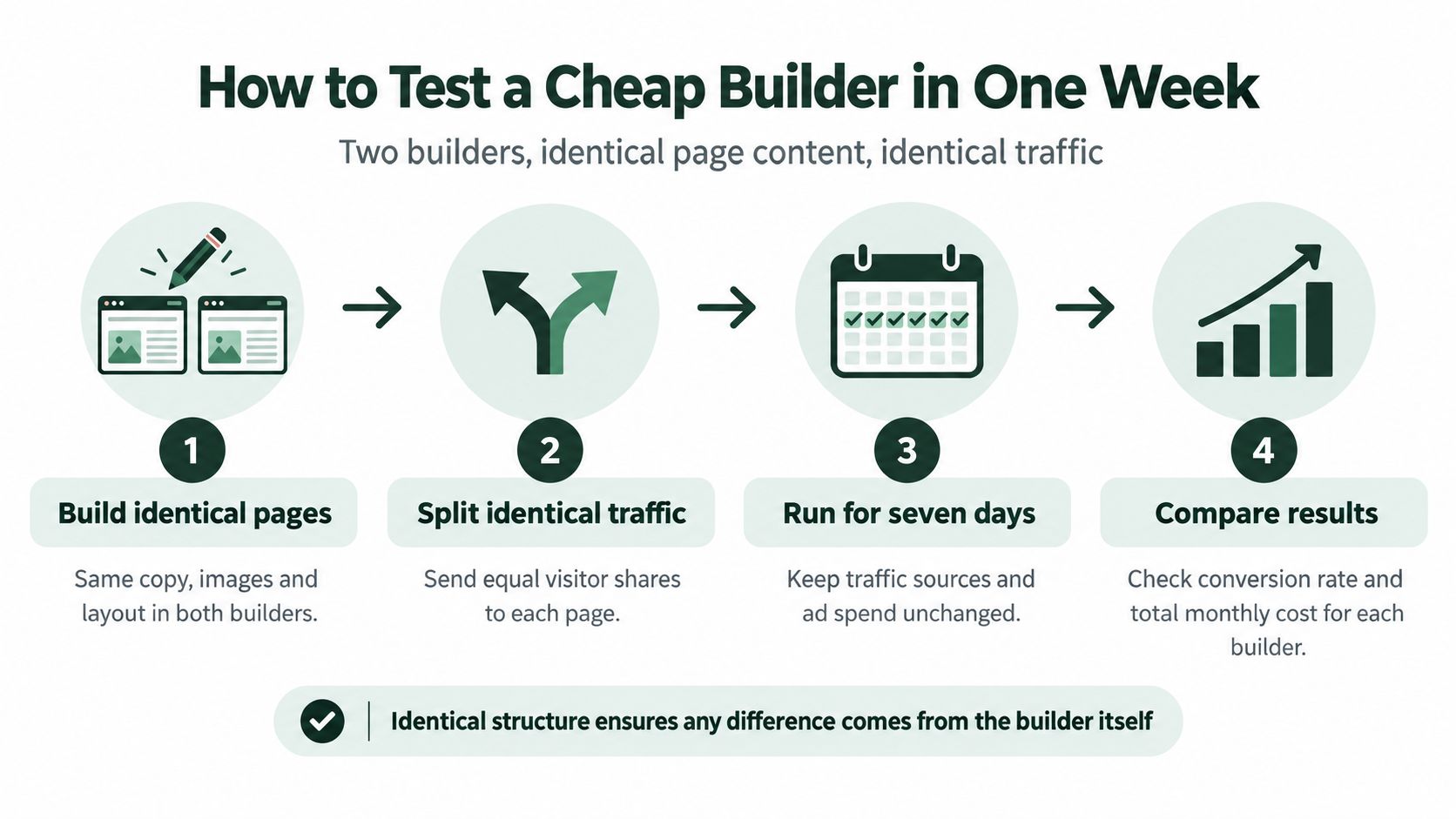
A week can expose the practical differences: whether pages publish cleanly, how quickly variants can be duplicated, and whether mobile performance holds up on the live route. Use those results to price the builder against your actual traffic, not its sticker price.
Choose the Cheapest Builder That Passes Your Test
The cheapest landing page builder is the one with the lowest cost per conversion that passes the speed thresholds and covers your traffic forecast for the next 90 days.
Apply it in order. If two builders tie on cost per conversion, take the one with fewer caps. If the cheapest fails the Core Web Vitals check on the published URL, drop it even when the fee is the lowest on the shortlist. If that plan needs an upgrade inside the quarter, put the upgrade price in the decision before you sign up.
Two buyers, two correct answers
A DTC brand on Shopify, spending on paid social, and needing advertorials, listicles, and variant tests will often find the entry plan blocks the test. Visit caps, one stored page, or no duplication means the true cost is the upgrade, plus the conversions you do not learn. A single-offer seller with no paid campaign, staying under a couple of thousand visits, can remain on the entry plan and should. Paying for testing you will not run is the mirror-image mistake.
Landra is one option when the job is pre-sell advertorial and listicle pages published to Shopify, Webflow, or HTML. Compare its current generation and storage limits with the category table before you pay. A plan that fits this month's two pages can still be the wrong plan once you are testing openings every week.
This week, write a three-month visit forecast, shortlist two builders from the table, and run the one-week test on the offer you are really buying traffic for.
Landra generates mobile-first advertorial and listicle pre-sell pages from a product URL, then publishes them to Shopify, a hosted URL, Webflow, or HTML so you can test angles without rebuilding the page in a general website builder. If you are pricing a cheapest landing page builder against real paid-social traffic, put Landra's current plan limits next to your 90-day visit forecast and keep the builder that wins on cost per conversion. Start with the plan details at Landra.