

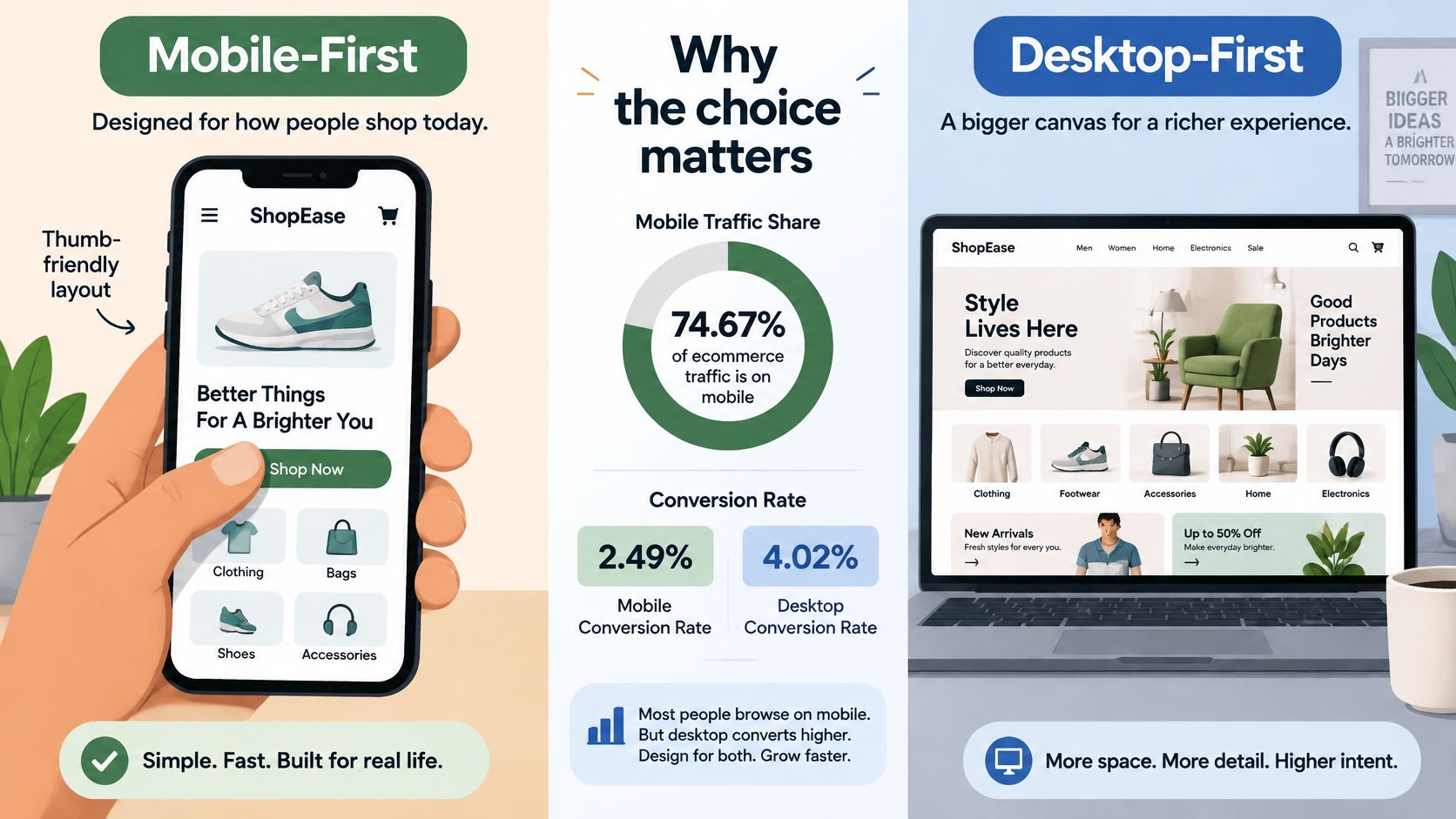
Mobile generated 74.67% of ecommerce traffic, compared with 23.67% from desktop, in the trailing twelve-month period reported by Dynamic Yield, according to IvyForms' conversion benchmark roundup. That's a strong reason to prioritize phones, but it doesn't tell you where shoppers finish evaluating an offer. The useful question in mobile first vs desktop first is whether you're designing for the first click, the purchase decision, or both.
Table of Contents
- Mobile-First vs Desktop-First at a Glance
- Why Google Indexes the Mobile Version First
- Performance Gaps and Where Each Approach Breaks
- How to Build a Mobile-First Pre-Sell Page for Paid Social
- Where Desktop Still Carries the Decision
- Choose the Approach That Matches Your Traffic
Mobile-First vs Desktop-First at a Glance
Default to mobile-first for cold paid-social visitors on phones. Use desktop-first information architecture when buyers need substantial comparison and validation, then rebuild that experience for mobile. Neither approach earns a conversion advantage just because you chose it.
In 2024, average ecommerce conversion rates were 2.49% on mobile and 4.02% on desktop, according to Monetate, as reported in OwlClaw's ecommerce statistics roundup. Those averages don't establish that desktop-first design converts better. Device, acquisition channel, returning-customer behavior, and purchase intent aren't controlled in that comparison.
Mobile-first means the smallest screen sets the content hierarchy and performance budget, with desktop enhancements added upward. It decides what buyers encounter immediately and what belongs later in the persuasive sequence, not which essential evidence gets deleted.
Desktop-first means designing the complete, wider layout before adapting downward. Its useful contribution is information architecture: identifying every question a buyer needs answered. Its implementation challenge is deciding what must be rebuilt, rather than merely shrunk, for phones.
Mobile-first vs desktop-first on core criteria
| Criterion | Mobile-First | Desktop-First |
|---|---|---|
| Design starting point | Smallest screen, then enhance upward | Full layout first, then simplify downward |
| What gets cut | Secondary content moves below the fold or into later sections | Multi-column content and wide media shrink or stack |
| Performance budget | Set by phone CPU and network limits | Set by desktop, often inherited by mobile |
| Main risk | Thin desktop detail and missing comparison depth | Heavy scripts and hidden claims on phones |
| Search indexing fit | Matches the version Google crawls first | Safe only when mobile content matches desktop |
| Best fit | Paid social and phone-heavy DTC traffic | Complex comparisons and desktop-heavy buyers |
When choosing software for editorial landing pages, use Outrank's guide to blog builders to frame your shortlist, then inspect the actual mobile output. A convenient editor isn't evidence of a lightweight published page.
Decision rule: Treat mobile-first as a performance budget and desktop-first as an information architecture method. You can use both without maintaining separate persuasive stories.
Evaluate the resulting page against search visibility, speed and interaction, and the multi-device purchase path. These tests are more useful than judging which mockup looks cleaner.
Why Google Indexes the Mobile Version First
Before mobile-first indexing, Google generally used a page's desktop version for crawling, indexing, and ranking; Google's rollout announcement describes the broad transition beginning on March 26, 2018. The practical change was to make the smartphone version the primary indexing source, rather than treating mobile as a secondary adaptation.
Mobile-first indexing isn't a ranking bonus for using mobile-first design. It identifies the version Google uses to understand the page. A desktop-first workflow can satisfy that requirement, provided its mobile output preserves the substantive content.
The danger isn't an unattractive phone layout alone. It's an incomplete phone page: missing product explanations, absent supporting evidence, or structured data that exists only in the desktop implementation.
Check the rendered page before launch
Compare text and headings. Open the mobile and desktop versions and inventory the offer, qualifications, product details, FAQs, and evidence. Keep equivalent meaning even when the layouts differ; don't let a responsive visibility setting remove a substantive claim.
Inspect structured data. Confirm that relevant markup is present in the mobile implementation and describes content users can access. Use the rendered output, not just the desktop template, as your reference.
Expose the primary argument. Make the main proof and CTA available without hover interactions or an interaction-dependent hero. Accordions can organize secondary detail, but essential information shouldn't require buyers to discover an obscure control.
A collapsed section isn't automatically absent from indexing. The important distinction is between content that remains available in the rendered page and content that the mobile implementation never delivers.
Assign ownership to content parity
For a DTC launch, have the copy owner verify claims and qualifications while the developer checks rendering and markup. Include subscription terms, product limitations, and offer conditions in that review, not just the headline.
If you're preparing a responsive-design brief, AI Optimization Services' mobile-first approach offers a relevant reference point for discussing implementation. Make content parity and rendered mobile checks explicit acceptance criteria, rather than assuming that responsive styling guarantees them.
Performance Gaps and Where Each Approach Breaks
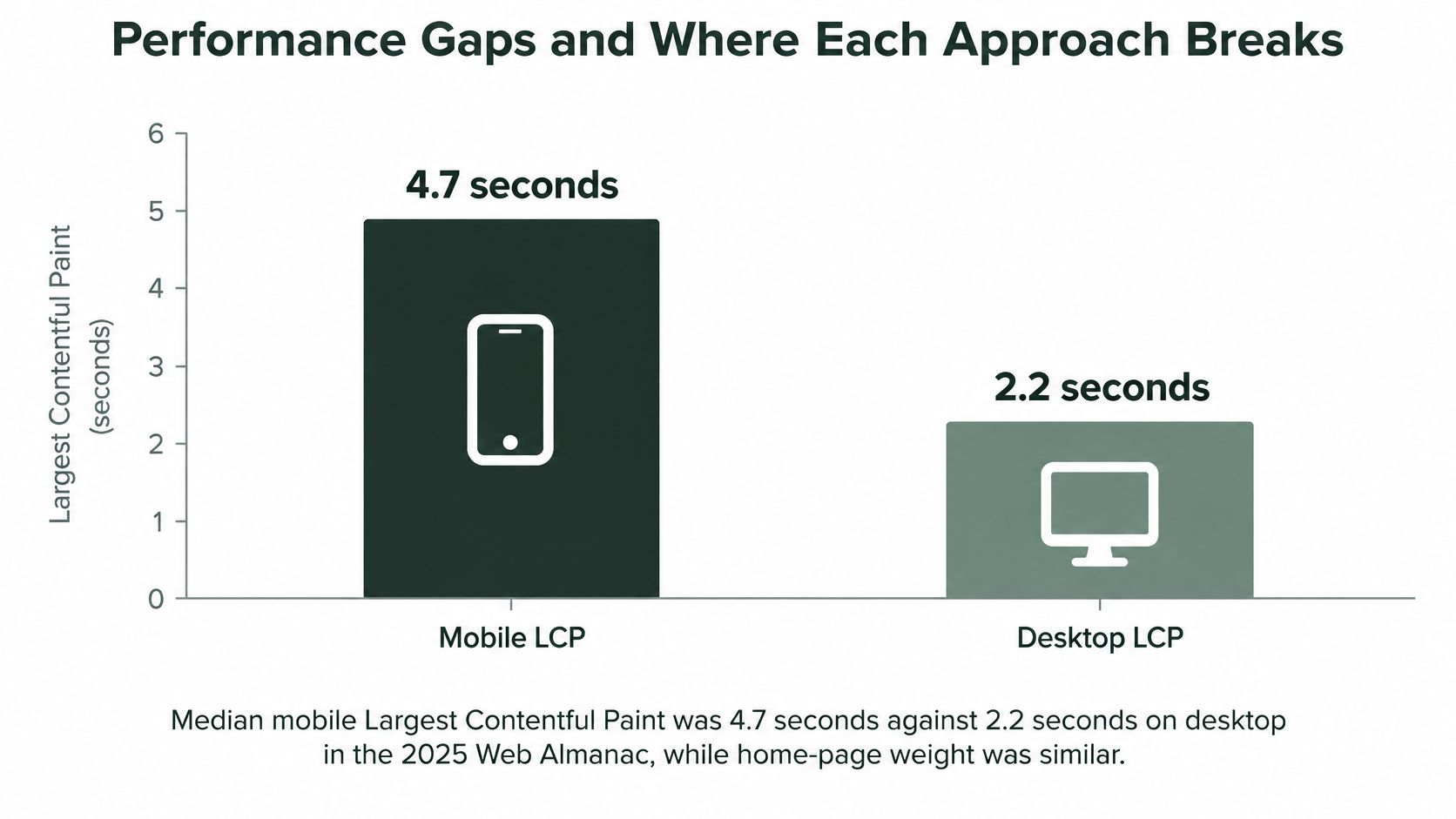
The design brief changes when the same page has to run on a phone. The 2025 Web Almanac page-weight analysis reports median Lighthouse Largest Contentful Paint of 4.7 seconds on mobile versus 2.2 seconds on desktop, despite median home-page weights of approximately 2.6 MB and 2.9 MB, respectively.
Similar bytes, different outcomes. Transfer size is only one cost, because device processing, network conditions, JavaScript execution, and rendering all charge their own toll on a phone. That gap is the case for treating mobile-first as a performance budget rather than a layout choice: the phone pays more for every script and every kilobyte, so the design has to decide what the purchase decision needs before deciding what to ship.
Mobile vs desktop performance and Core Web Vitals, 2025
The table distinguishes lab loading measurements from field experience outcomes. They answer different questions, so don't combine them into a single performance score.
| Metric | Mobile | Desktop | What the gap means |
|---|---|---|---|
| Median Lighthouse Largest Contentful Paint | 4.7 s | 2.2 s | Main content takes more than twice as long to appear in the mobile lab measurement |
| Median home-page weight | Approximately 2.6 MB | Approximately 2.9 MB | Similar transfer weight doesn't eliminate device and rendering constraints |
| Good Interaction to Next Paint | 77% of phone experiences | 97% of desktop experiences | A larger share of phone experiences misses the good responsiveness range |
| Sites passing all Core Web Vitals | 48% | 56% | Mobile implementations pass less often |
For the field comparisons, the 2025 Web Almanac performance analysis reports good INP for 77% of phone experiences versus 97% on desktop, and all-Core-Web-Vitals pass rates of 48% on mobile versus 56% on desktop. These aren't conversion measurements or a controlled comparison of design methods. They establish the execution problem that either method must solve.
Why a finished-looking page can still fail
A browser can display the CTA before it can respond promptly to a tap. JavaScript tasks can occupy the main thread while a shopper tries to open product details or select an offer.
In the 2024 Web Almanac performance measurements, median mobile Total Blocking Time was 1,209 milliseconds, compared with 67 milliseconds on desktop. TBT is a lab diagnostic for blocking work, not the same measurement as real-user INP, but it helps developers investigate why an apparently complete page remains unresponsive.
That distinction changes the review process. A screenshot can confirm hierarchy, and a loading filmstrip can reveal when the headline appears, but neither proves that the offer selector works promptly.
A CTA isn't ready merely because the browser has painted it. Test the action, not just its appearance.
Where desktop-first breaks
Desktop-first earns its keep as an information architecture method, particularly when buyers compare several options side by side. It breaks when the architecture survives the port to a phone but the interaction model is only resized.
- Hover-only disclosure. Price explanations or offer details become difficult to discover on touchscreens. Replace hover dependencies with explicit controls and accessible disclosure patterns.
- Dense comparison tables. Shrinking columns can make labels unreadable, while horizontal scrolling separates an answer from its product heading. Consider stacked comparisons with repeated labels.
- Multi-column video heroes. When stacked, decorative media can push the offer beneath a long opening screen. Reorder the argument before resizing the media.
- Synchronous third-party scripts. Review widgets, experimentation tools, and personalization can compete with the tap a shopper is trying to make. Audit when each script runs, not just whether it's installed.
None of these failures is inevitable. They occur when teams mistake responsive resizing for a mobile implementation.
Where mobile-first breaks
A small-screen mockup can still ship a large application bundle. Mobile-first styling doesn't automatically prevent blocking scripts, unstable components, or expensive media; the budget is spent at build time, not declared at kickoff.
It can also produce an incomplete sales argument:
- Overaggressive trimming. Designers remove evidence because it doesn't fit near the top, rather than moving it into a readable later section.
- Thin explanatory copy. Short paragraphs become a substitute for answering objections about suitability, ingredients, compatibility, or recurring charges.
- Unreviewed desktop output. Teams expand a narrow column across a large screen without checking comparison tasks or reading order.
The remedy is a small critical rendering path with complete supporting content. Start with semantic HTML, CSS-based layout, appropriately sized images with explicit dimensions, and limited font variants. Split or defer secondary code instead of delivering every feature at initial load, and keep the full argument on the page even when the phone layout delivers it later.
Set acceptance criteria before adding enhancements
Google's Core Web Vitals assessment defines a good page experience as LCP below 2.5 seconds and INP below 200 milliseconds, each evaluated at the 75th percentile of real-user visits. Use those thresholds as field acceptance targets, and keep them separate from a single Lighthouse run.
Test on mid-range Android hardware over a real mobile connection. Investigate any conspicuous mobile-desktop interaction gap, especially when a visible button doesn't respond immediately.
Use the workflow to improve Core Web Vitals on mobile, then segment field results by device and traffic source. Don't approve the phone experience from a desktop score.
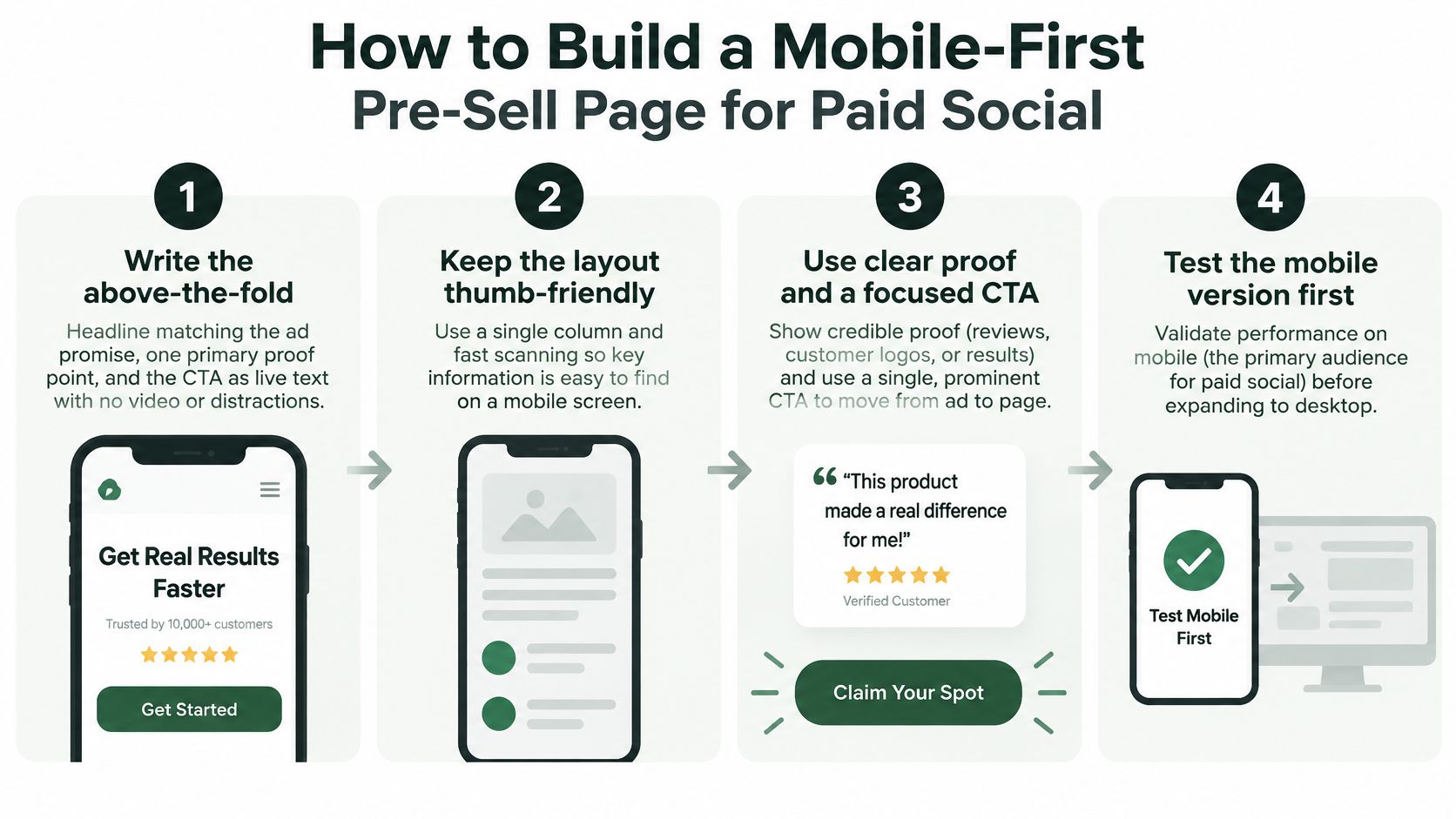
How to Build a Mobile-First Pre-Sell Page for Paid Social
Build the phone version as a complete persuasive experience before expanding the layout. The sequence should move from the ad's promise to evidence, explanation, and a usable next action.
Build the argument before the decoration
Write the opening screen. Use a headline that matches the ad promise, a primary proof point, and a clear CTA as live text. The common slip is allowing an oversized hero image, carousel, or video to precede the reason to keep reading.
Allocate the loading budget. Size and compress the hero asset before uploading it, and identify which element should become the main visible content. Don't build an elaborate opening and leave image optimization until launch.
Make the layout touch-friendly. Use a single column, readable body text, comfortably separated controls, and no hover-only content. Check offer selectors and disclosure buttons with your thumb, because a neat editor preview doesn't reveal cramped interaction.
Schedule noncritical code deliberately. Defer review widgets, personalization, and video until they're needed, while loading essential measurement through an appropriate lightweight path. The common slip is delaying all analytics until interaction and then losing visibility into visitors who leave without engaging.
Expand without changing the promise
Add desktop decision support. Use the wider canvas for comparison layouts and specification panels, while keeping the underlying claims and essential detail available on mobile. Don't create a desktop-only fact that changes the meaning of the offer.
Test the actual journey. Open the page on mid-range Android hardware over a mobile connection, then scroll, expand details, select the offer, and tap the CTA. A frequent mistake is approving the page after checking only that its layout fits.
Duplicate for ad-angle tests. Change the opening argument to match each campaign angle while keeping the offer consistent. Our generated landing pages are separate from the Shopify theme, so building and testing them doesn't change the storefront design or checkout flow.
For the copy sequence, use Landra's guide to presell writing. When matching that sequence to creative, SimpleLab Digital's guide to Facebook ad formats that convert provides useful format context, but the page still needs to continue the specific promise your visitor clicked.
Our builder starts from a brand URL: paste the store URL, generate the page, then publish it after reviewing the result. Treat generation as the starting draft, not a replacement for device testing or claim verification.
Where Desktop Still Carries the Decision
A shopper can encounter the emotional hook on a phone and later use a desktop to validate the purchase. That's a journey to investigate, particularly for expensive, ingredient-heavy, or subscription products, not a universal rule about how people buy.
Figma's web-design statistics overview provides context for evaluating device behavior, but device popularity alone can't identify your brand's decision point. Look for the tasks buyers complete before purchase: comparing alternatives, checking specifications, reading qualifications, or understanding recurring commitments.
Design for validation, not extra decoration
Say a skincare brand attracts a skeptical shopper with an ingredient-focused ad. The phone page should make the explanation understandable; the desktop view can place the ingredient panel beside the supporting evidence so the shopper can compare without repeatedly scrolling.
The distinction is presentation depth, not contradictory content. A wider viewport can improve the arrangement of information without receiving an exclusive version of the product's benefits.
Use these operating rules:
- Keep a shared offer and proof hierarchy. Price framing, qualifications, and supporting evidence should tell the same story on both devices.
- Make device-specific modules presentational. A desktop comparison grid can become labeled mobile cards. Maintain the facts in a shared content source instead of writing separate claims.
- Use a common measurement plan. Track equivalent actions so a device-specific layout change doesn't also change what counts as engagement.
Audience temperature matters too. We choose a narrative advertorial for colder, skeptical buyers and a scannable listicle for warmer, comparison-minded buyers. On desktop, that choice determines whether the page should support sustained reading or rapid side-by-side evaluation.
Measure the path, not only the final session
Review assisted conversions, returning users, and revenue per session, rather than judging the opening mobile visit only by last-click purchase. Use consented identifiers where available, and acknowledge that anonymous cross-device behavior won't always be observable.
Measurement caution: A desktop purchase doesn't prove the mobile visit failed. Equally, a mobile visit doesn't prove it contributed to the later purchase.
A missing qualification on either device can create conflicting expectations and support questions. Keep the decision-support layout flexible, but keep the product story consistent.
Choose the Approach That Matches Your Traffic
If your acquisition traffic is predominantly cold paid social on phones, build mobile-first and treat desktop as an enhancement. Make a different starting choice when your own behavior data shows that buyers need a more extensive information architecture before they can act.
The exception isn't permission to neglect phones. Desktop-first should describe how you organize the full decision, not an instruction to deliver the same desktop assets to every device.
Recommended approach by traffic and offer
| Situation | Default Approach | Why | Verify With |
|---|---|---|---|
| Paid social, cold traffic, mostly phone | Mobile-first | The first experience must work under phone loading and interaction constraints | Mobile LCP and INP by variant |
| Expensive or comparison-heavy product | Mobile-first with desktop detail | Initial persuasion and later validation require different arrangements | Assisted conversions and revenue per session |
| Desktop-heavy B2B or considered purchase | Desktop-first, rebuilt for mobile | Define the full information architecture, then implement a touch-ready version | Add-to-cart and checkout completion by device, or lead completion for non-commerce offers |
| Existing desktop site with heavy scripts | Mobile-first pages for paid traffic | Resizing alone won't remove blocking JavaScript | Total Blocking Time on mid-range Android |
| Storefront theme must stay unchanged | Separate mobile-first landing pages | Isolate acquisition-page development from the storefront | Message match from ad to page |
Test the implementation, not the label
A useful split test holds the offer, claims, copy, and traffic allocation consistent while changing hierarchy, layout, and execution strategy. Otherwise, a stronger headline or different discount can be mistaken for evidence that a design philosophy won.
Define the hypothesis before launching. For a mobile-first variant, it might be that earlier proof and a lighter opening improve progression to the product offer. For a desktop-first information architecture, it might be that a more complete comparison arrangement improves purchase readiness among returning desktop visitors.
Evaluate both technical and commercial outcomes:
- Loading and interaction. Compare mobile LCP and INP, with lab diagnostics used to investigate regressions.
- Content progression. Check whether visitors reach meaningful proof and offer sections, not just how far they scroll.
- Purchase progression. Compare add-to-cart and checkout behavior by device and acquisition source.
- Economic outcome. Use revenue per session to distinguish useful engagement from activity that doesn't lead to sales.
Keep the measurement setup stable and don't declare a winner from an early fluctuation. Use the workflow to analyze landing page test results before applying a variant's result to other campaigns.
A generated pre-sell page fits when you need an acquisition-specific implementation without a storefront redesign. We build and launch the pages while you keep your ads, ad creative, and test setup, preserving responsibility for the experiment.
The final choice isn't mobile or desktop in isolation. It's which constraints to solve first, which information buyers need, and whether the resulting implementation improves the purchase path.
Landra builds and launches pre-sell pages so you can test a mobile-first acquisition experience while keeping your existing ads and test setup. Visit Landra to create your first page free, then compare its device-level performance and revenue outcomes against your current destination.