The most popular advice on Advertorial vs Editorial gets the job backwards. You'll hear that an advertorial works when readers don't notice it's an ad, and that a clear disclosure is a tax you pay for compliance. That's backwards for a pre-sell page. If a reader finds out halfway through that the format misled them, you've spent paid traffic creating distrust. I would treat disclosure wording, placement, and contrast as conversion variables you test, just like a headline. Match the page to what the reader already understands, label it plainly, and then judge it on qualified clicks, purchases, and refunds together.
Table of Contents
- Advertorial and Editorial Compared at a Glance
- Where the Line Between the Two Formats Sits
- Disclosure Rules That Keep Advertorials Honest
- Trust, Compliance and the Performance Trade-off
- Matching Each Format to Traffic and Awareness
- Advertorial Template and Worked Example
- How to Build a Compliant Advertorial From a Product URL
- Confirm the Format Before You Launch Your Test
Advertorial and Editorial Compared at a Glance
An advertorial is paid content styled to look like editorial, while editorial is produced under a publication's own standards and isn't bought by an advertiser. That's the whole line. Both can use a headline, a narrative open, expert quotes, and evidence. The style doesn't separate them. The funding, the control, and the label do.
For a DTC team, that distinction matters because an advertorial borrows the editorial form to do a pre-sell job before the product page. You're not trying to earn a newsroom's credibility. You're renting its reading conventions, problem first, explanation second, proof third, to make a considered purchase easier to understand. Search teams face a similar sorting problem with changing formats, which is why resources on AEO vs SEO in 2026 are useful context for separating what's new from what still converts.
Advertorial and editorial compared on eight criteria
| Dimension | Advertorial | Editorial |
|---|---|---|
| Who pays | Brand or its agency pays for the placement or page | Publisher's newsroom budget; no advertiser sets the story |
| Primary purpose | Move the reader toward a product, offer or checkout | Inform, explain or entertain the audience |
| Who decides the content | Brand and its marketing team, within disclosure rules | Editors, under journalistic or opinion standards |
| Disclosure required | Yes, a clear label such as Advertisement or Sponsored Content | No paid-content label, because the content is not advertiser-funded |
| Typical cues | Headline, byline, narrative and reported-style structure | Headline, byline, reporting and sourcing |
| Where it runs | Paid social landing pages, publisher sites and print | Newspapers, magazines, blogs and news sites |
| Success measure | Qualified clicks, checkout starts and purchases | Audience reach, engagement and trust |
| Main risk | Readers mistake paid persuasion for independent reporting | Loss of trust if editorial independence is questioned |
Key differentiator: The style can match, but the funding and the disclosure cannot.
Read the table downward and two rows drive most brand decisions. Disclosure required determines your layout, your label copy, and your mobile check. Success measure determines your test design, because reach and time on page don't pay for paid social if checkout starts don't move. The other rows explain why readers confuse the formats, since the cues overlap almost entirely.
That overlap is the opportunity and the risk. Used well, narrative structure helps a cold reader follow an unfamiliar product without hunting through a spec sheet. Used carelessly, the same structure implies independent reporting you haven't earned. The sections that follow cover where regulators drew the line, how to design a label people notice, how awareness should pick the format, and how to build and test a page without crossing into disguise.
Where the Line Between the Two Formats Sits
A familiar writing style does not make a page editorial. Funding, control, and how the page is presented to readers draw the line. A historical account in The Conversation traces advertorial-like practices to 1917, when the U.S. Federal Trade Commission settled a case involving a vacuum-cleaner advertisement presented as a favorable newspaper review. The issue was the disguise, not only the product claim.
By the 1920s, journalism organizations were developing ethical codes that emphasized separating advertising from editorial decision-making. The term "advertorial" came into common use in the mid-twentieth century, while the practice of making commercial messages look like news or reviews was older.
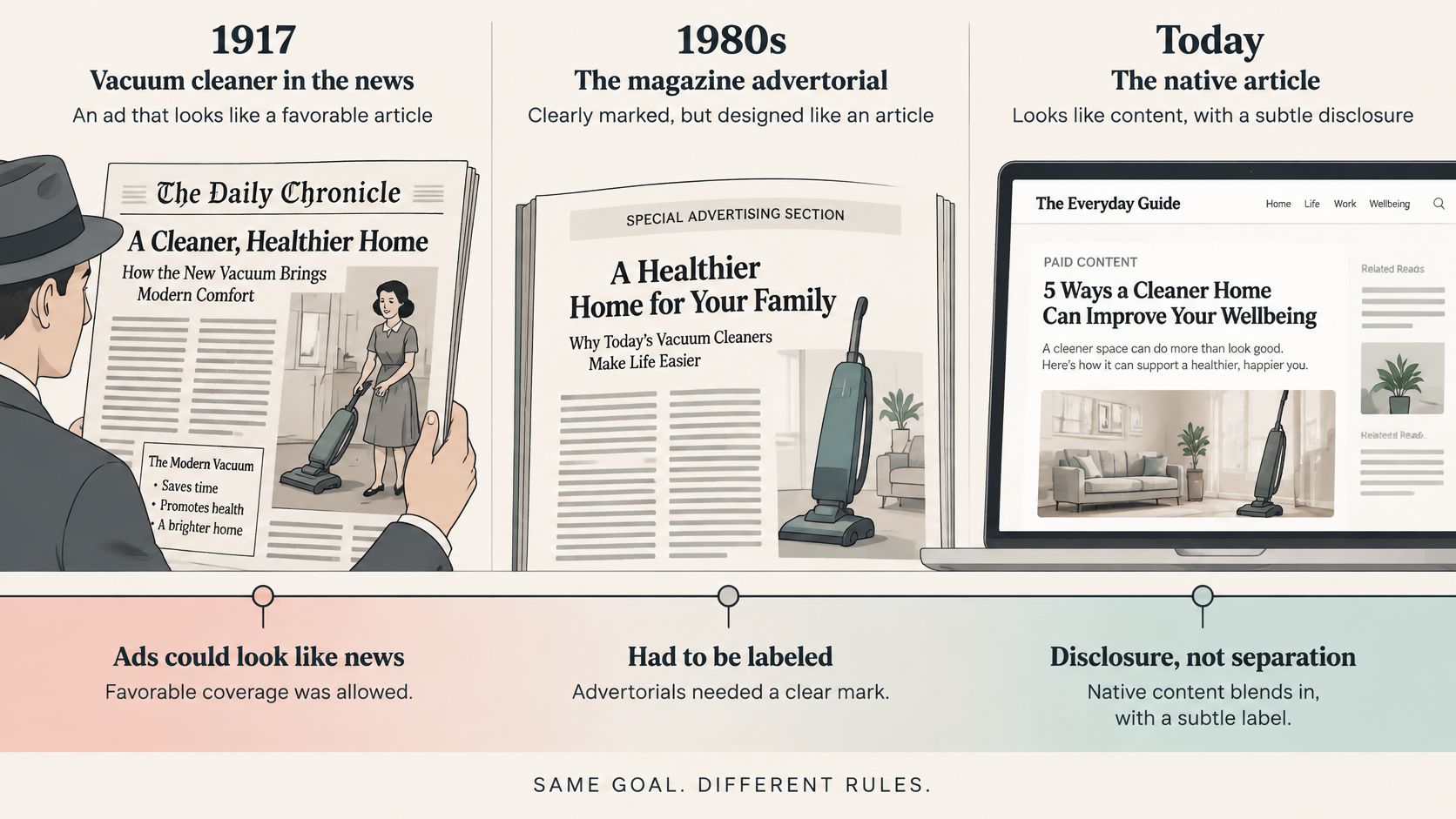
Regulators later applied the same principle to a newspaper column about a local restaurant: truthful details did not cure a misleading frame, so clear disclosure was required. A reader can be misled by the way information is presented, even when individual details are accurate.
Apply that distinction to two edge cases. A brand-written best-of page on its own domain is brand-controlled persuasion, even if it reads like a roundup. Ranking the brand first without making that context clear can undermine the page's credibility. A sponsored review on a news site still needs to be identified as paid content; its editorial setting does not make it independent reporting. For creator placements, blogger campaign insights from Affiliate Landscape offer practical context for keeping commercial relationships clear.
The format is a conversion variable as well as a labeling decision. A narrative advertorial can help readers understand an unfamiliar product, while a direct product page may suit readers already comparing options. Test placement and disclosure alongside the format, then judge results by qualified clicks, checkout starts, and purchases. The trade-off is straightforward: narrative can build understanding, but a news-like presentation without clear commercial context risks eroding trust.
Disclosure Rules That Keep Advertorials Honest
Disclosure is a design problem before it's a legal paragraph. A label nobody notices doesn't protect the reader, and it doesn't protect you when the page is reviewed. The Advertorial vs Editorial distinction then becomes measurable, because an editorial page needs no paid-content label while your page lives or dies on recognition.
Readers miss weak labels at a striking rate. In one University of Georgia study, only 7% of participants identified a native article as advertising, while labels using "advertising" or "sponsored content" produced seven times more recognition than softer phrases such as "brand voice." If your label needs interpretation, it isn't a disclosure. It's a euphemism.
Stronger and weaker disclosure choices
| Disclosure Element | Stronger Choice | Weaker Choice | Recognition Evidence |
|---|---|---|---|
| Label wording | Advertisement or Sponsored Content | Brand voice | Explicit wording gave about seven times more recognition in one University of Georgia study |
| Placement | Within the article, beside the headline or first claim | Top of page only or page edge | 90 percent looked at in-article disclosures versus 40 percent at the top |
| Size and contrast | Larger, bolder text with contrasting colour | Small grey text | Enhanced disclosures raised recognition by about 10 to 45 points in 13 of 17 conditions |
| Border or shading | Border or background shading around the label | None | Part of the enhanced design in FTC testing |
| Mobile visibility | Visible without scrolling on a phone screen | Visible only after scrolling past the hero | Findings held across mobile and desktop environments |
Placement inside the reading flow beats a polite note at the edge. The same University of Georgia research found that only 40% looked at a disclosure placed at the top, compared with 90% when it appeared within the article. That doesn't mean you should remove a top label. It means you shouldn't rely on it alone if the headline and first claim sit below it, detached from the commercial context.
The FTC's own testing points the same way. In an FTC staff report on consumer recognition of paid search and native advertising, enhanced disclosures using clearer labels, stronger contrast, larger or bolder text, improved placement, borders, and background shading increased ad recognition by approximately 10–45 percentage points in 13 of 17 tested ad conditions. The improvement remained broadly consistent across mobile and desktop environments and across search and publisher-style native formats.
Don't ask whether a disclosure exists. Ask whether a reader on a phone recognizes the commercial status in five seconds.
Use this placement rule. Put Advertisement or Sponsored Content before or next to the headline or primary claim, in type that survives a small screen, with enough contrast and spacing that it doesn't read as a category tag. Don't place your only disclosure in a footer, behind a tooltip, or under the byline in grey. Review the detailed FTC disclosure rules for advertorials before launch if you're adapting a publisher template to your own domain.
Validate it like any other conversion element. Run a five-second user test or a short survey and ask one question, is this advertising or editorial content. If people hesitate, fix the label before you touch the headline. After any change, monitor scroll depth, outbound clicks, add-to-cart rate, and conversion rate. Concealing sponsorship may lift initial engagement, but clear disclosure is the defensible baseline you optimize from.
Trust, Compliance and the Performance Trade-off
Disclosure is not a conversion penalty by definition. The central trade-off is whether readers recognize the sponsorship early enough to judge the page on its merits, and whether the content earns their trust after that.
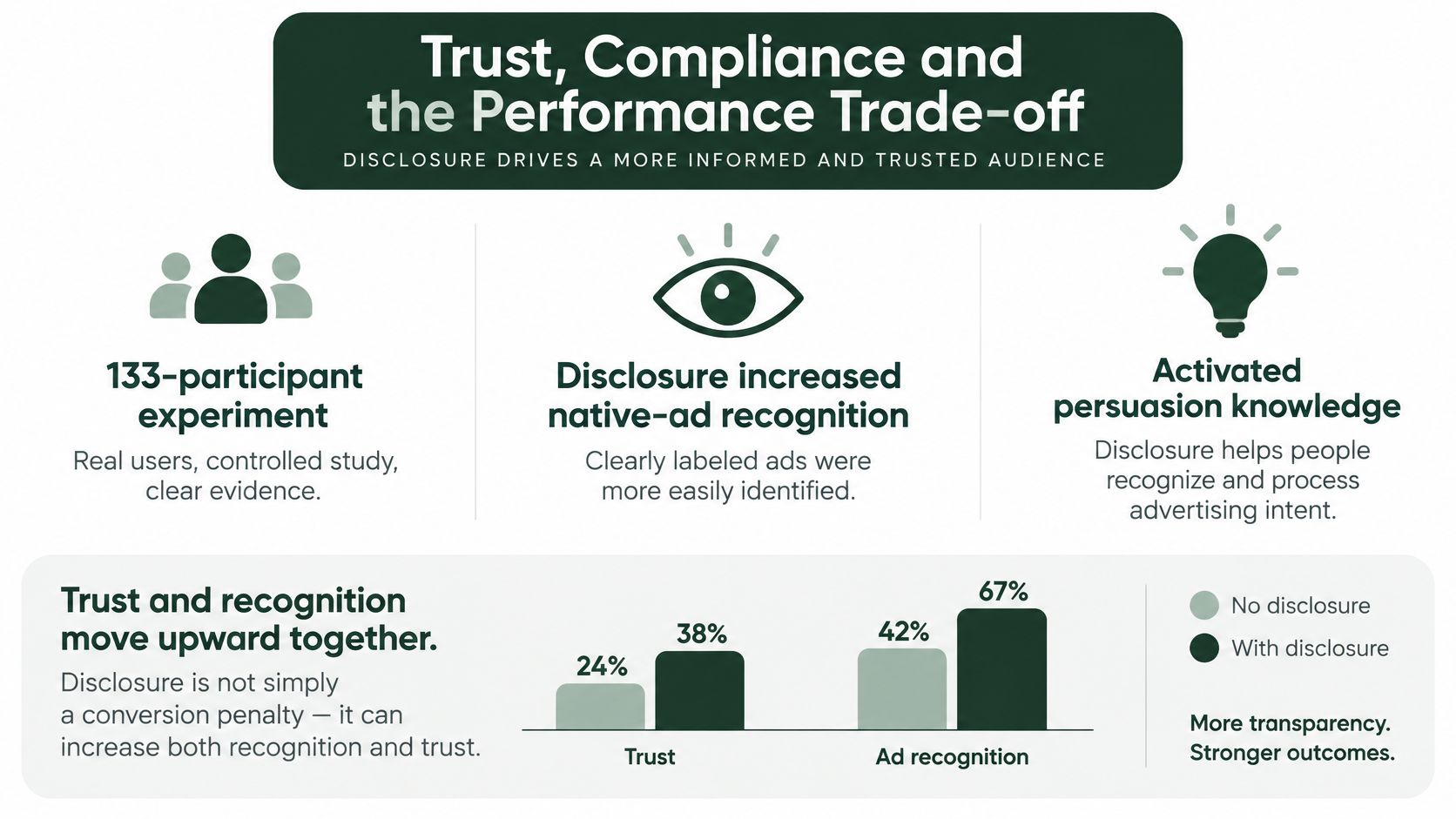
In an experiment described in a Journal of Interactive Advertising article, disclosure increased recognition of native advertising and activated persuasion knowledge, which reduced brand attitudes and purchase intention. The same disclosure also increased perceived transparency, which improved brand attitudes and purchase intention. Both effects ran at once.
A separate experiment found that explicitly using “advertisement,” rather than a vague label such as “brand voice,” strengthened perceived sponsorship transparency. That transparency could improve advertising evaluations when the disclosure was prominent. Plain wording gives readers a clear basis for evaluating the page.
What actually triggers distrust
Readers are more likely to distrust a page when they discover its commercial purpose after initially taking it for independent editorial content. A peer-reviewed study of in-feed native ads styled as news found that this realization led consumers to infer deliberate manipulation, reducing message engagement, brand attitudes, purchase intention, and sharing intention. The timing of recognition matters: an upfront label lets readers assess the content with its sponsorship understood.
An editorial format can make claims easier to follow, but it cannot make them more credible on its own. Avoid four practices that invite readers to infer deception:
- Fabricated bylines: An invented journalist name implies reporting authority the brand does not have.
- Implied newsroom endorsement: A publisher-like masthead or “our testers” framing suggests independent evaluation.
- Unverifiable report framing: Claims such as “a new report finds” need a real, checkable source.
- Unsubstantiated product claims: Editorial structure can make weak claims sound reported, increasing the risk when readers question them.
Competitors' disclosure choices are a poor standard to copy. An industry analysis summarized by Gizmodo's report on sponsored content covered more than 12,000 native-advertising campaigns and reported that 37% of publishers were not complying with FTC identification guidance. A rival's buried label is a warning, not a benchmark.
Set a clear operating standard: use editorial structure to organize information, identify the sponsor near the opening content, and substantiate every claim. Then evaluate the trade-off with more than click-throughs. When you measure return on ad spend, track conversion alongside refunds and post-purchase perception, and compare results with presell conversion data for DTC marketers. Disclosure placement and wording are variables to test; clear sponsorship is the baseline.
Matching Each Format to Traffic and Awareness
This decision is often sorted by traffic temperature: cold traffic gets an advertorial and warm traffic gets a product page. I would prioritize reader awareness instead. Two cold readers may require different pages. One might not recognize the problem yet and needs narrative education. The other experiences it daily and seeks options to compare. Temperature indicates their origin, not their level of understanding.
Separate pre-sell from earned content before you choose. Pre-sell content is brand-controlled paid content that warms a reader before the product page. Earned content is third-party coverage, reviews, or listicles the brand didn't pay to place, and its credibility comes from an outside author making an independent choice. You can control the first and test it this week. You can only earn the second over time, and you shouldn't imitate its independence in your own copy.
Best format by reader situation
| Reader Situation | Better Fit | Why It Fits |
|---|---|---|
| Cold traffic, unaware of the problem | Advertorial | Narrative can educate the least-aware reader step by step |
| Cold traffic, aware of the problem | Problem-led listicle or advertorial | Naming the problem matches what the reader is already looking for |
| Warm traffic, comparing options | Best-of listicle | Ranking the category borrows third-party credibility |
| Expensive, considered purchase | Advertorial or presell page | Higher-ticket products need more explanation before the close |
| Impulse, low-price, self-explanatory product | Product page | Belief is cheap, so extra reading adds friction |
| Warm traffic, ready to buy | Product page | The presell step repeats what the reader already decided |
The best-of row needs a warning. A ranking borrows third-party credibility, so a brand ranking itself first on its own page is the weakest version of the format. If you publish it, use real selection criteria, honest limitations, and clear sponsorship. Readers comparing options are closer to purchase and quicker to spot a rigged list.
Pre-sell pages earn their place for expensive, education-heavy, or commodity products where the product page asks for belief before it builds understanding. They add friction for impulse, low-price purchases where a photo, a price, and a guarantee close the sale. An advertorial is the wrong tool when the reader already wants the item and your page only delays checkout.
Treat vendor benchmarks as a hypothesis, not a forecast. Company-reported figures cite a 2 to 3 times conversion benchmark against product pages and a 46 percent CAC reduction in a first-party test that routed the same ads to an advertorial instead of the product page. Your category, price, and creative can produce a very different result.
In paid social, route the same ad sets to a labeled advertorial for cold, considered-purchase audiences and to the product page for warm, ready-to-buy traffic. Map the stages from unaware prospects to product-aware shoppers so the ad promise and the page awareness stage stay aligned. The mismatch that kills conversion is usually the wrong awareness stage, not the wrong temperature.
Advertorial Template and Worked Example
A usable advertorial template should force honest choices before design polish. Use these seven fields for any Advertorial vs Editorial page you ship, and don't let a writer skip the proof checks because the narrative flows well.
- Label: Place Advertisement or Sponsored Content above the headline, where it's visible before the first claim.
- Headline options: Write three, each naming a problem the reader already feels. "Why Your Drink Is Lukewarm by Lunch" beats a vague superlative.
- Problem section: Two short paragraphs describing the reader's situation in concrete scenes, without invented statistics.
- Explanation: Say how the product works, with specifications copied from the brand site, such as capacity, materials, or tested temperature retention.
- Proof block: Add reviews, each attributed to a named source or marked clearly as a brand-collected review.
- Objection section: Answer the two most common doubts, such as price and durability, with substantiated facts and guarantee terms.
- Call to action: One link to the product page, with no fabricated journalist name or newsroom quote above it.
Worked example with an insulated water bottle
Say a DTC brand sells an insulated water bottle for commuters. The label, Sponsored Content, sits above the headline "Your Commute Is Warming Your Water Before 9AM." The opening paragraph reads as a product-led explainer, describing a train ride, a desk, and a bottle that tastes flat by mid-morning. It doesn't claim a reporter investigated anything.
The explanation section names double-wall insulation and the tested cold-retention specification from the brand site. A draft line like "the best bottle we've ever tested" gets replaced before publishing with that specific specification and the conditions it came from. That's the edit that separates editorial structure from editorial impersonation.
Replace every "best ever" with a specification, a source, or a deletion.
The proof block uses two named customer reviews collected by the brand, labeled as such, and the objection section answers price with cost per use and durability with warranty terms. One call to action sends the reader to the product page. The page still reads smoothly, but nobody can mistake who paid for it or where the claims came from.
How to Build a Compliant Advertorial From a Product URL
Build speed matters only when the review steps keep pace. Set the audience, evidence, and disclosure before polishing the copy.
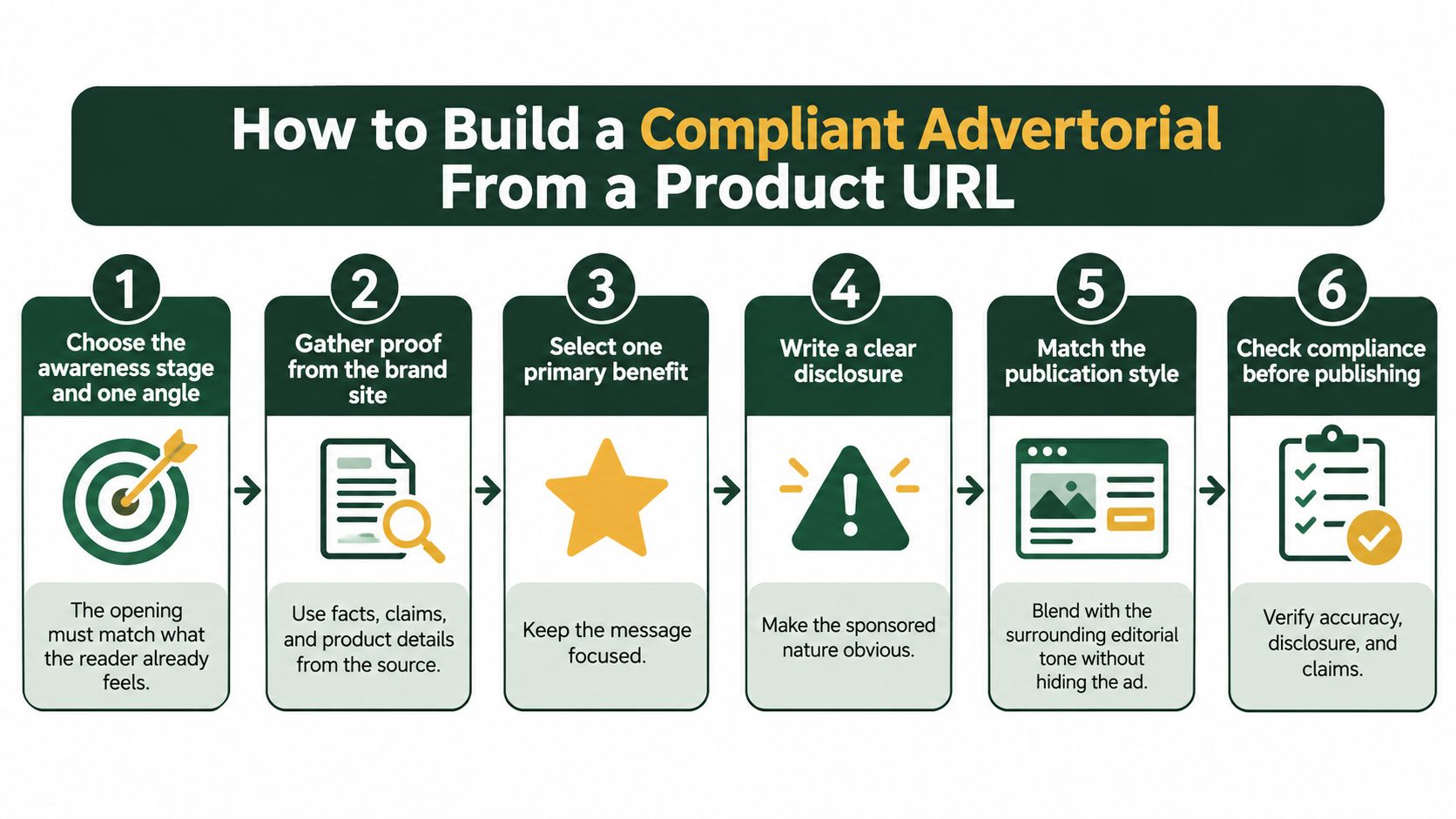
1. Choose the awareness stage and one angle. Decide whether the reader is unaware of the problem, already knows the problem, or is comparing solutions. Match the opening to that awareness: a comparison-led hook can lose an unaware reader, while a basic problem introduction can feel slow to someone choosing between products.
2. Gather proof from the brand site. Collect the offer, reviews, ingredients, specifications, guarantees, and shipping terms before drafting. Keep claims that can be traced to that material or a named external source; remove the rest. That gives the draft a usable evidence base instead of leaving attractive but unsupported copy to fix later.
3. Generate the draft from the product URL. Landra reads a brand's site and can produce an editable, editorial-structured page in under five minutes, with multiple headline options. AI image generation is available on the Pro plan. Treat the result as a structured draft, not a finished set of claims.
4. Replace unverifiable claims. Remove fabricated bylines, invented journalist names, implied newsroom endorsement, and report framing without a real report behind it. Replace superlatives with specifications. If a sentence implies that a magazine tested the product, provide evidence of that test or cut the claim.
5. Place the label before persuasion starts. Put Advertisement or Sponsored Content before or next to the headline or first claim. Include the sponsor name where the layout allows, and don't rely on a vague term such as “partner content” as the only disclosure. Placement matters as much as wording: a label readers miss cannot clarify the commercial intent.
6. Check mobile and run recognition testing. Open the page on a phone and confirm the label appears without scrolling past the hero. Then show the page briefly to people who haven't seen it and ask what kind of page it is. If they call it an article without recognizing the ad, increase the label's size or contrast, move it closer to the headline, and test again.
7. Publish and create one variant. Choose Shopify, a Landra-hosted URL, Webflow, or HTML export to fit your stack. Duplicate the page with an opening for a second awareness stage or angle. Start with one variant; wait for the first page to show whether the format suits the offer before expanding the test.
A draft-and-edit workflow can reduce production time and cost compared with agency-built advertorials. Generating and editing a draft takes minutes, which makes it easier to prepare two awareness-matched openings for the same offer without waiting through another production cycle.
Before launch, use the free Advertorial Compliance Checklist to review the label, claims, and byline. The Headline Analyzer can screen headline options you've written. Both tools help catch avoidable issues while the page is still easy to change.
Confirm the Format Before You Launch Your Test
Test the labeled advertorial against the product page with the same traffic source, offer, price, and creative. Change the destination format and nothing else. Use your reader-situation decision to pick the pair, so you don't waste spend sending ready-to-buy traffic through a page built for unaware readers.
Measure qualified click-through rate, engaged-session rate, checkout initiation, purchase conversion, and refund rate. Add a post-purchase survey asking whether the page felt like advertising. Watch scroll depth, outbound clicks, and add-to-cart rate after any disclosure or opening change.
A winning advertorial improves commercial outcomes without increasing confusion or negative sentiment. Higher conversion with more refunds, complaints, or "I thought this was a review" responses isn't a clear win. It's borrowed revenue.
Run the five-second recognition test on the label before spending on paid social. Then draft one advertorial from your product URL, check the label on mobile, and set up the split test. I would start with one awareness stage, one angle, and one clean comparison before building variants.
Turn one product URL into a labeled, editorial-structured advertorial you can edit and publish to Shopify, a hosted URL, Webflow, or HTML. Use it to test an awareness-matched pre-sell page against your product page without hiding the commercial intent. Visit Landra to draft your first page and run the comparison properly.