

You're probably in the same spot most DTC teams hit after a few paid social cycles. The ads are decent, the offer isn't broken, traffic is coming in, and the product page still doesn't carry cold clicks well enough. People bounce, skim, get distracted by navigation, or land without enough context to buy.
That's why the best landing page builder matters more now than it did a few years ago. As customer acquisition gets more expensive, teams need pages they can launch fast, tailor to the ad angle, and improve without waiting on design or development. The broader market is moving that way too. The global landing page builders market was valued at USD 527.60 million in 2023 and is projected to reach USD 1.45 billion by 2030, with a 15.56% CAGR during 2024 to 2030 according to Virtue Market Research's landing page builders market report.
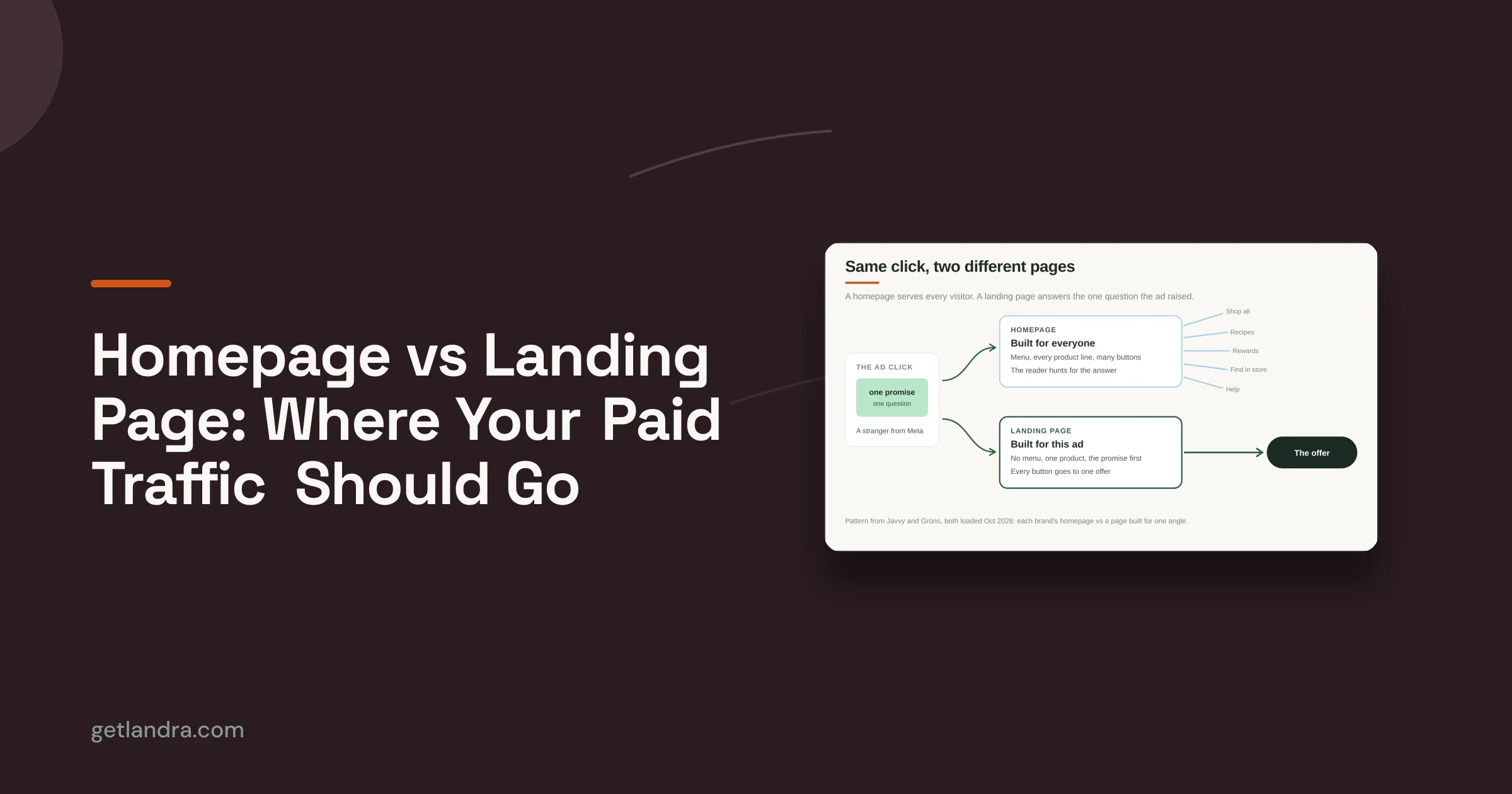
For DTC brands, the actual gap isn't “can this tool make a page?” Almost all of them can. The gap is whether the builder helps you ship the right page type for the traffic you're buying, especially pre-sell pages for cold Meta and TikTok traffic.
Table of Contents
- 1. Landra
- 2. Unbounce
- 3. Instapage
- 4. Leadpages
- 5. Webflow
- 6. Swipe Pages
- 7. Shogun
- 8. PageFly
- 9. GemPages
- 10. Landingi
- Top 10 Landing Page Builders, Quick Comparison
- How to Pick and Validate Your Next Builder
1. Landra

Landra is the most opinionated pick on this list, and that's why it earns the top spot for DTC teams buying cold traffic. It isn't trying to be a generic page builder for every use case. It's built to generate pre-sell landing pages, advertorials, listicles, and warm-up pages from a product URL, then let you edit and publish them fast.
That focus matters. Most “best landing page builder” lists talk about templates and testing, but they miss the practical difference between a standard landing page and a pre-sell page built to bridge ad click to purchase intent. That's also where the production gap shows up. Agency-built advertorials reportedly cost about $2,000 and take 1 to 2 weeks, while automated AI generation can produce a publishable mobile-first pre-sell page in under 5 minutes, according to Prismic's roundup of landing page builders.
Why Landra stands out
Landra reads your site, pulls in brand voice, offers, reviews, proof points, and product context, then turns that into a direct-response draft that feels more editorial than storefront copy. For DTC operators, that's a key advantage. You don't start from a blank canvas, and you don't have to force a product page template to do a pre-sell job.
It also fits the stack most brands already have. You can publish to Shopify, a Landra-hosted URL, Webflow, or export HTML.
Practical rule: If your paid social team needs three audience angles by tomorrow, a builder that starts with advertorial structure beats one that only gives you a blank page and a widget library.
For hands-on teams, the inline editor is a strong middle ground. The AI handles the first draft. The marketer still controls headlines, sections, proof blocks, and structure. If you want a better sense of what makes these pages work, Landra's guide to landing page design best practices is worth reviewing before you build your first variant.
Best fit
Landra is best for brands that need speed, angle testing, and mobile-first pre-sell pages without paying agency timelines. It's especially strong for Shopify brands running Meta and TikTok.
Pros and cons are pretty straightforward:
- Best for pre-sell pages: It's built around advertorial and listicle workflows, not generic brochure-style pages.
- Fast to publish: Small in-house teams can go from product URL to editable draft quickly.
- Stack-friendly output: Shopify, Webflow, hosted links, and HTML export keep it flexible.
- Less ideal for bespoke web experiences: If you need a heavily custom, interactive brand microsite, an agency or design-first build may still make more sense.
2. Unbounce

A common DTC scenario looks like this: the ad account is live, the offer is clear, and the bottleneck is getting clean test pages up fast without pulling in a developer. Unbounce handles that job well. It remains one of the safer picks for paid traffic teams that want control over page layout, faster launches, and a testing workflow that does not depend on engineering tickets.
Its strength is breadth. You can build standard campaign landing pages, route traffic to variants, add pop-ups or sticky bars, and keep the whole process inside one tool. For brands running lead generation or straightforward offer pages, that setup is usually enough.
Where Unbounce fits best
Unbounce is a better fit for teams that already know the page type they want to build. A product launch page, lead capture page, promo page, or simple PDP-style landing page are all reasonable use cases. It is less suited for long-form advertorial pre-sell flows than Landra, which matters if your Meta or TikTok funnel depends on story-led warming before the click to product.
That distinction matters in practice. If the goal is rapid iteration on classic paid landing pages, Unbounce is efficient. If the goal is publishing multiple pre-sell angles around one hero product, its general-purpose builder can feel more manual than a tool built around advertorial structure from the start.
Unbounce works best when speed and testing matter more than specialized pre-sell page formats.
The trade-off is cost and weight. Unbounce can be hard to justify for a lean Shopify brand that only needs a handful of pages each month. For a team spending enough on paid traffic to care about testing workflow, template flexibility, and fewer developer requests, the premium is easier to defend.
Pros and cons are fairly clear:
- Good all-around paid traffic builder: Strong for standard landing pages, promotions, and lead capture.
- Useful testing workflow: Marketers can publish and iterate without waiting on engineering.
- More general than specialized: Better for broad campaign use than advertorial-heavy funnels.
- Can feel expensive for smaller brands: The value improves when traffic volume and testing cadence are already there.
3. Instapage

Instapage is the platform I'd look at when a paid media program is already advanced and the pain point isn't page creation alone. It's orchestration. You've got lots of ads, lots of variants, multiple stakeholders, and enough traffic volume that experimentation discipline matters.
Its feature set reflects that. Server-side A/B testing, heatmaps, ad-to-page mapping, collaboration tools, and reusable blocks all push it closer to an enterprise landing page workflow than a scrappy DTC builder.
Best for larger paid media programs
Instapage shines when teams care about message match across campaigns. If different ad sets speak to different pain points, offers, or audiences, the ability to map ads to specific pages becomes useful fast. That's especially true when creative testing is active and consistency between ad promise and landing page angle starts to influence efficiency.
The upside is obvious. You get a more controlled experimentation setup and better collaboration between media buyers, designers, and growth teams.
The downside is just as obvious. Instapage can be overkill for brands with modest traffic, fewer campaigns, or simple one-product funnels.
- Best for paid teams with process: AdMap, heatmaps, and reusable blocks help when multiple people are touching campaigns.
- Strong experimentation stack: Server-side testing is attractive for teams that care about cleaner test delivery.
- Less ideal for lean operators: If you just need pages live quickly, you may not use enough of the platform to justify it.
4. Leadpages

Leadpages has gotten more interesting as smaller teams ask for fewer tools, not more. A lot of DTC operators don't want to stitch together one platform for page creation, another for heatmaps, and another for simple tests if they can avoid it.
That's where Leadpages fits. It combines AI-assisted page creation, built-in A/B testing, heatmaps, dynamic text replacement, and broad integrations in a package that feels manageable.
Why small teams like it
Leadpages is a strong option when speed matters but you still want enough CRO tooling to make decisions. It's not as specialized as Landra for advertorials, and it's not as enterprise-oriented as Instapage. It sits in the middle well.
For brands that need campaign pages, collection launch pages, promo pages, or lead capture tied into tools like Stripe, Google Ads, HubSpot, or Klaviyo, that middle ground is useful.
A practical advantage is that it reduces tool sprawl. A practical drawback is that some of its more advanced features sit higher in the plan structure, so the platform can feel simple at first and more layered as your needs grow.
If your current problem is “we need to launch pages this week and learn from them without adding another CRO tool,” Leadpages makes a lot of sense.
5. Webflow
Webflow isn't a pure landing page builder, and that's both its strength and its weakness. If your team wants total visual control, owns brand design tightly, and prefers to keep the main site and campaign pages in one system, Webflow is hard to beat.
For DTC teams, that usually means one of two scenarios. Either the brand already runs on Webflow, or the creative team wants a level of control that generic landing page tools don't offer.
When Webflow is the right call
Webflow gives you pixel-level flexibility, CMS support, production hosting, and room to build pages that feel native to the brand rather than obviously template-driven. If design quality is a key part of conversion, that matters.
Where it falls short is classic landing page software behavior. Built-in experimentation and heatmap workflows aren't its native strength. You'll usually add tools around it.
That doesn't make Webflow a weak choice. It just means you should choose it for design freedom and site ownership, not because you want the fastest out-of-the-box CRO stack.
If you're comparing site-first and landing-page-first setups, Landra's take on landing page software for WordPress is a helpful contrast because it surfaces the trade-off between general site systems and specialized page tools.
- Best for design-led teams: You can control layout, spacing, interactions, and brand consistency at a high level.
- Good for system consolidation: Full-site content and campaign pages can live under one roof.
- Not ideal if testing is the priority: You'll likely need add-ons for the kind of experimentation that tools like Unbounce or Instapage handle more directly.
6. Swipe Pages

A paid social click lands on your page from TikTok. The customer is on a weak mobile connection, half-distracted, and gives you a couple of seconds before bouncing. That is the setting where Swipe Pages makes sense.
Swipe Pages is built for fast mobile delivery. AMP support, built-in hosting, compression, testing, funnels, analytics, and collaboration features all point to the same use case: getting simple campaign pages live quickly and keeping them light enough to load well on phones.
Best for mobile-first paid traffic
I would shortlist Swipe Pages for advertorial presell pages, lead capture, and straightforward offer pages where speed matters more than heavy customization. DTC brands running Meta or TikTok traffic often fit that profile. If the page only needs clear messaging, a strong CTA, and a short path to conversion, Swipe Pages is usually easier to justify than a more design-heavy platform.
The trade-off is flexibility. AMP can help performance, but it can also limit what you do with third-party scripts, interactive elements, and more complex page behavior. Teams that rely on richer quizzes, custom tracking setups, or heavily scripted experiences should test carefully before committing.
It also helps to watch usage limits closely. Some brands outgrow traffic caps faster than expected once a campaign hits.
For Shopify brands, the key question is whether the page should live outside the storefront for speed and testing, or inside it for tighter product and theme control. This guide to building landing pages in Shopify is a useful comparison if you are deciding between those setups.
A practical rule: use Swipe Pages when launch speed and mobile load time are the constraint. Choose something else if your funnel depends on deeper customization or store-native workflows.
7. Shogun

Shogun is one of the cleaner answers for brands that want landing pages to live inside the commerce stack, not beside it. If your team already works day-to-day in Shopify or BigCommerce, that convenience is real.
The core appeal is simple. Visual editing, reusable sections, testing, personalization, and storefront-native publishing reduce friction for merchandising and growth teams.
Best for storefront-native teams
Shogun works well when your pages depend on theme consistency, product data, and operational simplicity. A lot of Shopify brands don't want a separate landing page environment unless they have to. They want the page where the products already live.
That's why Shogun tends to be a practical fit for launches, seasonal pages, promo pages, and campaign landers tied closely to catalog and store content.
The trade-off is complexity in pricing and usage structure. Once personalization and testing deepen, the platform can feel less straightforward than lighter Shopify page builders.
If you're deciding whether to build inside Shopify or externally, this guide to landing pages in Shopify lays out the operational pros and cons clearly.
- Best for Shopify and BigCommerce teams: It keeps page building close to the storefront workflow.
- Strong on brand consistency: Reusable sections help maintain design control.
- Can get more complex as needs grow: Personalization and higher-tier usage may require more planning.
8. PageFly

PageFly stays popular because it solves a very common Shopify problem. The brand wants more page flexibility than the theme allows, but it doesn't want to move the workflow outside Shopify.
It gives teams a drag-and-drop editor, AI help, testing features, heatmap preview, funnel analytics, and broad compatibility with themes and apps. That package is why a lot of stores start here.
Why PageFly stays popular
For lean ecommerce teams, PageFly is approachable. There's enough functionality to build launch pages, collection pages, feature pages, bundles, and campaign landers without turning every request into a dev task.
It's also broad rather than narrow. Unlike a dedicated pre-sell platform, PageFly isn't optimized around one page type. That makes it flexible, but sometimes less sharp.
The main caution is performance discipline. On some themes, extra scripts and layered app logic can weigh pages down if the team keeps piling on features without cleanup.
- Good Shopify flexibility: It's easy to build more custom pages than the default theme allows.
- Broad CRO coverage: Testing, analytics, and templates make it useful for many store scenarios.
- Watch page weight: More app logic and page complexity can create speed issues if no one manages them carefully.
9. GemPages

GemPages is a good fit for brands that are constantly launching something. New bundles, new offers, new collection pushes, new seasonal campaigns. If that's your operating style, template depth and funnel tooling matter more than perfect design purity.
Its mix of AI-assisted building, a large template library, funnel features, upsells, and integrations makes it useful for promotion-heavy stores.
Strong for promotional builds
GemPages tends to work best for merchants who need lots of pages across the funnel, not just one high-stakes hero landing page. You can use it for launch landers, upsell flows, promotional storytelling, and post-purchase experiences.
That range is useful, especially if your team likes to run merchandising experiments inside Shopify instead of through external landing page platforms.
The main trade-off is common to many Shopify builders. The more advanced your campaigns become, the more likely you are to graduate from the free or lighter plans into more involved usage.
If your calendar is packed with drops, promos, and bundles, GemPages is often more useful than a “perfect” builder that nobody on the team ships quickly with.
10. Landingi

Landingi is the classic independent landing page platform pick for teams that want the essentials without buying into a premium-heavy stack. It covers the basics well: builder, forms, pop-ups, AI help, pre-designed sections, analytics, and integrations.
If your needs are straightforward, that's often enough.
Good value for classic landing pages
Landingi makes sense for small teams that want a dedicated landing page tool without the complexity or cost profile of some bigger names. The setup is usually easy to understand, and the plan structure is easier to parse than some alternatives.
It's a good option for campaign pages, lead capture, simple ecommerce promotions, and lightweight offer testing. It's less compelling if your team needs advanced experimentation or highly specialized paid-social page formats.
That's the pattern across this whole category. A solid generalist tool can be the best landing page builder for one team and the wrong pick for another.
- Good starter standalone platform: You get the core landing page workflow without much overhead.
- Clear fit for small teams: Simple setup and straightforward packaging help.
- Lighter on advanced CRO: Teams with heavier testing demands may outgrow it.
Top 10 Landing Page Builders, Quick Comparison
| Product | Core features | UX & Performance (★) | Value & Pricing (💰) | Best for & USP (👥 / ✨) |
|---|---|---|---|---|
| Landra 🏆 | AI advertorial/listicle/presell generator, visual inline editor, Shopify/Webflow/HTML publishing, saved brand context, AI images (Pro) | ★★★★★, mobile‑first, fast load, templates tuned for Meta/TikTok | 💰Free first page + 14‑day trial; Starter → Pro → Pro Plus; far cheaper & faster than agency (~$2k/1–2w) | 👥 DTC brands, performance marketers, small in‑house teams; ✨Generate & publish in <5min, on‑brand first drafts, 2–3× conv lift, 46% CAC↓ |
| Unbounce | Drag‑and‑drop builder, 100+ templates, A/B & Smart Traffic, pop‑ups/sticky bars | ★★★★☆, mature testing & responsive templates | 💰Mid‑tier, robust but can feel premium | 👥 Non‑technical performance teams; ✨Strong testing workflow & template library |
| Instapage | Server‑side A/B, heatmaps, AdMap, dynamic personalization | ★★★★☆, enterprise experimentation, no‑flicker tests | 💰Premium, priced for high‑scale programs | 👥 Enterprise advertisers/agencies; ✨Advanced experimentation & collaboration |
| Leadpages | AI page creation, built‑in A/B tests, heatmaps, integrations (Stripe/Klaviyo) | ★★★☆☆, unified CRO toolkit for quick launches | 💰Affordable tiers, no traffic caps on plans | 👥 SMBs and growing teams; ✨Fast drafts + integrated CRO tools |
| Webflow | Visual designer + CMS, custom code, production hosting/CDN | ★★★★☆, best‑in‑class design control & performance | 💰Varies; can escalate for team workspaces | 👥 Designers/dev‑savvy teams; ✨Pixel control & full site ownership |
| Swipe Pages | AMP pages, AI assist, A/B testing, funnels, CDN hosting | ★★★★☆, ultra‑fast mobile performance | 💰Good value for speed, but plan traffic caps | 👥 Performance marketers; ✨AMP‑optimized pages for paid social |
| Shogun (Shopify/BigCommerce) | Visual builder, templates, reusable sections, A/B & personalization | ★★★★☆, deep Shopify/BigCommerce fit | 💰Shopify‑centric pricing, MTU tiers can add complexity | 👥 Merchants on Shopify/BigCommerce; ✨Ship on‑brand pages inside storefront |
| PageFly (Shopify) | Drag‑drop editor, 320+ templates, A/B, heatmap preview, funnel analytics | ★★★☆☆, broad CRO feature set inside Shopify | 💰Free plan available, affordable paid tiers | 👥 Shopify stores wanting speed + flexibility; ✨Large template inventory |
| GemPages (Shopify) | AI‑assisted building, 400+ templates, funnels, post‑purchase upsells | ★★★☆☆, conversion‑oriented templates & funnels | 💰Free plan to test; paid for advanced funnels | 👥 Promo‑driven DTC stores; ✨Funnel & upsell automation |
| Landingi | Drag‑drop builder, AI helpers, forms, pop‑ups, basic analytics | ★★★☆☆, easy setup for small teams | 💰Cost‑effective entry, clear plans & trial | 👥 Small teams & budget buyers; ✨Simple, lower‑cost alternative to Unbounce/Leadpages |
How to Pick and Validate Your Next Builder
A team spends all week comparing builders, picks the one with the longest feature list, then misses the next paid social launch because nobody can get a page live fast enough. That is usually the real decision. Not which tool looks strongest in a comparison table, but which one fits the job, the traffic, and the team shipping it.
Start with the page type you need to publish repeatedly.
For Shopify-first teams building collection pages, product launches, and seasonal campaign pages inside the store, Shogun, PageFly, and GemPages usually create less operational drag. For paid acquisition teams running cold traffic into advertorials, quiz pages, or pre-sell flows, the better question is whether the builder supports that workflow cleanly, including publishing options, fast edits, and mobile performance. For brands that care more about design control and broader site ownership, Webflow is often the better fit. For teams that already run disciplined experimentation, Unbounce and Instapage still make more sense than forcing a store-native builder into a testing role.
Then validate with one live campaign, not a long internal debate.
Build a single page in the new tool and keep everything else as stable as possible: same offer, same traffic source, same audience, same primary CTA. If the ad angle, page format, and promotion all change at once, the result will be noise. The goal is to isolate whether the builder helps or slows the system around it.
A practical validation checklist looks like this:
- Measure mobile load speed: Paid social traffic is impatient, especially on slower connections.
- Measure conversion by page format: Compare advertorials against direct-response product pages separately. They serve different jobs.
- Measure downstream CAC or CPA: A higher on-page conversion rate matters only if it improves acquisition efficiency.
- Measure production time: Track how long it takes to brief, build, edit, approve, and publish. Teams often ignore this, even though it directly affects testing velocity.
- Measure iteration friction: Count how many people need access, how many handoffs happen, and how hard it is to swap copy, creative, or sections mid-flight.
Benchmarks help, but only in context. As noted earlier, landing page performance varies widely by traffic quality, offer strength, page type, and category. A pre-sell page for a hero product should not be judged against the same baseline as a simple lead capture page or a branded Shopify collection page. Use your own control first.
One mistake I see often is evaluating every builder as if it solves the same problem. It does not. A Shopify page builder can be great for merchandising and still be a poor fit for advertorial testing. A CRO-focused tool can be excellent for experiments and still feel slow for a lean DTC team that needs to launch three new angles before the next Meta spend cycle.
If your bottleneck is getting pre-sell pages live quickly, Landra is worth shortlisting early. It is built around advertorial and warm-up page workflows, and the publishing options fit common DTC setups, including Shopify, Webflow, hosted pages, and HTML export.
Pick the builder that helps your team publish, learn, and revise faster. In performance marketing, that usually matters more than having a few extra templates or settings.