
You've got paid social traffic coming in, the ad looks convincing, and checkout works. But visitors land on your WordPress site, browse briefly, and disappear. Before rebuilding the theme or installing another conversion plugin, check whether you're asking people to buy something they don't yet understand.
A useful WP landing page bridges that gap. It matches the visitor's awareness, gives them enough evidence to take the next step, and stays fast and measurable when the campaign goes live.
Table of Contents
- Why Cold Clicks Die on a WordPress Page
- Choose the Build Path and Decide Whether to Generate First
- How to Structure a Pre-Sell Page
- Speed Targets for Paid Mobile Traffic
- Measure the Page Without Slowing It
- Pre-Launch QA on Real Devices
- Run Tests Your Traffic Can Finish
Why Cold Clicks Die on a WordPress Page
Say someone taps a skincare device ad on Instagram. They recognize the problem in the creative, but they haven't decided that a device is the answer. Your destination opens with a full menu, related posts, a product grid, and a buy button.
Nothing is technically broken. The page assumes a level of belief the visitor hasn't reached.
That's an awareness mismatch, not necessarily a theme problem. A polished product layout can explain what's for sale without explaining why a skeptical stranger should consider it.
Give the URL a specific job
A WordPress landing page is one URL with one primary job, published inside your existing site. You can keep the hosting, brand assets, commerce integration, and checkout while changing the campaign experience.
Choose the job before choosing the editor:
- Lead page: Collect an email address or qualified inquiry in exchange for a clear benefit. The visitor needs to understand the exchange, not your entire catalog.
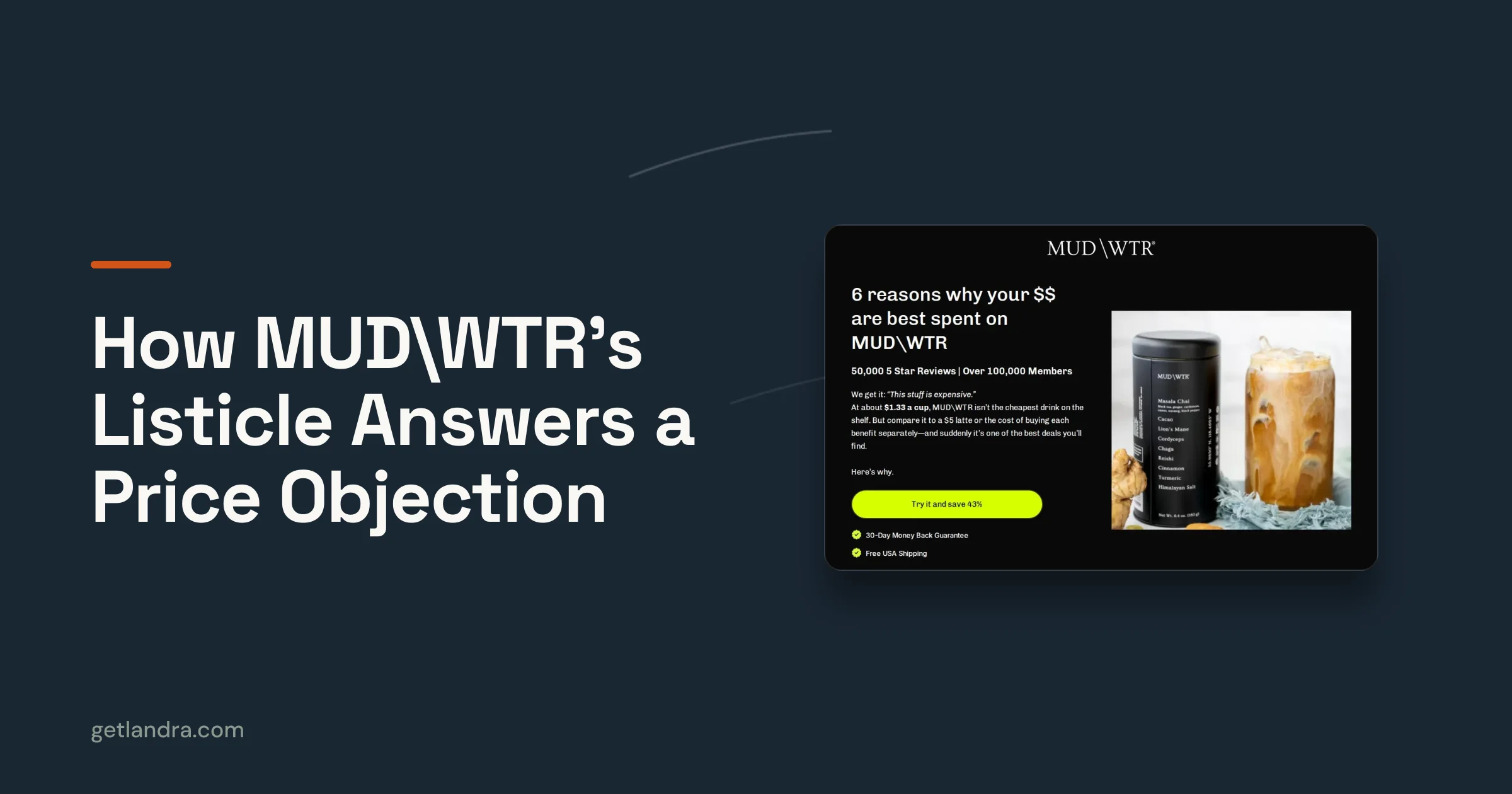
- Pre-sell page: Educate someone who recognizes a problem but doesn't yet trust your solution. An advertorial or listicle develops the ad's promise, answers objections, and hands the reader to the product page.
- Direct offer page: Present the product, terms, and purchase action to someone who already understands the category and wants to evaluate the offer.
Most weak campaign URLs miss the middle job. They look like blog posts or theme demos, but neither their copy nor their sequence helps the reader make a buying decision.
Keep the platform, change the experience
WordPress already supports a substantial publishing ecosystem. W3Techs reports that it powers 39.6% of all websites in its latest reported snapshot. That gives teams access to established hosting, development, analytics, and commerce options, but popularity doesn't make a campaign page persuasive.
You don't need to replace the whole site to create a focused destination. You need control over this URL's layout, content sequence, scripts, and next action.
Decision rule: The job of the click picks the build. The installed plugin doesn't.
Write down what visitors believe when they arrive and what they must believe before continuing. That brief should determine the build path, pre-sell structure, performance checks, and eventual experiment.
Choose the Build Path and Decide Whether to Generate First
WordPress landing page build paths
| Approach | Best when | Time to first draft | Main risk | Output |
|---|---|---|---|---|
| Block editor | Short offer on the current theme | Once copy and assets are ready | Weak layout for complex advertorials | Native WordPress page |
| Page builder | Designed, reusable campaign sections | After adapting an existing template | Extra CSS and JavaScript | Builder page |
| Landing theme | Many similar campaign URLs | After configuring the campaign template | Theme lock-in | Theme template |
| HTML export | Page already built elsewhere | Paste first, then complete integration QA | Theme CSS and script conflicts | Custom HTML block or template |
| AI generator such as Landra | Cold-traffic advertorial or listicle from a product URL | Generate a draft, then edit and validate it | Still needs editing, tracking, and publish QA | Shopify, hosted URL, Webflow, or HTML |
Choose the editor you can maintain
Start with the block editor when the offer needs a headline, explanation, proof, form, and button. Use a page-specific template so you can remove unwanted navigation without changing the rest of the site. Native blocks are also easier for another WordPress editor to maintain than a heavily customized layout.
The limitation is composition. A long advertorial with alternating editorial sections, comparison modules, and carefully controlled mobile spacing can become awkward if your theme gives you little layout control.
Use a page builder when your team already has reusable campaign sections and knows how to manage its assets. Elementor or another established builder can make design iteration straightforward. The trade-off isn't plugin count, it's what the published page loads.
Avoid adding a separate widget package for every design request. A testimonial module shouldn't require a slider library when a static review would do.
Choose a landing theme when repeated campaign production justifies maintaining a dedicated template system. Keep campaign-specific changes in a child theme or controlled template rather than modifying the parent theme directly. Before committing, check what remains editable if you later switch themes.
Use HTML export when the page has already been written and designed elsewhere. A Custom HTML block can accommodate a self-contained fragment, but a complete HTML document needs a suitable template or developer integration. Don't paste document-level markup into a normal content block and assume the browser will resolve everything cleanly.
Test stylesheet scope, font inheritance, content width, buttons, and script initialization. Prefix custom classes so exported styles don't accidentally change your site's checkout.
Generate first when the story is the bottleneck
An AI generator is useful when you know the traffic angle but can't get an advertorial or listicle onto a blank canvas. Treat its output as a working draft, not verified product evidence. Review every mechanism claim, testimonial, comparison, and offer condition against material your brand can substantiate.
For comparing production options, PlatformDTC's directory of landing page tools for DTC brands helps frame the choice around the campaign workflow rather than the page editor alone. For the export-and-publish route, Landra's guide to WordPress landing pages provides a WordPress-specific reference.
Generate first when cold traffic needs a story and copy production is blocking launch. Stay in WordPress when the offer is straightforward, your team has a clean template, and the visitor is ready for a direct presentation.
Don't choose between those paths using someone else's conversion benchmark. Compare the editing burden, publishing control, and evidence required for your own offer.
If the current destination is a product layout with distracting navigation, write the awareness match first. Build a clean mobile draft, complete the launch checks, and route a controlled portion of campaign traffic to it.
How to Structure a Pre-Sell Page
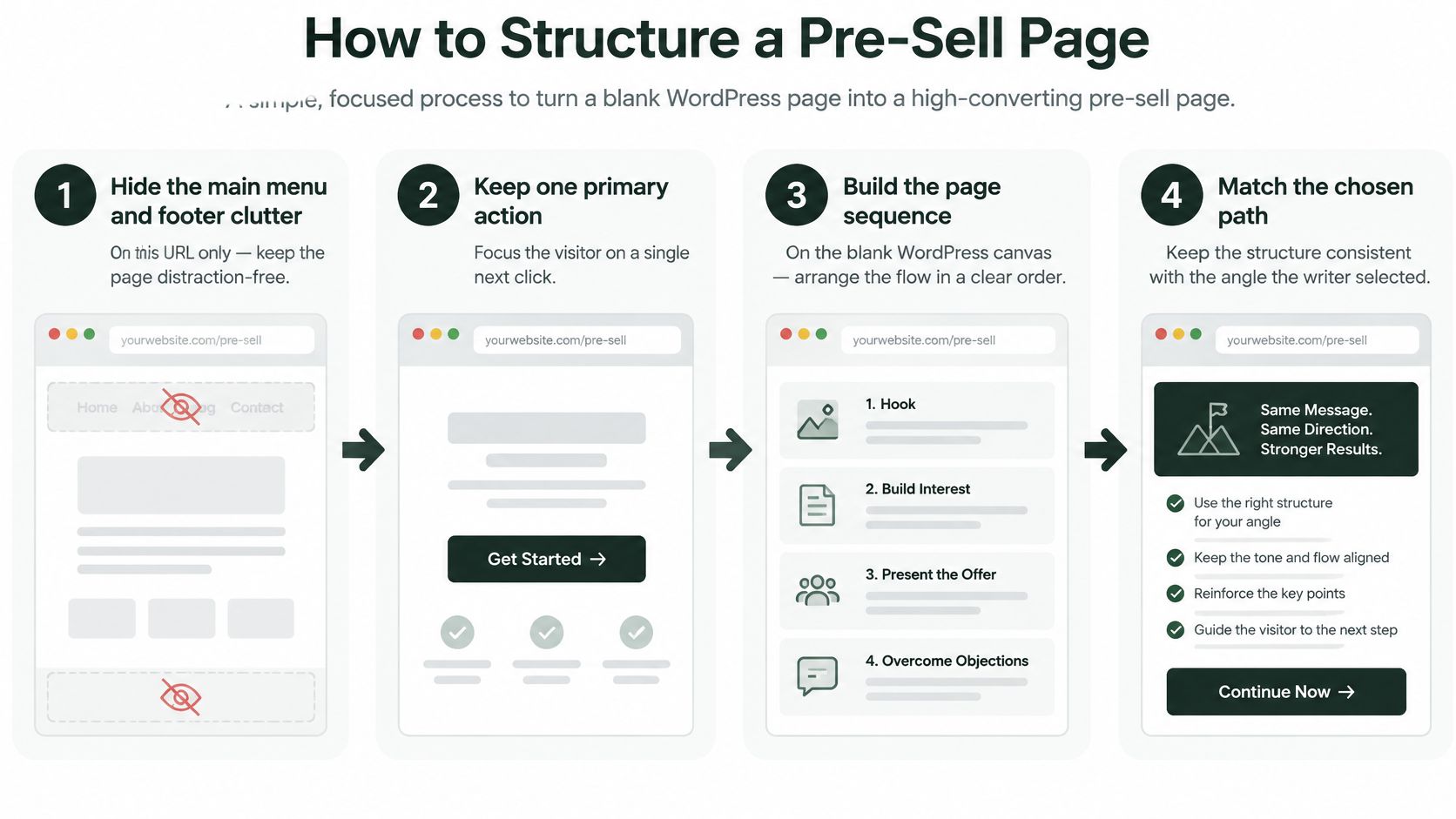
A pre-sell page should answer the reader's questions in the order they arise. For a skincare device, that usually means explaining the use case and credible mechanism before asking someone to choose a variant.
Use this visual as a canvas checklist, then build the argument around the visitor's remaining doubts.
Build belief before the purchase handoff
Remove competing destinations on this URL. Hide the main menu, related-post modules, and promotional footer clutter through the page template. Keep necessary business, privacy, and disclosure links available. The reader shouldn't have to choose between learning about the device and browsing unrelated products.
Match the headline to the ad's promise. A problem-led ad needs a problem-led opening. If the creative discusses difficulty maintaining a skincare routine, don't switch immediately to technical specifications. Keep the connection explicit without making stronger claims than the ad or product evidence supports.
Start with the reader's situation. Use the first phone screen to establish who the page is for and what it will help them evaluate. A clear device photograph and concise explanation do more useful work here than a large logo animation. Don't pretend branded advertorial content is independent reporting.
Arrange proof around skepticism. Explain how the product is intended to work, then show substantiated results, relevant product details, and genuine customer feedback. Answer the practical objection next: effort, compatibility, maintenance, discomfort, or suitability. A review can support an experience claim, but it can't substitute for evidence of efficacy.
Make the next click feel consistent
Place the purchase CTA after the relevant evidence. For a cold reader, an early action can jump to the explanation rather than force checkout. When you introduce the product-page CTA, describe the destination accurately. Preserve the same product, bundle, and offer terms through the handoff, then repeat that action after the closing objection.
Use a restrained visual system. Choose readable typography, short paragraphs, a compressed hero image, and clear section spacing. Use a pull-quote only for a claim worth remembering, not an unsupported promise made larger. For additional layout ideas, Up North Media's landing page CRO techniques for 2026 can serve as a review checklist, not proof that a tactic will work for your audience.
Duplicate the draft for another angle. Keep the original page intact while developing a different opening or argument. Label each version in WordPress and your campaign records so editors don't accidentally replace the control.
A pre-sell isn't mandatory. For an inexpensive, self-explanatory impulse purchase, extra reading may introduce friction without resolving a meaningful objection. Start directly on the product page when the ad already supplies the context buyers need, then test whether an educational step adds value.
The format that converts is the one matched to the reader who lands, not the theme that shipped with the site.
Speed Targets for Paid Mobile Traffic
Your acceptance bar is a stable first screen on a real phone. The MD Tech Team mobile WordPress guide gives Core Web Vitals targets of LCP at or below 2.5 seconds, INP at or below 200 milliseconds, and CLS at or below 0.1, measured at the 75th percentile.
Keep those targets visible during production, not just during a final SEO review.
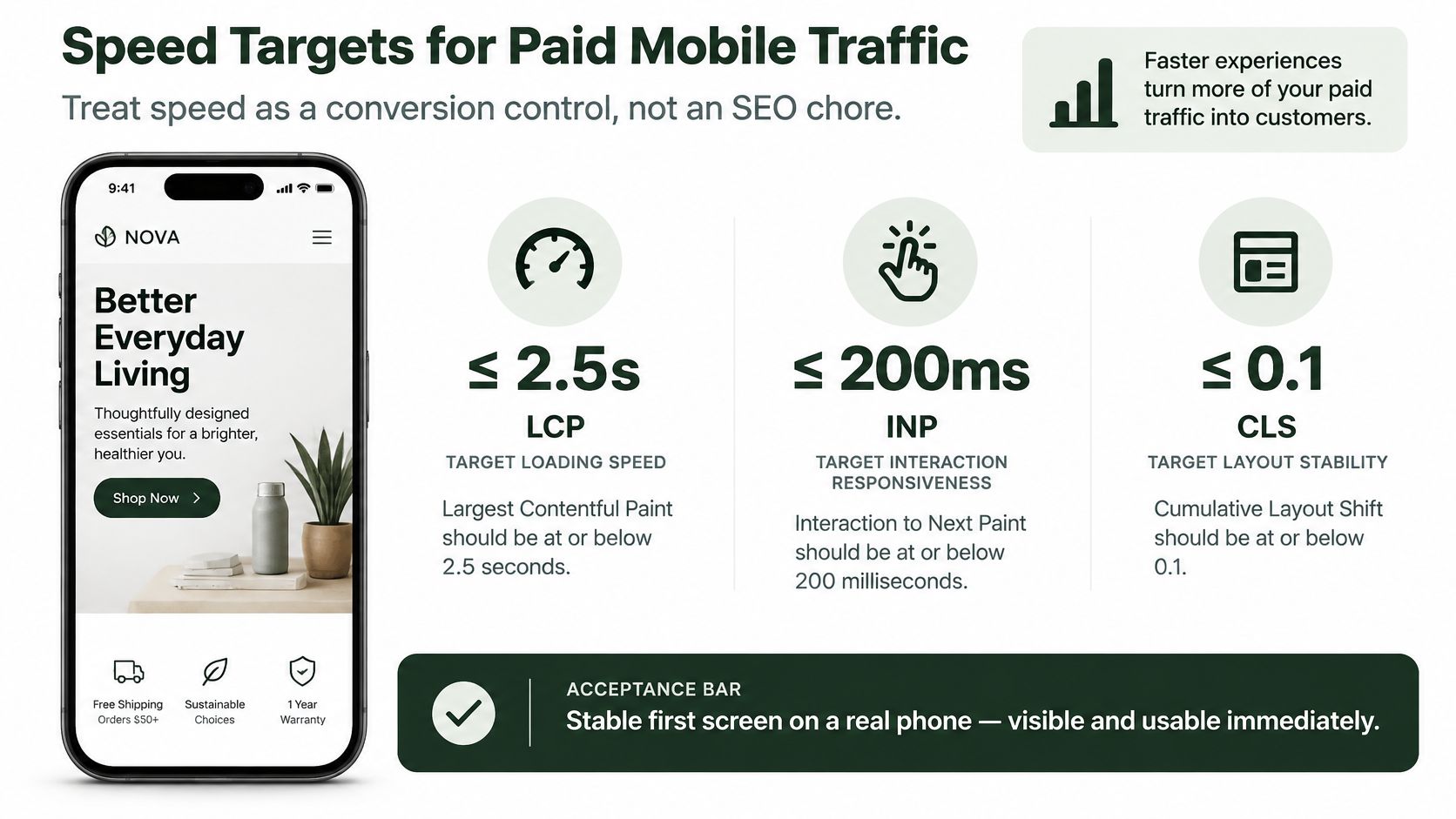
Mobile speed targets for a WordPress landing page
| Measure | Target | Why it matters |
|---|---|---|
| LCP | Meet the field loading threshold | Visitors can see the main content |
| INP | Meet the field responsiveness threshold | CTA taps and form interactions respond |
| CLS | Meet the field stability threshold | Images and banners don't move controls |
| Full load | Keep loading below the abandonment threshold | Visitors can continue before losing patience |
| Incremental speed gain | Directional, not a conversion guarantee | Evaluate business results in your own funnel |
Google's mobile speed analysis found that 53% of mobile visitors leave when a page takes longer than three seconds to load, while modeled bounce probability increased 113% as load time rose from one to seven seconds. Treat those findings as a reason to remove avoidable waiting, not a forecast of your campaign's conversion lift.
Test the published funnel
Open the live URL on a representative phone connection. Use mobile service, including representative 4G conditions, rather than relying exclusively on office Wi-Fi or the builder preview.
Inspect real-user performance. Use PageSpeed Insights and available field reporting, then investigate with browser tools. Understand field versus lab performance measurement before treating a simulated score as a launch verdict.
Optimize the main visual. Serve appropriately sized responsive images, declare dimensions, and avoid lazy-loading the visible hero. Don't make autoplay video the price of understanding the opening.
Delay noncritical work. Defer below-the-fold media and optional scripts. Remove unused builder widgets rather than installing another optimizer to hide their cost.
Retest interactions after caching. Check buttons, forms, consent controls, and checkout redirects with optimization enabled. Script deferral can make a page look complete while leaving its primary action unusable.
Stacked builder assets, missing image dimensions, overlapping optimization plugins, and shifting consent banners deserve particular attention. Use a single coherent caching strategy, with exclusions for dynamic commerce behavior.
For a visual performance walkthrough, use the accompanying video.
Release speed changes separately from copy experiments. Otherwise, you can't tell whether readers responded to the argument or merely received a usable page sooner.
Measure the Page Without Slowing It
Choose purchase or qualified lead as the primary outcome. The business question is whether this destination produces that outcome more economically than the product page, not whether visitors click an attractive button.
In GA4, mark the primary event as a key event. Add supporting events for the product-page handoff and meaningful engagement with the proof section. Give events stable names and include page variant, campaign context, and consent state where your implementation permits.
Connect campaign activity to actual orders
Preserve campaign identifiers through the handoff and use the appropriate cross-domain setup when checkout lives elsewhere. Don't add fresh internal UTMs that overwrite the original acquisition source. Reconcile analytics purchases with store orders, using transaction identifiers to investigate missing or duplicated events.
The Google Ads Landing Pages report includes clicks, cost, and conversion rate, allowing you to assess the destination alongside campaign performance. Compare pages receiving comparable traffic and apply a consistent attribution window.
What to load on a WordPress landing page
| Script | Class | Load rule |
|---|---|---|
| GA4 or first-party events | Measurement | Keep the schema small; respect consent |
| Ad platform pixel | Marketing | Block until explicit consent |
| Chat widget | Optional | Leave off paid landing URLs |
| Heatmaps and session replay | Optional | Sample for a defined diagnostic task |
| Extra builder and slider scripts | Often removable | Delete if the section is unused |
Accept the measurement trade-off
Document each script's owner, purpose, loading condition, and applicable regional consent requirements. Configure optional marketing cookies to wait for explicit consent, and verify that the implementation follows the rules relevant to your audience. First-party collection isn't an automatic exemption from privacy obligations.
When visitors reject tracking, analytics may miss purchases that still appear in the store. Compare observed orders with platform-reported and modeled conversions, keeping those categories separate. Never add them together as though they represent different customers.
Measurement discipline: Less complete attribution is preferable to bypassing a visitor's consent choice.
A minimal event schema is easier to debug than overlapping plugins sending competing purchase events. Judge the page on cost per primary outcome, and use margin and order quality to determine whether cheaper acquisition is worthwhile.
Pre-Launch QA on Real Devices
Run this checklist on the published URL, logged out of WordPress. Preview mode can hide caching, consent, and asset-loading problems that paying visitors will encounter.
Inspect the first screen on a phone. Confirm that the headline and intended next action are understandable without dismissing overlays. On a pre-sell, that action may lead into the explanation rather than straight to purchase. Check that motion doesn't obscure the content.
Use without a mouse. Reach the CTA with a keyboard, confirm visible focus, and check meaningful labels on every field. Test readable contrast, error messages, and reduced-motion behavior. Use Evoproxy's practical mobile website testing strategies to broaden device and browser coverage beyond your own handset.
Complete the journey. Submit the form and place a test order through the actual handoff. Confirm the right product, offer, confirmation page, campaign attribution, and transaction event.
Exercise both consent choices. Accept, reject, and reopen the preferences interface. Verify marketing requests only run under the intended consent state and that the banner doesn't move important controls.
Inspect the network requests. Confirm chat and unplanned recording tools are absent. Check that tag-manager rules haven't reintroduced scripts removed from WordPress.
Review publishing details. Decide whether the campaign URL should be indexed. Check its slug, title, description, social preview, and destination links against the ad's promise.
Record the release
Log failures against the page version and assign an owner to each fix. Save the final URL, screenshots, consent configuration, and event validation with the release record. Send paid traffic only after the blocking issues are resolved.
Run Tests Your Traffic Can Finish
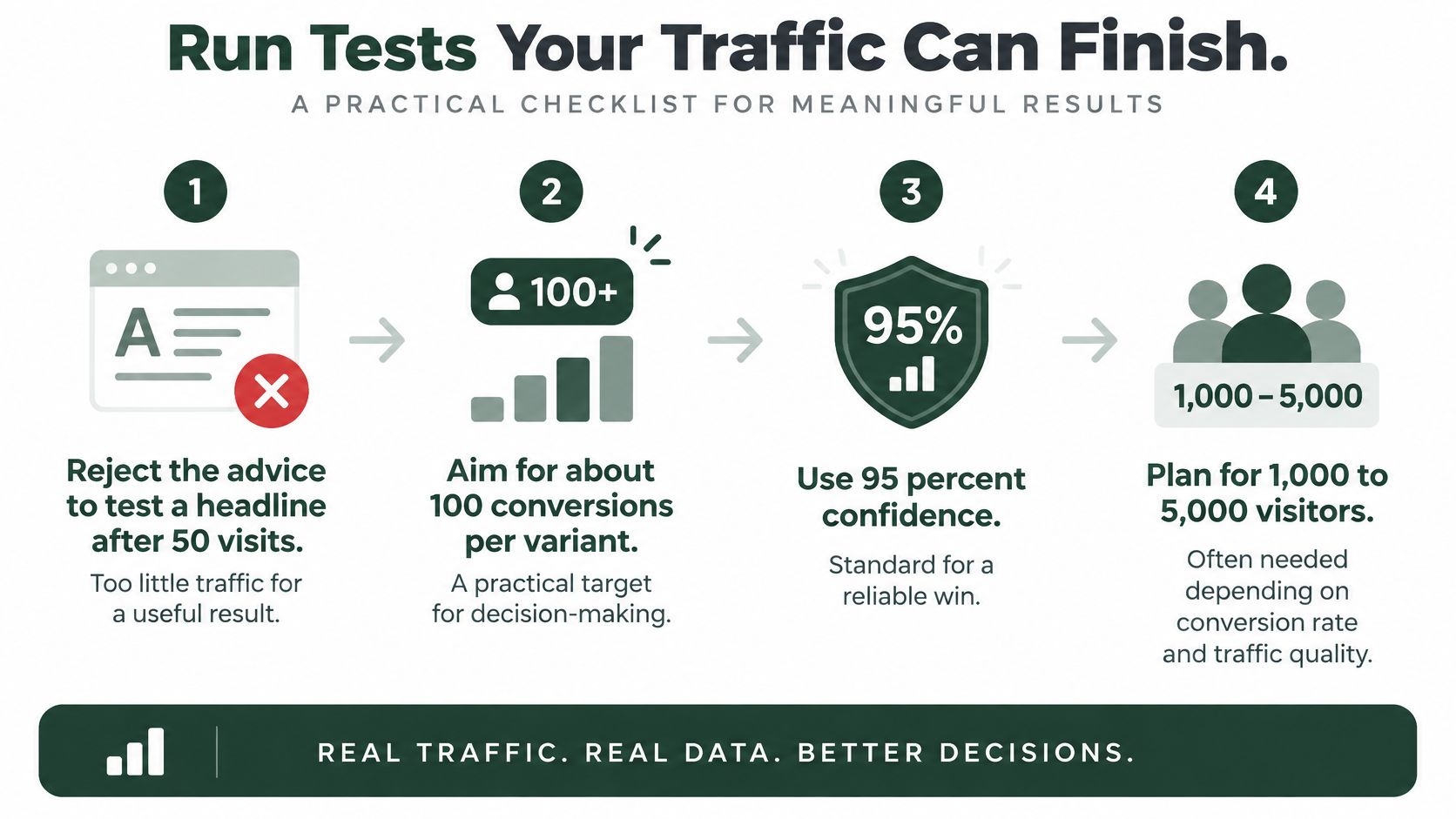
Don't declare a headline winner after a handful of visits. The Zoer WordPress landing-page guide warns against judging experiments after 50 visitors and suggests roughly 100 conversions per variant with 95% confidence, potentially requiring 1,000–5,000 visitors, depending on baseline conversion rate.
Those are planning heuristics, not a universal sample-size calculation. Your required sample also depends on the improvement you need to detect and the uncertainty you're willing to accept.
Use the workflow below to challenge an experiment before committing traffic.
Match the method to available volume
Which test to run on a WordPress landing page
| Situation | Method | Read it when |
|---|---|---|
| Enough volume | Randomized two-page split, one change | The planned sample and statistical decision criteria are met |
| Thin DTC traffic | Sequential or pre/post on the same ads | Source and offer remain stable across a sufficient observation window |
| Cannot wait for a split | Session review plus one primary metric | Use it to find friction, not declare a winner |
With sufficient traffic, randomize visitors between persistent variants and define the decision rule before launch. Report the estimated difference with a confidence interval, not just a winner badge. Keep an unchanged WordPress control so later edits don't erase the comparison.
For thin traffic, sequential or pre/post analysis can support a practical decision, but it's weaker causal evidence. Auction conditions, seasonality, and audience composition can change between periods even when the ads stay unchanged. Record those limitations instead of presenting the result as a randomized experiment.
Separate persuasion from acquisition changes
Don't swap the creative, audience, offer, and landing URL together if you want to isolate the page's contribution. Use a stable campaign setup and avoid common split testing pitfalls, including repeated peeking followed by stopping as soon as a favorable result appears.
Allow time for purchases that happen after the initial landing session. Reconcile campaign context, store orders, and reporting windows so an educational page isn't judged only on immediate checkout completion.
The primary decision is profitable acquisition, not scroll depth or time on page. Session review can reveal a broken button, confusing explanation, or form error when a split test is underpowered. It helps you choose what to fix, but it doesn't prove that the fix increased revenue.
Landra turns a product URL into an editable, mobile-first advertorial or listicle, with HTML export for a WordPress publishing workflow. Visit Landra to draft a pre-sell for your next campaign, then validate its claims, consent behavior, and checkout handoff before sending paid traffic.