
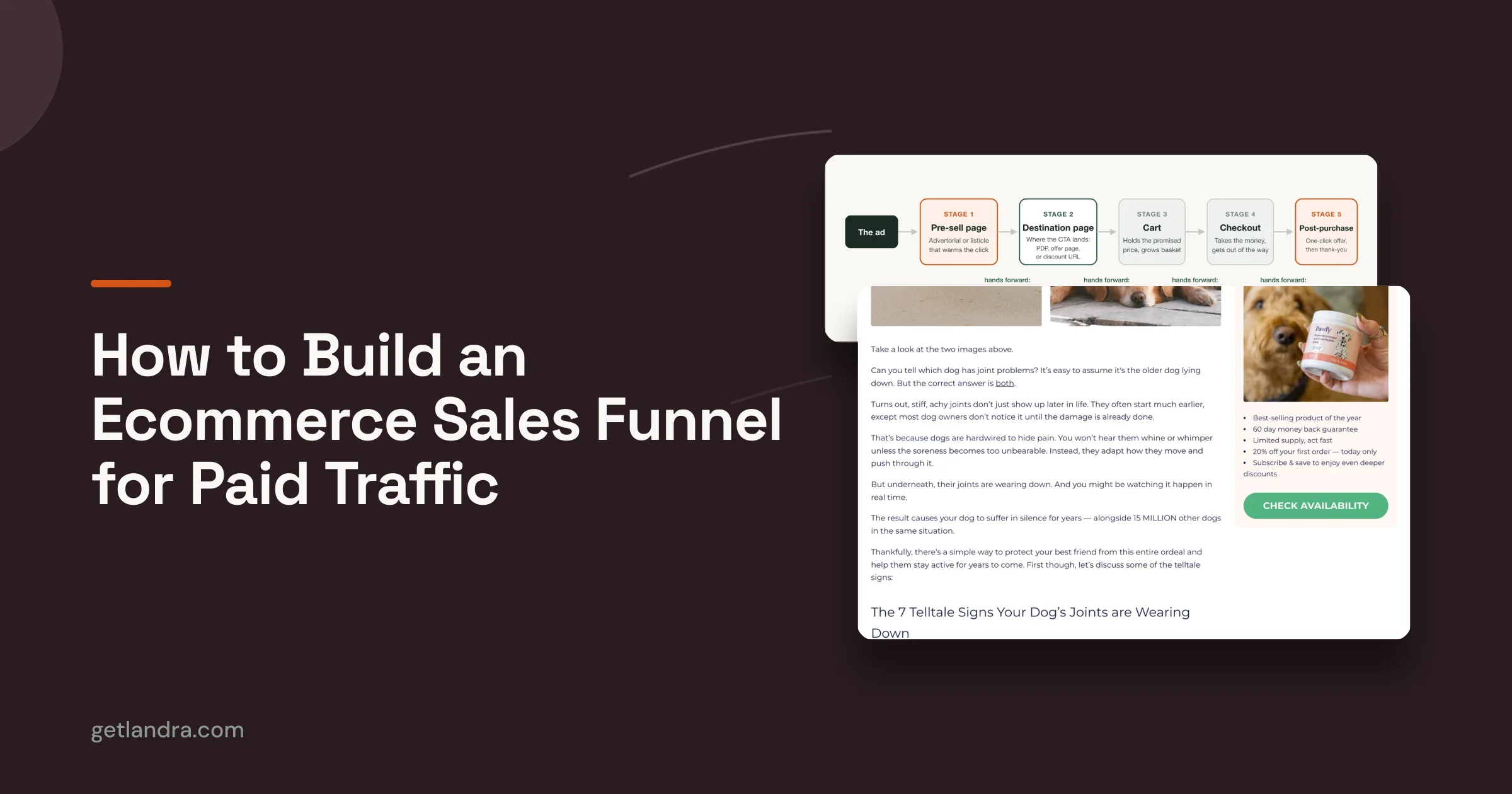
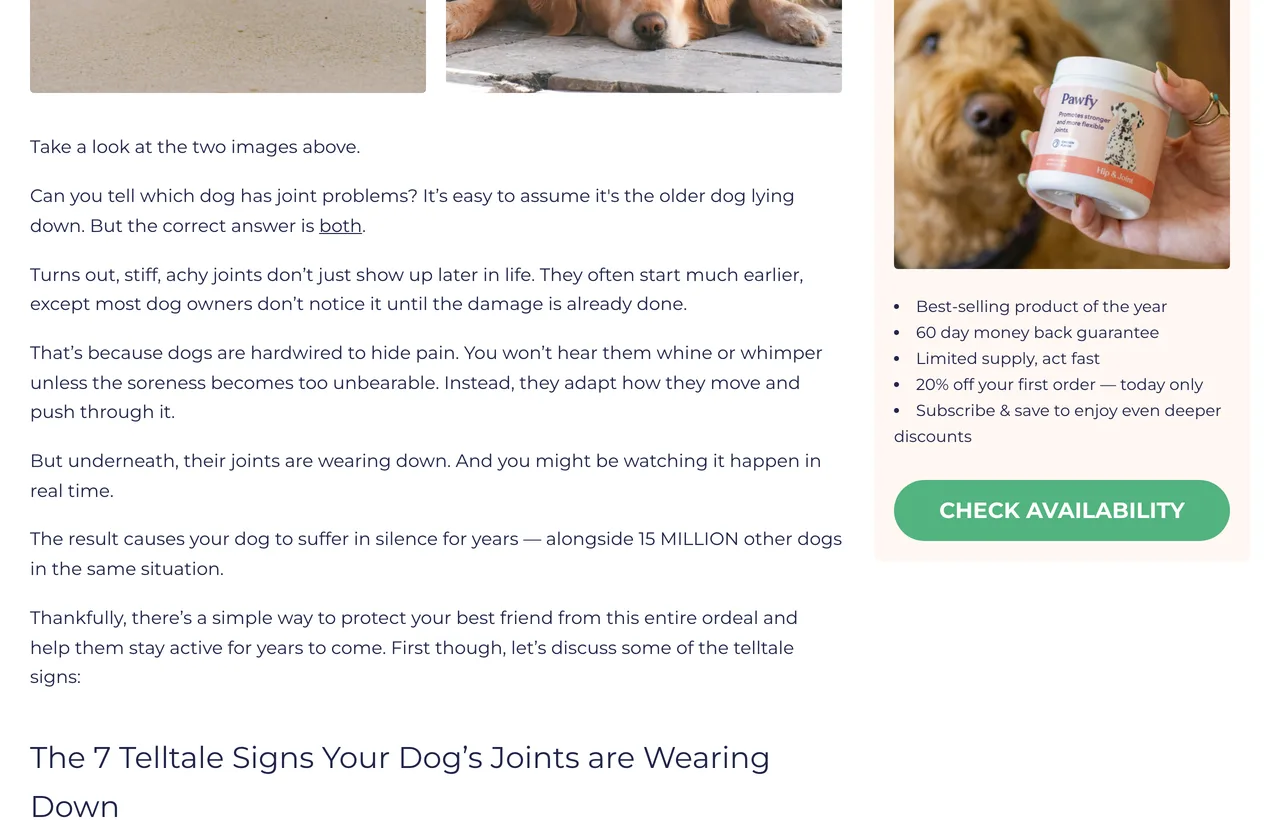
The most useful thing on Pawfy's dog-joint advertorial is not the headline. It is where the button goes. The CTA reads "CHECK AVAILABILITY," and it resolves to pawfy.com/discount/HJCFB20?redirect=/products/hip-and-joint (checked live on 3 September 2026). The discount code travels in the URL and gets applied before the shopper ever sees a price. That is one decision, made once, expressed entirely in a link.
A paid-traffic funnel is a chain of decisions like that one. Not audiences, pages. If the term itself is new, start with what an ecommerce funnel is. Older funnel guides spend their length on which ad to show which segment, and that layer is increasingly the platform's: Meta's own documentation says that "for new campaigns, Advantage+ audience is automatically applied if it's available, unless you create an Advantage+ sales campaign" (Meta, Advantage+ audience, read 3 September 2026). You still choose the creative, the offer and the budget. What you fully control after the click is the sequence of pages. So that is what this guide walks.
Five stages, in order, with what to build at each, the one decision that actually matters, what the stage hands to the next one, and the number that tells you it is working. Stage two is the one most guides skip, and it is where our own research had the most to say.
The five stages of a paid-traffic funnel
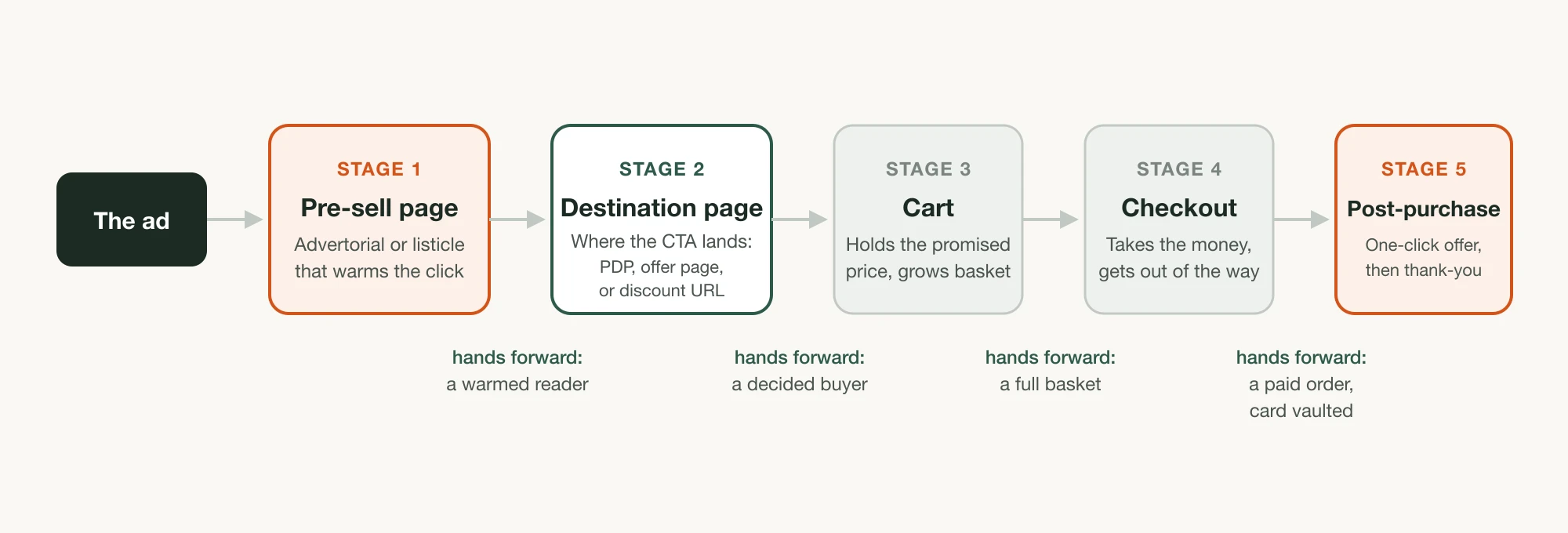
A paid-traffic funnel has five stages: the pre-sell page that warms the cold click, the destination page the pre-sell CTA points at, the cart, the checkout, and the post-purchase offer after payment. Four already exist in some form: a product page, a cart, a checkout, and a thank-you page, though the one-click offer that makes stage five worth having does not exist until you add an app. Only the pre-sell page has to be built, and the destination page has to be chosen, which is why those two get the work.
Read it as a relay. Each stage receives something from the one before and owes something to the one after. The pre-sell page receives a cold, mostly problem-unaware reader and owes the destination page a warmed one who believes the mechanism. The destination page receives that warmed reader and owes the cart a decided buyer with the right variant and quantity selected. The cart owes the checkout a full basket. The checkout owes the post-purchase step a paid order with a vaulted card. Post-purchase owes you the second decision that costs no ad spend. When a funnel underperforms, one of those four handoffs is dropping something, and blended store conversion rate will never tell you which.
Cold traffic is why the relay is fragile at all. Contentsquare's 2026 Digital Experience Benchmark, built on 99 billion sessions across more than 6,500 sites from Q4 2024 to Q4 2025, puts new-visitor conversion at 1.7% against 2.9% for returning visitors, with only 13% of visitors coming back within 30 days (read 3 September 2026). New visitors are the bulk of paid traffic, and Contentsquare puts mobile at 69.9% of all sessions. Both cut the same way. Most of the people your five stages have to carry are strangers on a phone, on a first visit that mostly does not get a second one.
Build the five stages in order
Build it front to back, one stage at a time. Stage one warms the click. Stage two keeps the offer intact through the handoff. Stages three and four are mostly about removing friction you added. Stage five is one slot on your store, one app at a time.
1. Build the pre-sell page
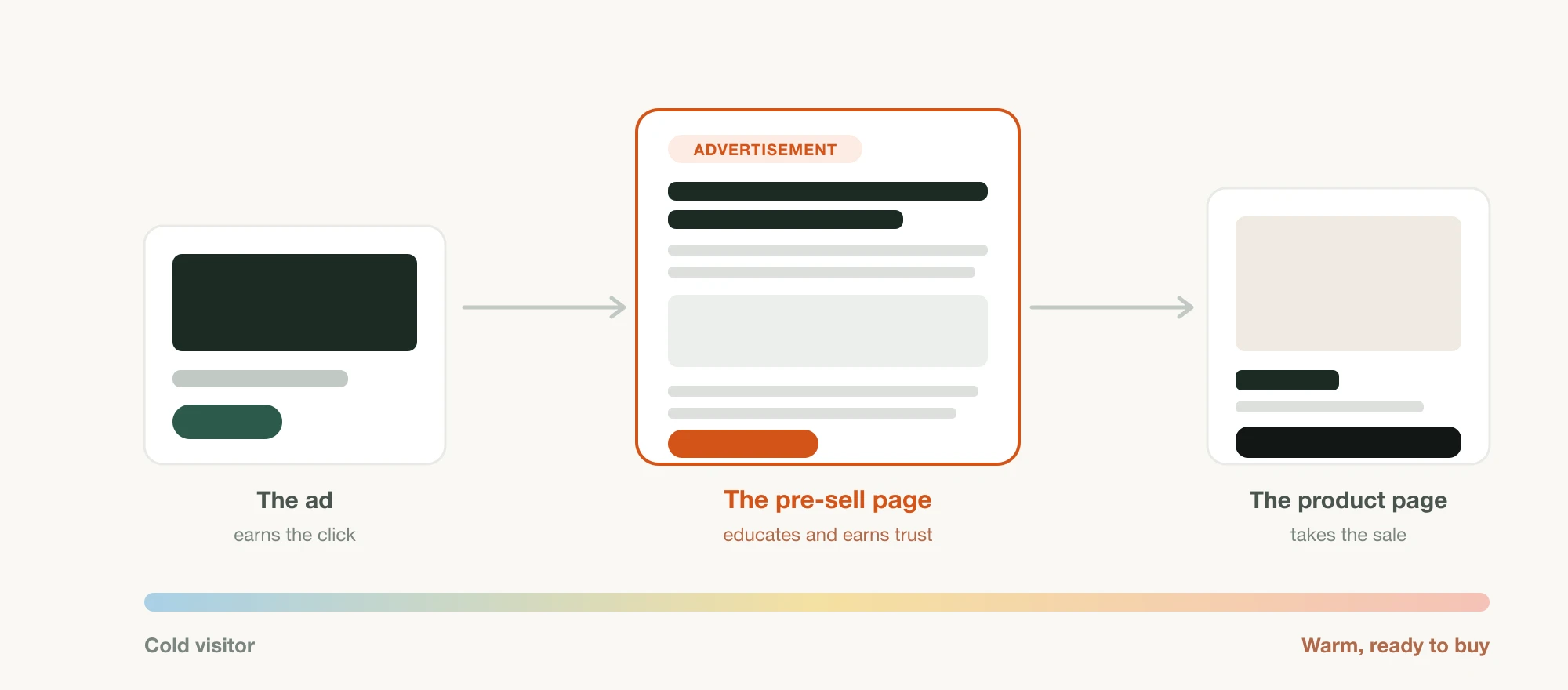
The pre-sell page is the advertorial or listicle that sits between the ad and the offer. Its job is to change the reader's state: name a problem, teach a mechanism, prove it with something real, and only then point at the product. It is the only stage in the funnel whose output is belief. Every other stage produces a cart line.
What to build: one page per angle, not one page per product. An advertorial reads as a flowing article and suits a reader who needs the full story. A listicle reads as scannable numbered reasons and suits a skimmer. Both are pre-sell pages. If you want the whole page sequence to copy, matched to how aware your reader is, the sales funnel templates for paid social lay out four with real captured examples and fill-in skeletons. Start with what a pre-sell page is if the format is new, how to write a pre-sell page for the copy, and pre-sell page versus product page if you are still deciding whether you need one at all. This guide will not re-teach any of that.
The one decision that matters: how far back you start the reader. Start too late and the page reads as an ad with more words. Start too far back and you lose them before the offer. Native traffic starts furthest back, which is why the native ad funnel demands a longer page than the same offer needs on Meta.
Where it lives: on your store, or as a step inside whatever funnel platform already runs the stages after it. If the rest of the funnel is on GoHighLevel, the pre-sell page belongs there too, as a step rather than a link out to another domain, which is its own short build: adding it as a GoHighLevel funnel step.
What it hands the next stage: a reader who accepts the premise and has clicked a CTA with a specific promise attached to it. That promise is now a liability the next page has to honour.
What to measure: click-through from the pre-sell page to the destination, and scroll depth to the first CTA. A page with high scroll and low CTR is failing at the offer, not the story.
2. Choose the destination page
The destination page is where the pre-sell CTA sends the click. Most of the funnel guides we read jump from "write the advertorial" straight to "the customer buys," and the page in between gets no decision at all. It defaults to your catalogue product page, which is the one page in your store written for someone who arrived from search.
The rule underneath this stage is older than ecommerce. Nielsen Norman Group, writing about information scent, notes that "good information scent provided by a link can be wasted by poor context provided by the actual landing page" (NN/g). The pre-sell page just made a specific promise in a specific dialect. The destination has to repeat it. A catalogue PDP written months earlier for organic traffic usually does not.
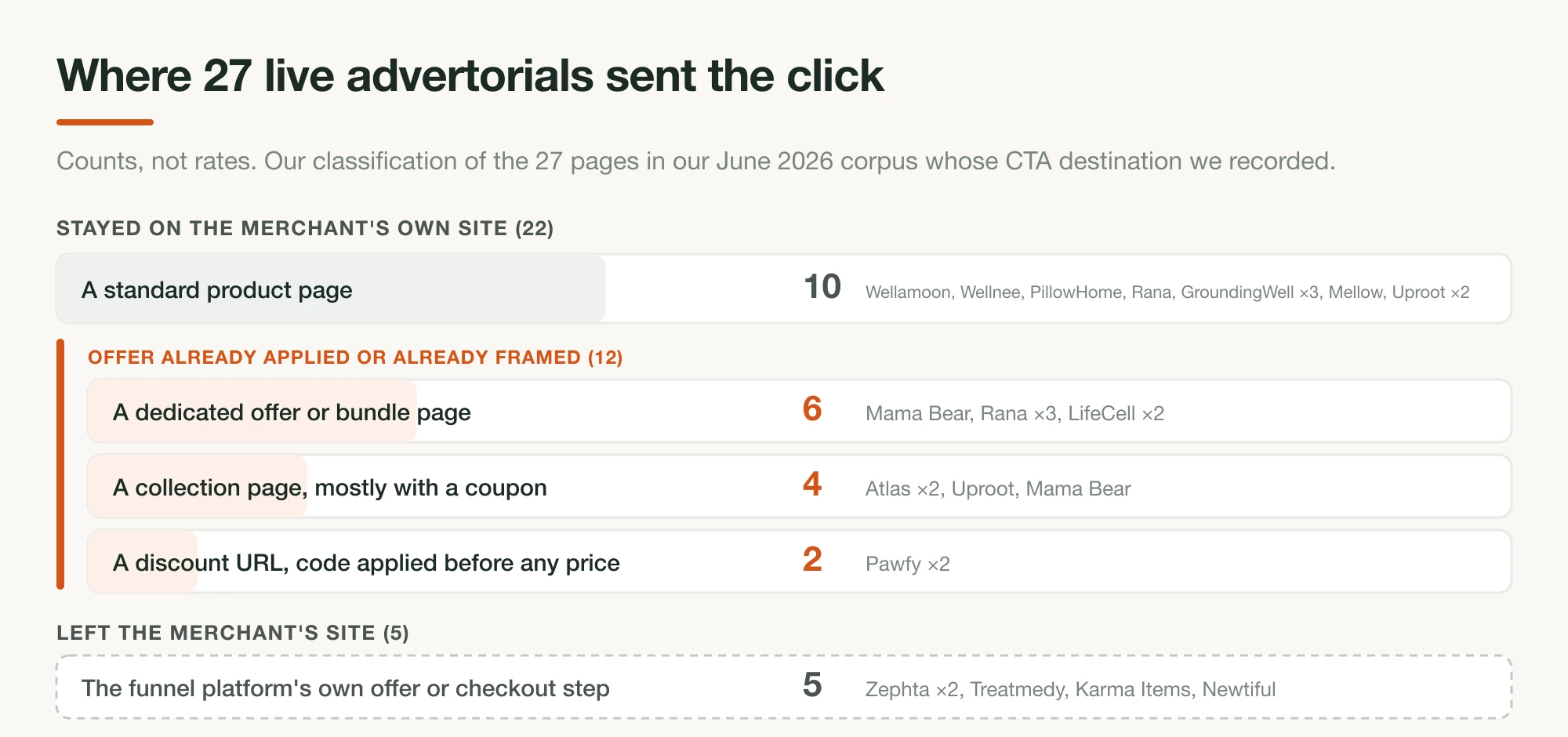
What we found in our own corpus. We pulled 50 live Facebook-ad advertorials in June 2026 and analyzed 44. Our notes record a CTA destination for 27 of the 44. The classification below is ours, applied by reading each page and following its link:
| Where the pre-sell page sent the click | Pages | Which brands |
|---|---|---|
| A standard product page on the brand's own store | 10 | Wellamoon, Wellnee, PillowHome, Rana, GroundingWell ×3, Mellow, Uproot ×2 |
| A dedicated offer or bundle page, not the catalogue PDP | 6 | Mama Bear, Rana ×3, LifeCell ×2 |
| A collection page, three of the four with a coupon in the URL | 4 | Atlas ×2, Uproot, Mama Bear |
| A Shopify discount URL that applies the code before a price is shown | 2 | Pawfy ×2 |
| The funnel platform's own offer or checkout step | 5 | Zephta ×2, Treatmedy, Karma Items, Newtiful |
Twenty-two of the 27 stayed on the merchant's own site. Ten of those went to a standard product page. The other 12 landed somewhere the offer was already applied or already framed. These are counts from 27 pages, not a rate, and we are not projecting them onto the market. Two of the Rana rows read "offer/product page" in our notes and are genuinely ambiguous, so read that split as approximate at the edges.
Three of them, looked at closely.
- Pawfy is the cleanest illustration. A discount URL means the reader's first sight of the product already carries the adjusted price, so the offer the advertorial promised is already applied by the time a price first appears. Nothing for the reader to remember or type.
- Mama Bear takes the other route on its bundle page, headlined "Struggling With Painful Muscle Cramps? This Special Mineral Helps Relax Tight Muscles Fast—In Just 15 Minutes a Day," with a 90-day "Results or Refund" guarantee and a three-pack ladder priced at "$25 / each" (read 3 September 2026). It speaks the advertorial's dialect. A catalogue PDP speaks the catalogue's.
- Atlas Coffee Club does the most instructive thing with the least visible effort. Its CTA runs through an Unbounce
clknredirect, so the handoff is instrumented, and it lands onatlascoffeeclub.com/products/atlas-plus-superblend-latte#plus-builder(read 3 September 2026). The reader arrives at the buy module, several screens below the hero. Atlas has also re-cut its creative since our June capture: the page runs "I Thought Mushroom Coffee Was A Gimmick. I Was Dead Wrong." today. Destinations and creative both rotate, so date every observation you record.
The one decision that matters: does the offer survive the handoff. Discount in the URL, a dedicated offer page, or a deep link to the buy module are three ways to make it survive. Sending the click to the top of a generic PDP is the way it dies.
What it hands the next stage: a buyer who has already decided, with the right variant, quantity and price in front of them.
What to measure: add-to-cart rate on that page for pre-sell traffic only, segmented from the rest of the store. Your site-wide number is dominated by other sources. If you want realistic targets before you set one, we keep DTC landing page conversion benchmarks with the sources dated.
One thing building this taught us. When we shipped Landra's page-wide link settings, the obvious version was a field per button. We built it over the rendered page instead, one destination URL and one open-in-new-tab choice applied at publish across every anchor on the page, because a page emits links from more places than an editor's field list knows about: the header CTA, the sticky bar, a roundup card, an inline link in the prose. A per-field pass gets most of them and quietly misses the rest, and a missed button on a pre-sell page is a click paid for and dropped. The reason it works as one control is the thing this whole stage is about. The destination is one funnel decision, made once, for every button on the page.
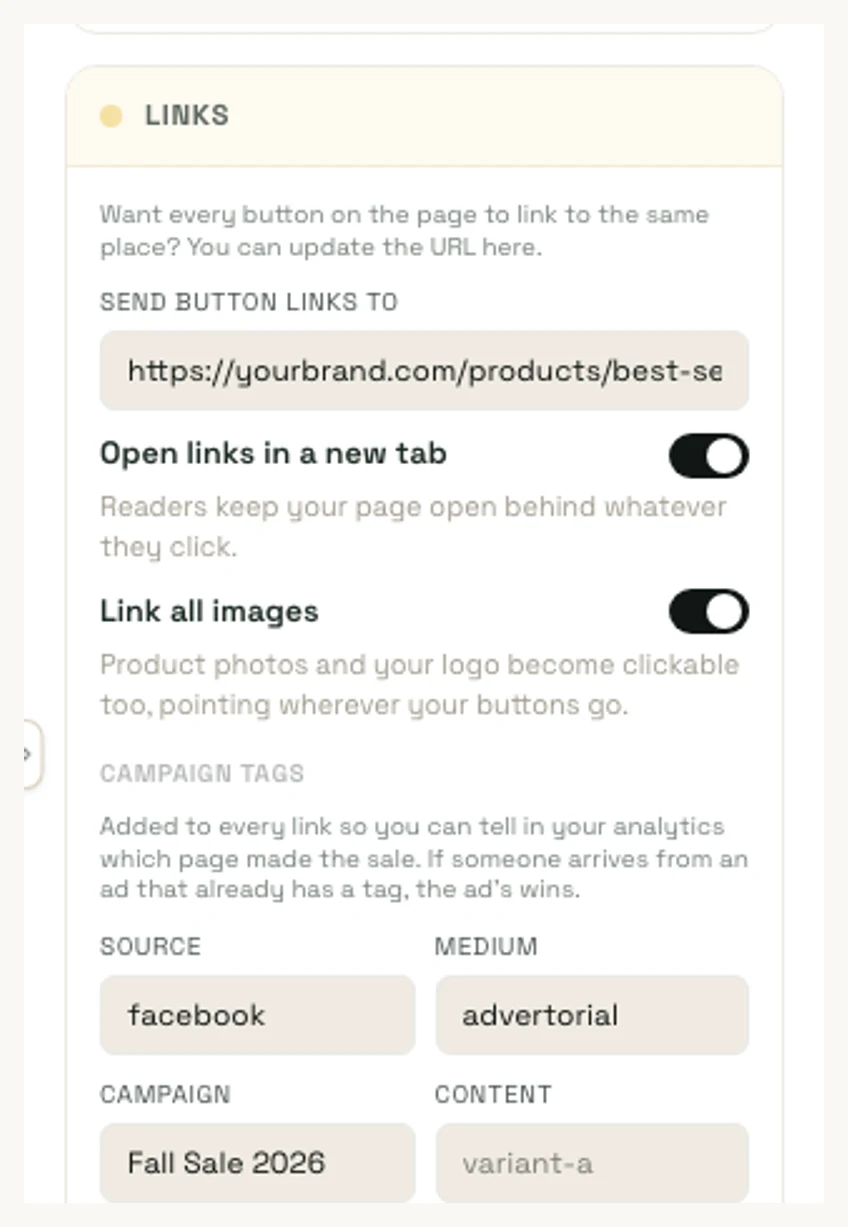
Landra builds stage one, and it owns the one control that sets stage two. It does not do the cart, the checkout or the upsell, and it never touches Shopify's post-purchase slot.
3. Tune the cart
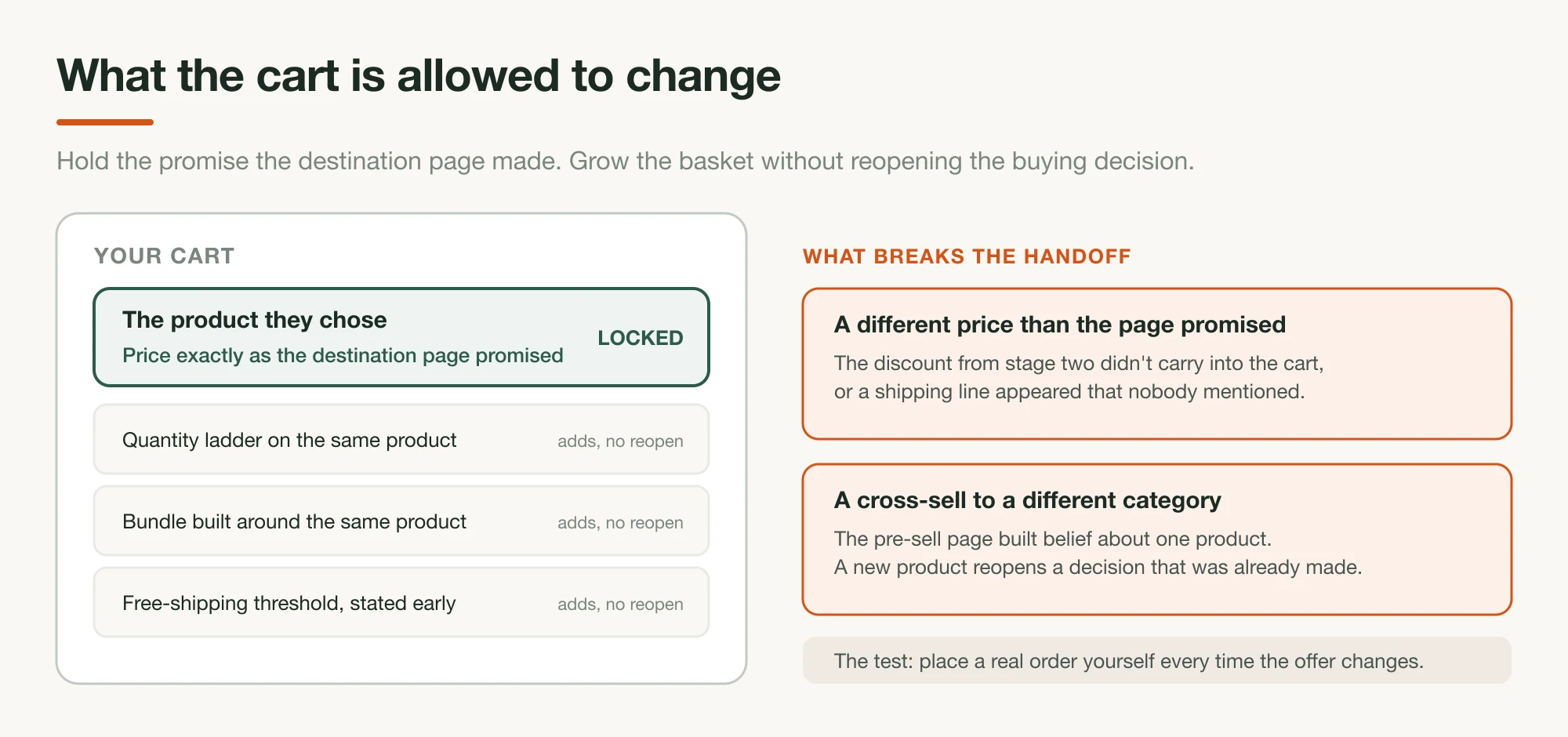
The cart is the first stage you neither build nor choose. Every store has one, which is why it gets treated as plumbing. On paid traffic it is the stage where a carefully constructed offer most often changes shape without anyone noticing, because the cart drawer shows a different price, a different bundle name, or a shipping cost the pre-sell page never mentioned.
What to build: as little as possible, in this order. Confirm the discount from stage two actually appears in the cart. Then add quantity breaks or a bundle offer if your AOV needs it. Then a shipping threshold, if you have one worth stating. Unlimited apps can live at this stage, so restraint is on you rather than the platform.
The one decision that matters: whether a cart offer reopens the buying decision. A quantity ladder on the product they already chose does not. A cross-sell to a different category does, and on cold traffic that is a real risk, because the reader's belief was built about one product by one pre-sell page.
What it hands the next stage: a basket with the promised price on it and no unexplained line items.
What to measure: cart-to-checkout rate, and the gap between the price your pre-sell page promised and the subtotal a real test order shows. Run that test order yourself every time you change the offer.
4. Get out of the way at checkout
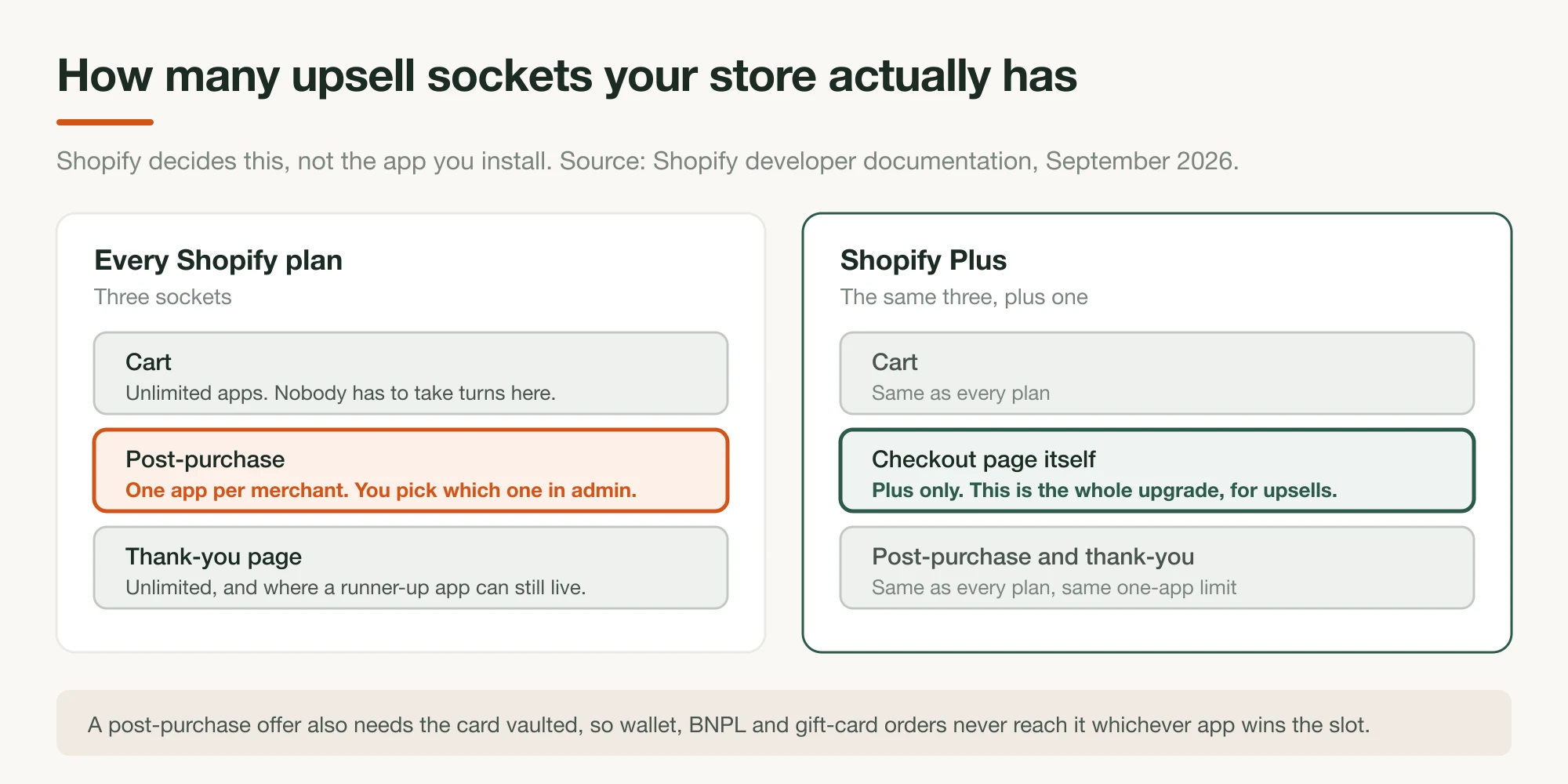
Checkout is where the most measured failure in ecommerce happens. Baymard Institute puts the documented average cart abandonment rate at 70.22%, across 50 studies spanning 2006 to 2025 (read 3 September 2026). Baymard's latest quantitative study on why people abandon puts extra costs at 40%, slow delivery at 20%, card security worries at 19%, a forced account at 18%, and a checkout that is too long at 17%.
Read that list against a paid-traffic funnel and two of the five, plus one you configured, are earlier problems arriving late. Extra costs is the pre-sell page's promise breaking. Slow delivery is information you could have given a stage earlier. A forced account is a checkout setting you chose on the shopper's behalf.
What to build: nothing, on most plans. Shopify's checkout UI extensions documentation states that "Checkout UI extensions for the information, shipping, and payment steps are available only to stores on a Shopify Plus plan." So unless you are on Plus, this stage is about removal: guest checkout on, shipping cost visible before this screen, express wallets available, fields cut to the ones you actually use.
The one decision that matters: whether shipping and total cost are visible before the shopper reaches checkout. It is the top abandonment reason in Baymard's data and it is fixable one stage earlier.
What it hands the next stage: a paid order. On Shopify, it also has to hand over a vaulted card, or stage five does not run at all.
What to measure: checkout completion rate against your own baseline. That 70.22% is a documented average across studies. It sizes the problem for you and makes a terrible target. Baymard's own checkout usability benchmark, covering 344 top-grossing US and EU sites, grades 65% of checkouts as "mediocre or worse" and only 2% as good, so there is usually something to find.
5. Run one post-purchase offer
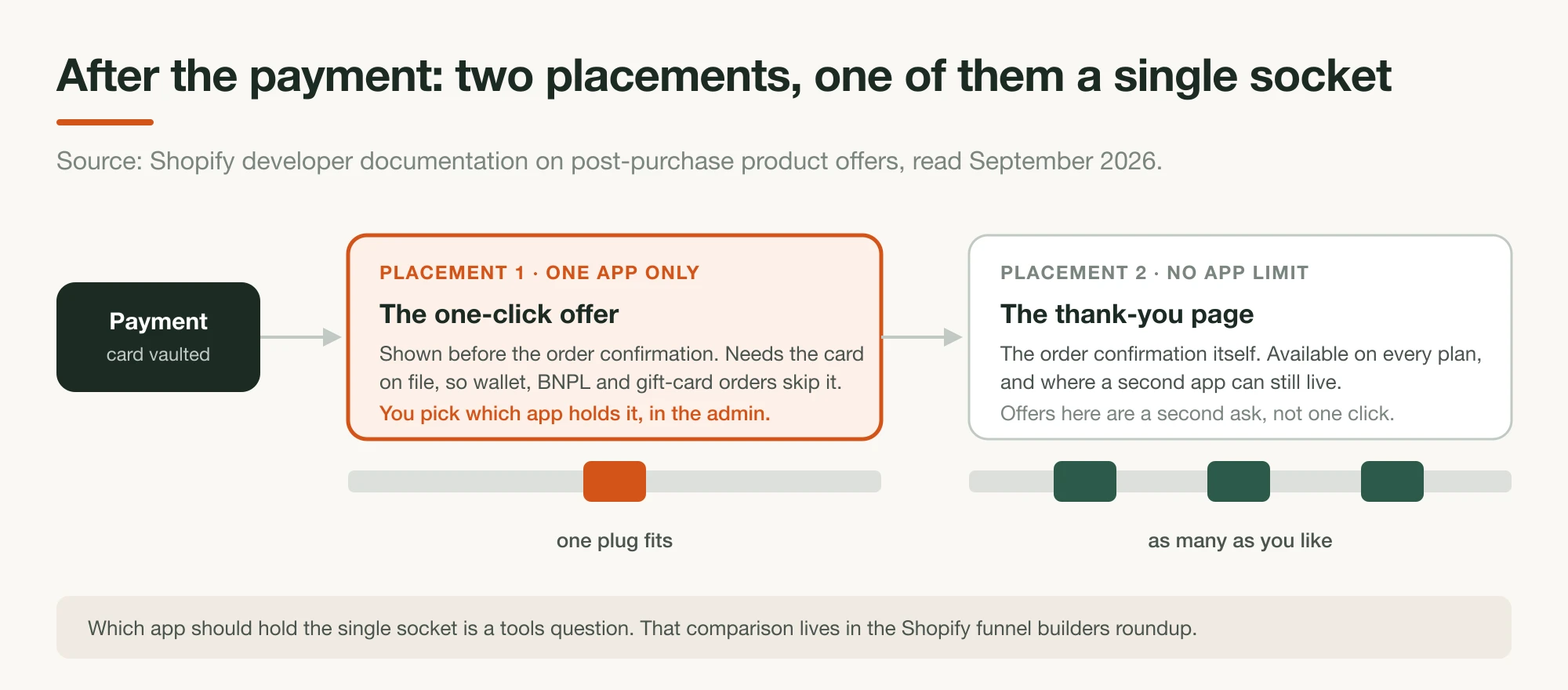
Stage five is the one-click offer straight after payment, plus the thank-you page after that. The economics are the best in the funnel, because the customer has already paid, the second decision costs them almost nothing, and the incremental order costs you no ad spend. The constraint is unusual. One slot, one app at a time.
Shopify's post-purchase product offers documentation states that "only one app can be selected for post-purchase product offers. Merchants with multiple apps that have the post-purchase checkout extension need to select which app appears on the post-purchase page." The same doc requires that "the customer's credit card must be vaulted before the post-purchase offer is displayed," which is why a meaningful share of orders never see the offer at all. We compared the tools that compete for that slot in the Shopify funnel builders roundup, including which ones collide.
What to build: one offer, on the product a buyer of stage two's offer would plausibly want next. Then the thank-you page, which is a separate placement and available on every plan.
The one decision that matters: which app holds the single post-purchase socket. It is a select field in your admin, and installing a second app that wants it makes one of the two an expensive no-op.
What to measure: take rate, incremental revenue per order, and refund rate on post-purchase items specifically. Read your own numbers here, because there is no independent, audited figure for post-purchase AOV lift. Every percentage quoted in this category traces back to a vendor's own merchant base, including two widely circulated studies we went looking for and could not source at all.
What to measure at each stage

One number per stage, and each one measures a handoff between two stages. Segment every one of them to paid traffic only. A store-wide conversion rate blends returning customers, organic search and email into the same figure, and Contentsquare's split between new and returning visitors is wide enough that the blend will flatter you.
| Stage | The number that tells you it is working | Read it against |
|---|---|---|
| Pre-sell page | CTA click-through to the destination | Your own history. This is the number that moves most with copy |
| Destination page | Add-to-cart rate, pre-sell traffic only | The same page's rate for other sources, to isolate the handoff |
| Cart | Cart-to-checkout rate | A manual test order at the price the pre-sell page promised |
| Checkout | Checkout completion rate | Your own baseline. Baymard's 70.22% sizes the problem only |
| Post-purchase | Take rate and incremental revenue/order | Your own data. No independent audited lift figure exists |
A caution on arithmetic. It is tempting to multiply these into one worked example, and the numbers on this page will not support it: Contentsquare, Baymard and IRP Commerce measure different populations, different geographies and different time windows. Any funnel model you build from stitched benchmarks is illustrative at best. Build it from your own five numbers instead.
Mistakes we see
Five failures recur, and every one of them lives between two stages. They come from reading real advertorial funnels in our corpus and from building the page half of one ourselves. All five are cheap to fix, and none of them show up in an ad account, which is why they survive so long in otherwise well-run funnels.
- The destination defaults to the catalogue PDP. Ten of the 27 recorded destinations in our corpus did this. Sometimes that is the right call, when the PDP already carries the offer and the proof. Usually it is nobody having made the decision.
- The offer changes shape between stages. The advertorial promises a price, the discount URL is missing the code, and the cart shows the list price. Nothing errors. The buyer just leaves. Run a real test order after every offer change.
- The link goes to the top of a long page. Atlas deep-links to
#plus-builderfor a reason. If your PDP is 4,000 pixels tall, landing a decided buyer at the hero costs you a scroll you already paid for. - The handoff is untagged. If the destination page cannot tell you which pre-sell page sent an order, you are optimizing stage one on click-through alone. Atlas routes its CTA through a redirect that records the click; a UTM does the same job for free.
- Stage five gets bought before stage two exists. Post-purchase apps are the fun purchase in this category. They also multiply a number that stages one through four produce, which means they are worth the least when those stages are weakest.
What to build first
Build stage one and stage two, in that order, and leave the rest alone for a month. Those are the two your store does not hand you already decided, one to write and one to choose. They are also the two that decide whether a cold click survives at all, and the two you can change this week without touching your checkout or your fulfilment.
Concretely: write one pre-sell page for your best-performing angle. Decide where its CTA goes, and make that page carry the offer the pre-sell page promised, whether that means a discount in the URL, a dedicated bundle page, or a deep link to the buy module. Tag the handoff so you can read it. Place a real test order at the promised price. Then read the two numbers those pages produce for a few weeks before you spend anything at stage three, four or five.
The last stages are worth real money, and they are multipliers. Multipliers on a weak first two stages are a rounding error, and there is a whole roundup of tools waiting whenever the first two are actually working.
Frequently asked questions
What is an ecommerce sales funnel for paid traffic?
It is the sequence of pages a paid click passes through on the way to a paid order: the pre-sell page that warms the cold click, the destination page the pre-sell CTA sends it to, the cart, the checkout, and the post-purchase offer after payment. Older funnel guides describe audiences instead of pages. On Meta in 2026, much of the audience layer is applied by the platform, and the pages are what you still build.
How many stages should a paid-traffic funnel have?
Five. Four already exist in some form on any store: a product page, a cart, a checkout, and a thank-you page. Only the pre-sell page has to be built, and the destination page has to be chosen, which is why those two get the work. The one-click post-purchase offer is the exception, since the thank-you half exists by default and the offer itself does not. Adding stages beyond these five usually adds steps, not revenue.
Where does retargeting fit?
Retargeting is not a sixth stage. It re-enters the same funnel at stage one with a different page, usually a second pre-sell angle for someone who bounced off the first, or the destination page directly for someone who already read it and did not buy. Email and SMS capture works the same way. It is an option you can add to stage one or stage two, and the address it collects buys you a second entry into the funnel later, not a stage of its own.
Where should a pre-sell page send the click?
To a page that already carries the offer the pre-sell page just made. Your catalogue product page usually does not. In our corpus of real Facebook-ad advertorials, brands used five destinations: a standard product page, a dedicated offer or bundle page, a collection page (three of the four with a coupon in the URL), a Shopify discount URL that applies the code before the shopper sees a price, and the funnel platform's own offer or checkout step. Every one of them except the plain product page carries some part of the offer through the handoff.
What should I measure at each funnel stage?
One handoff number per stage. For the pre-sell page, the click-through to the destination. For the destination page, add-to-cart rate on that page alone. For the cart, cart-to-checkout. For checkout, completion rate against your abandonment baseline. For post-purchase, take rate and incremental revenue per order. Blended store conversion rate hides all five.
Do I need a funnel tool to run a paid-traffic funnel?
Not to start. Shopify gives you the cart, checkout and thank-you page already. What you need first is the pre-sell page and a destination page that holds the offer, both of which you can build on your existing store. Tooling for the cart, the post-purchase offer and the thank-you page is a later purchase, and there is a separate guide comparing those tools.
Is a landing page funnel different from a sales funnel?
It is the same path described from a different end. A sales funnel is usually drawn as awareness moving to purchase across audiences. A landing page funnel is the actual sequence of URLs a click walks through. The second one is the one you can edit on a Tuesday afternoon, which is why this guide is written in pages.
How much does it cost to build a paid-traffic funnel?
The two stages you have to build cost the least. [Page tools for the pre-sell and destination stages](/blog/shopify-funnel-builders) run from about $19 to $199 a month as of September 2026, and Landra starts at $19/mo with a 14-day free trial. Cart and post-purchase apps start in single-digit dollars and scale with order volume. The expensive mistake is buying stage five before stages one and two exist.