
The most popular thank-you page advice starts with another sale. Add an upsell, offer a discount, capture a referral. That's the wrong starting point if the buyer still can't tell whether payment succeeded or when their order will arrive.
Good thank you page design starts as a fulfillment screen. It confirms the transaction, explains what happens next, and gives the buyer a useful action without making them hunt for their receipt. Judge the result by fewer avoidable support contacts, manageable refunds, and repeat purchases, not just clicks on another offer.
Table of Contents
- Thank You Page Component Order
- Layout Templates for Each Order Type
- Copy Patterns That Reassure Buyers
- Upsells and CTAs That Don't Cost Trust
- Tracking and A/B Tests to Run
- Audit Your Thank You Page This Week
Thank You Page Component Order
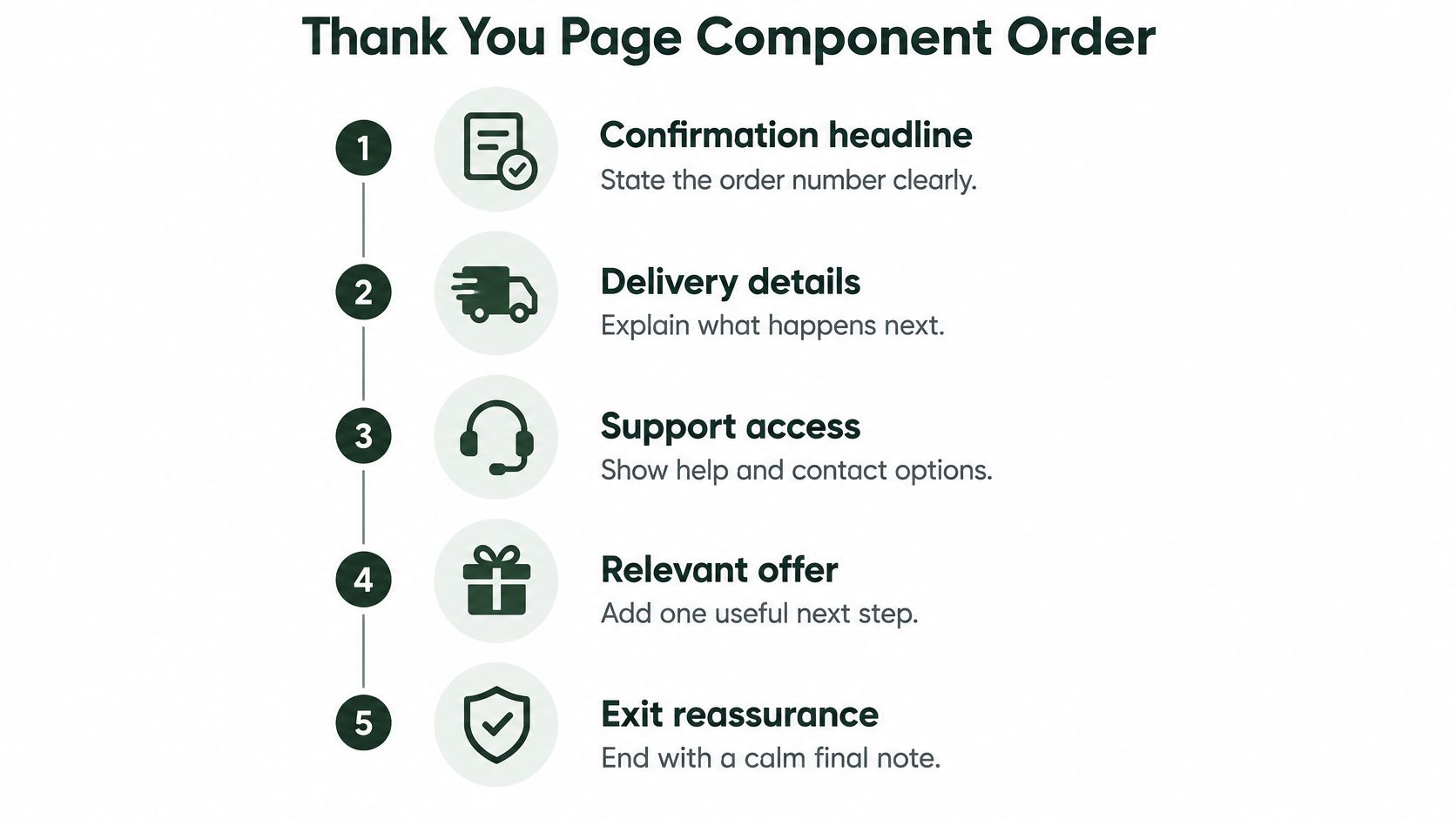
Start with this default stack: confirmation and order number, delivery or access expectations, a purchase-relevant primary action, optional relationship-building modules, then support and returns. Keep help accessible throughout, even when the full support block sits at the bottom.
Confirmation must precede promotion. Baymard's checkout usability research identifies shoppers who struggle to verify that their purchase succeeded or remain on the confirmation page waiting for an email. A promotional headline doesn't solve either problem.
Build the receipt before the campaign
Put the transaction outcome in the largest text. Follow it with enough detail to identify the purchase: items, quantities, payment status, delivery address, and total. Don't say payment succeeded if the order is still awaiting authorization.
The table uses hypothetical wording, not delivery guarantees or recommended discount levels. Replace every operational promise with what your store can fulfill.
Five components in stacking order
| Position | Component | Job for the reader | Example wording |
|---|---|---|---|
| 1 | Confirmation headline and order number | Shows the payment and order went through | Order #[order number] is confirmed. Payment received. |
| 2 | Delivery or access expectation | Says when and how the product arrives | Ships within 2 business days, arrives in 3–5 |
| 3 | Primary next action | One step tied to the purchase | Track your parcel or set up your device |
| 4 | Secondary modules | Referral, review request, account or survey | Invite a friend and both get 10% off their next order |
| 5 | Support and returns link | Gives a way out before the buyer emails support | Questions about this order? Get help in two minutes |
The primary action should fit the order's current state. Before dispatch, an order-status button is more accurate than a tracking button that opens an empty carrier page. For a digital purchase, access usually deserves the strongest button.
Use the following visual as a hierarchy reference, with support access available before the buyer encounters an offer.
Keep optional modules genuinely optional
Account creation shouldn't block a receipt. A referral request shouldn't resemble a required checkout step. Delay review requests until the customer has had an opportunity to use the product, and keep surveys visually subordinate to order information.
For narrow-screen hierarchy and scannability, Landra's tips for mobile-first DTC pages offer useful design principles. Apply them without importing the persuasive intensity of a pre-purchase landing page.
First-screen check: Without scrolling, can the buyer tell that the order worked and when it will arrive?
Run that check with a long product name, a large text setting, and an address that wraps. A tidy desktop mockup isn't enough.
Layout Templates for Each Order Type
For an inexpensive physical product, the baseline is straightforward: recognizable order details, a delivery window, and a route back to order status. The layout needs more explanation when the purchase creates uncertainty about access, billing, setup, or cross-border delivery.
The FedEx 2025 ecommerce trends report identifies post-purchase experience as a deciding factor in repeat purchases. That's a reason to prioritize useful fulfillment information, not a justification for adding more promotional modules.
Layout template by order type
| Order type | Lead module | Primary action | Skip or delay |
|---|---|---|---|
| Physical goods, low price | Order summary and tracking link | Track shipment, with a review request reserved for later | Large upsell carousels |
| Digital download | Access button and install or file instructions | Open or start using the file | Shipping copy and delivery estimates |
| Subscription | Plan details, billing date and cancel path | Set delivery preferences | Discounts on a second product before billing terms are clear |
| High-ticket or first purchase from an unfamiliar brand | Warranty, returns and support contact | Book a setup call or read the care guide | Any offer above the warranty block |
| International order | Duties, delivery window and carrier link | Confirm address or find local support | Upsells priced in a different currency |
Change the lead module, not just the headline
A digital download page should explain file format, compatibility, and what to do if access fails. Don't force account creation merely to reveal a download the customer already purchased. If an account is technically necessary, explain that dependency and preserve their purchase information through registration.
Subscriptions need a different kind of reassurance. Display the selected plan, recurring contents or service, next billing date, and management route. Distinguish changing future deliveries from changing the order just placed.
For an expensive device, a setup guide may be more useful than another accessory. Put warranty coverage and human support within reach, especially when installation requires preparation. Avoid implying that the buyer must purchase an add-on to use the original product unless that requirement was clearly disclosed before checkout.
Design for the unresolved question
International buyers need to know who handles duties, whether charges remain payable, and which carrier will provide updates. Don't invent a precise arrival date when customs or carrier handoffs make it uncertain. Show the available window and explain what could change it.
On phones, the lead module and primary action should fit before the first major scroll. Shorten decorative content before compressing essential order information, and don't hide recurring billing terms inside a collapsed accordion.
The more uncertainty an order carries, the less room an upsell deserves.
For a digital download, the access button matters more than an add-on. For a subscription, clear billing information matters more than a loyalty pitch. Choose the layout according to what the buyer needs to resolve, not which module your page builder makes easiest to insert.
Copy Patterns That Reassure Buyers
Write the outcome before the appreciation. A friendly thank-you can follow, but it shouldn't carry the burden of explaining whether money changed hands.
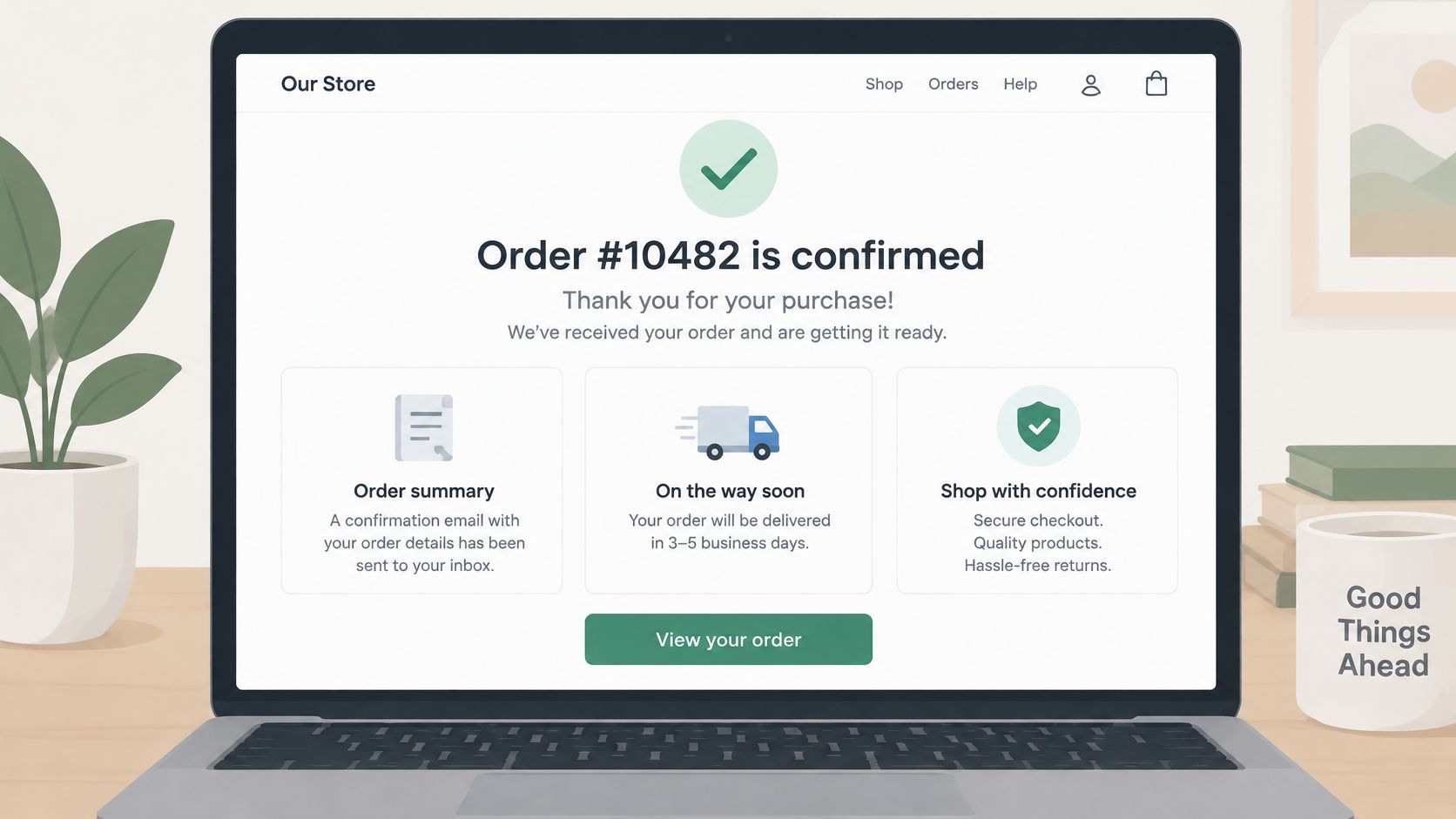
Use the confirmation screen to answer concrete questions rather than celebrate vaguely. The example below illustrates how a receipt and purchase details can share the screen.
Replace reassurance words with operational facts
These are hypothetical copy examples. The numerical delivery windows, staffed hours, response promise, and discount language illustrate wording only; they aren't benchmarks or commitments to copy without checking.
Confirmation copy before and after
| Element | Avoid | Use instead |
|---|---|---|
| Headline | Thanks for shopping! | Order #[order number] is confirmed, and your receipt is on its way to your inbox. |
| Delivery | Your order ships within days | Ships within 2 business days and arrives in 3–5 |
| What happens next | We will be in touch | Receipt email from the store, then a tracking link from the same sender |
| Support | Contact us if needed | Questions about this order? Replies 9–5 weekdays, usually within two minutes |
| Headline offer | 20% off if you act now | No discount or urgency language above the receipt |
A delivery range needs a clear starting point. Specify whether the range begins when the buyer orders or when the parcel leaves the warehouse, and identify business days where relevant. Explain a meaningful reason for variability, such as made-to-order production or a separate carrier transit window.
Name the actual email sender the customer should look for. If receipts and shipping updates come from different senders, say so instead of promising consistency your systems don't provide.
Make promises your team can keep
Support wording should include the channel, staffed hours, and time zone. If you can't reliably promise a response time, omit it and state when the team is available. An optimistic promise creates a new reason to contact support when it expires.
Show the charged shipping cost, tax, discounts, and total in the receipt details. The trade-off is screen space, so use a compact breakdown rather than hiding charges or repeating the entire checkout form.
Avoid unsolicited requests to re-enter payment information after success. For teams reviewing payment-related messages, AmaJova's resource on understanding checkout security threats provides relevant security context.
Finally, ask someone unfamiliar with the page to repeat the delivery expectation in a sentence. If they confuse dispatch with arrival, revise the copy before changing the button color.
Upsells and CTAs That Don't Cost Trust
The common mistake is an upsell that ignores the purchase: a generic carousel, an unrelated bestseller, or a discount that makes the original order look overpriced. Replace it with a complementary offer that solves an identifiable need.
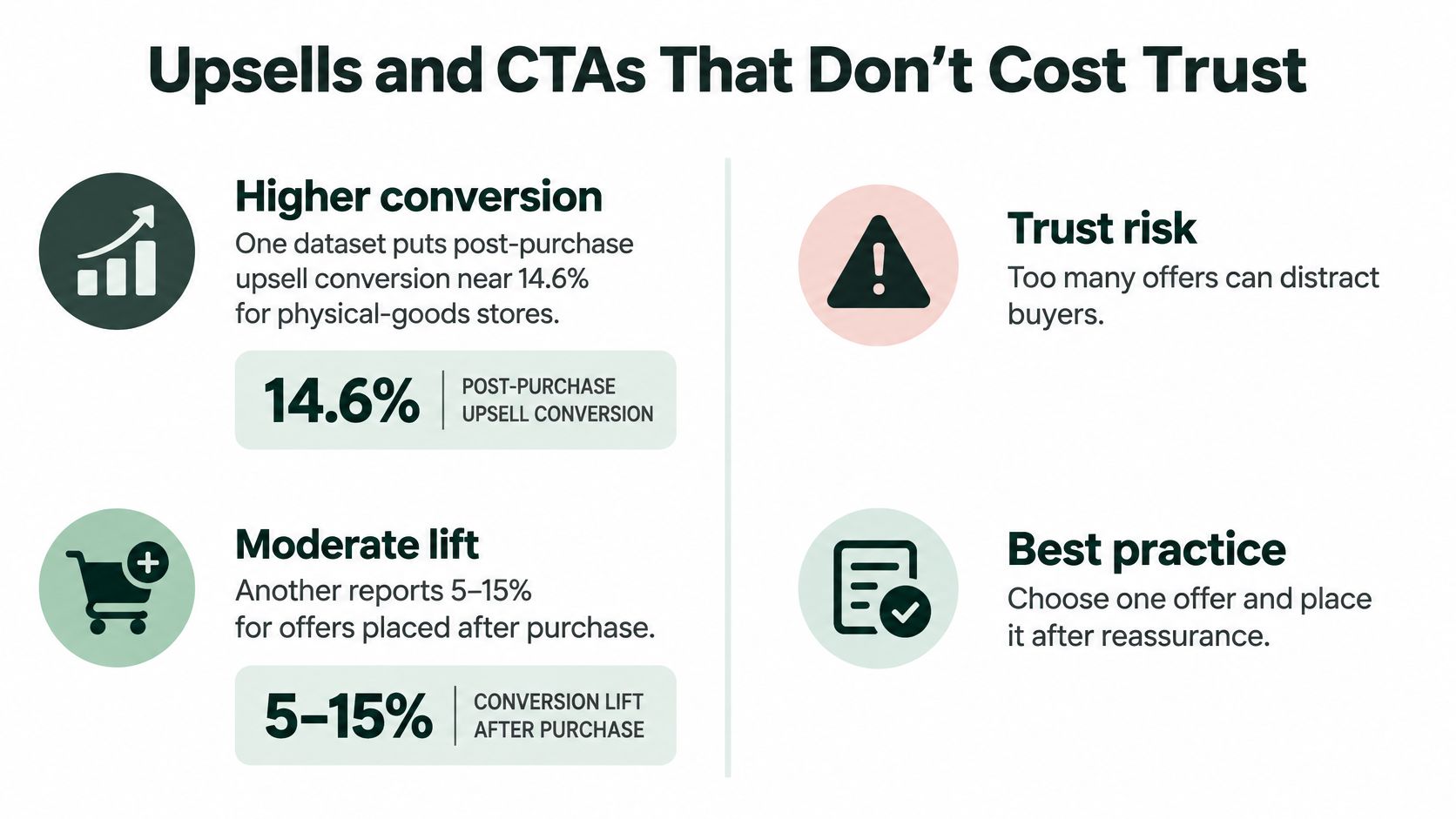
FME Modules' post-purchase guidance summarizes reported upsell conversion around 14.6% for physical-goods stores and a separate 5–15% range for thank-you-page upsells. These are directional claims from different reported datasets, not targets for your store.
This visual summarizes the opportunity and the trust trade-off.
Make the next conversion easier, not louder
Treat the offer as a separate decision after the completed purchase. Establish the transaction outcome and fulfillment expectation, choose a relevant action, embed it where possible, reuse known information safely, and evaluate completed outcomes rather than button engagement.
In a resource-download example documented by Convince & Convert, free-trial conversion moved from 0% to 6% after adding a clear trial CTA and directional cue, then to 15% after embedding the signup form and prepopulating known fields. That's a SaaS example, not an ecommerce revenue forecast; its useful lesson is to remove unnecessary handoffs.
| Do | Don't |
|---|---|
| Match the add-on to the purchased product | Show unrelated recommendations |
| Explain the added charge and fulfillment effect | Hide shipping or create a surprise separate shipment |
| Embed acceptance when the checkout platform supports it | Send buyers through avoidable intermediate forms |
| Reuse name, email, and authorized saved payment methods | Expose payment credentials or assume consent to another charge |
| Keep a primary offer and, at most, a subordinate secondary module | Stack competing discounts and equally prominent buttons |
An explicit purchase button should identify that the customer is accepting another charge. Saved payment details should remain with the payment provider; convenience isn't permission to process an undisclosed transaction.
For an additional visual reference on thank-you pages, use the video below.
Know when no offer is better
Skip monetization when a complex basket needs explanation, delivery remains unresolved, or the product requires immediate support. A setup action can be the right conversion without being another sale.
Use A/B testing your call to action to refine wording after deciding whether the offer belongs there at all. Clear copy can improve a suitable offer; it can't make an irrelevant product useful.
Tracking and A/B Tests to Run
A page view is not a purchase event. Record revenue only after your commerce backend or payment provider confirms the transaction. Refreshing a thank-you page must not create another sale in your reporting.
Use the order identifier to deduplicate events across browser and server tracking. In Shopify, reconcile analytics with order records; in GA4, inspect purchase events with DebugView and confirm that transaction identifiers and values match the underlying order.
Establish a trustworthy baseline
Keep original-order revenue separate from incremental add-on revenue. For each accepted offer, retain the experiment assignment, original order identifier, added item, discount, and resulting financial outcome.
Calculate incremental gross profit after discounts and product cost. Review additional shipping, fulfillment, payment, and support costs separately when assessing contribution margin. An offer that generates revenue can still be unattractive once those costs are included.
Test sequence for thank-you page offers
| Test | Variable changed | Metric to read |
|---|---|---|
| 1. Control | Confirmation and delivery only | Baseline support contacts and repeat purchase |
| 2. Offer or no offer | One complementary offer added | Incremental gross profit per order, not clicks |
| 3. Relevance | Related product versus unrelated product | Offer acceptance and refund rate |
| 4. Price framing | Percent off versus dollar off | Gross profit per order after discount |
| 5. Placement | Offer above versus below delivery block | Support contacts and add-on acceptance |
| 6. Checkout friction | One-click add versus extra checkout step | Completed add-on rate and cancellation rate |
The control should still include necessary receipt details and help access. It excludes promotional modules, not essential customer service.
Don't introduce a deliberately poor recommendation just to fill the relevance test. Prefer comparing plausible complementary products; an unrelated-product variant is useful only when it reflects an existing experience you need to evaluate.
Protect the experiment from false wins
Declare the primary metric before launch. Maintain a concurrent control, assign buyers consistently, and change a single variable so you can attribute the result. For price framing, keep the actual economic offer equivalent or you'll be testing discount size as well as wording.
- Segment deliberately. Review acquisition source and device, but avoid declaring winners from tiny subgroups.
- Allow outcomes to mature. Refunds and repeat purchases need an observation window suited to the product's buying cycle.
- Keep guardrails separate. Monitor cancellation rate, support contacts, referral activity, and repeat purchase without combining them into a vague engagement score.
- Preserve attribution. Check external payment redirects, accelerated checkout, and post-purchase add-on flows for lost experiment assignments.
- Wait for a reliable decision. Plan sample requirements around baseline performance and a commercially meaningful difference, rather than stopping after an encouraging day.
Reddog Consulting Group's discussion of experimentation for growing DTC and retail brands provides broader retail testing context. For experiment setup and interpretation, Landra's guide to conversion experiments is another practical reference.
More clicks can mean more curiosity, more confusion, or more accidental taps. Only completed outcomes distinguish them.
Treat placement above the delivery block as a guarded challenger, not a recommended layout. Stop a variant that obscures essential information even if offer acceptance improves. For signup actions, inspect lead quality and eventual purchases; for discounts, watch unsubscribes and margin as well as acceptance.
Audit Your Thank You Page This Week
Set aside an afternoon, use a phone, and complete a live test order through your normal storefront. Mark each check pass or fail and save screenshots alongside the order record.
Run the buyer-facing checks
- Open without scrolling. Confirm that the headline states the outcome and includes the actual order number. Check that payment status matches the backend.
- Read the expectation aloud. Require an understandable delivery range or immediate access instruction, plus the receipt sender. Reject ambiguous dispatch-versus-arrival wording.
- Count dominant actions. Fail the page if competing buttons make the next step unclear. Help links can remain visible without competing for visual priority.
- Inspect any offer. Verify product relevance, placement beneath fulfillment information, explicit charge disclosure, and use of an authorized saved payment method where supported.
- Tap support. Follow the route through to a working contact option. A link to a general help homepage isn't enough if the buyer must search again for order help.
Verify the implementation and schedule the test
Repeat the purchase through any redirect or accelerated checkout your customers use. Confirm that revenue appears only after successful payment, survives the return journey, and isn't duplicated by refreshes. If you accept an add-on, reconcile the added charge against both the commerce record and analytics.
Record support contacts relative to order volume, refund or cancellation rate, and repeat purchase using consistent definitions. Tag support reasons so you can distinguish delivery confusion from product faults.
Schedule an initial experiment with a receipt-focused control and a complementary-offer variant. Predeclare incremental gross profit per order as the primary metric, retain support and cancellation guardrails, and review device and acquisition-source splits.
Fix broken access, misleading promises, and duplicate revenue events before running that experiment. Those are implementation defects, not optimization opportunities.
Landra turns product URLs into editable, mobile-first pre-sell pages, including advertorials and listicles for DTC brands. Use it to make the promises before checkout as clear as the reassurance afterward. Visit Landra to explore its page-generation and publishing tools.