
Search "AI advertorial" and you'll mostly find tools for video ad creatives, plus a handful of guides that stop at "write a good prompt and test some angles." (Most tools sold as an AI advertorial generator turn out to be template-fillers, not page generators, worth knowing before you shop.) None of them cover the part that actually takes the time: turning the copy into a page, generating images that match your product, labeling the thing legally, and publishing it where your ads can point. This guide covers the whole pipeline. If you're new to the format itself, read what an advertorial is and how to write one first; this piece assumes the craft and teaches the workflow.
What an AI-generated advertorial actually is
An AI-generated advertorial is a complete editorial-style pre-sell page — narrative copy, article layout, and images — produced with AI tools from your real brand inputs: product facts, customer reviews, and a named audience. It is not what most "AI ad generator" tools make (short video creatives and display assets), and it is not a blog post; it's a pre-sell page built to warm cold paid traffic before the product page asks for the sale.
You're not early to this, for what it's worth. In HubSpot's 2026 State of Marketing survey of more than 1,500 marketers, 86.4% of marketing teams reported using AI somewhere in their work, and content creation was the top use — about 80% use AI for it at least occasionally. The open question for most DTC teams isn't whether to use AI; it's the workflow. That's what the rest of this page is.
Is an AI-generated advertorial Google-safe and legal?
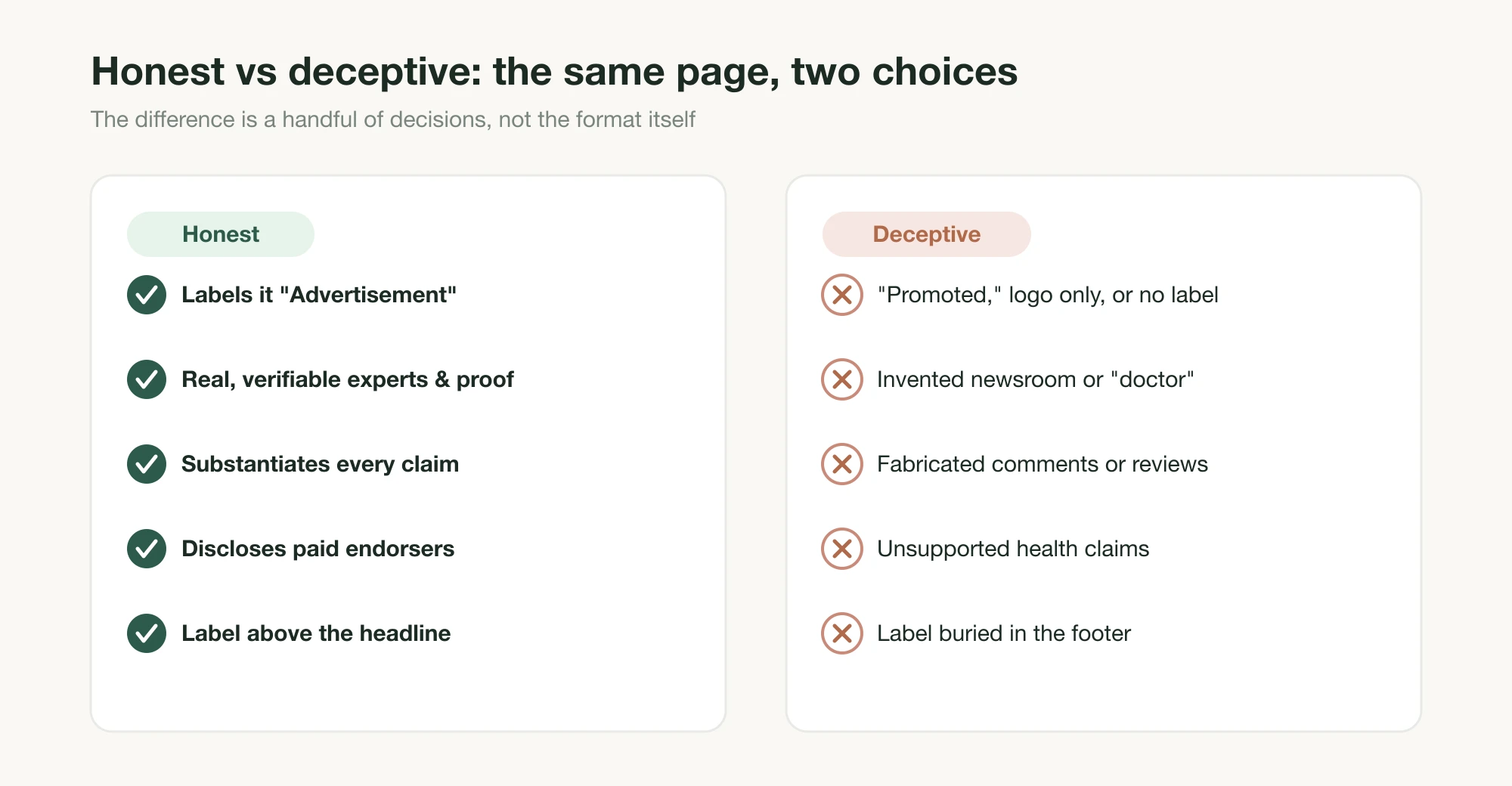
The short answer: the method is fine; fabrication and concealment are not. Google does not penalize AI-generated content for being AI-generated, and the FTC does not prohibit advertorials. Both regimes punish the same two sins: hiding what the page is, and making things up. Get those right and everything else is craft.
On the Google side, the spam policies define scaled content abuse as "creating large amounts of unoriginal content that provides little to no value to users, no matter how it's created," the operative phrase being the last one. Google's people-first content guidance draws the line at automation "to produce content for the primary purpose of manipulating search rankings." An advertorial is a paid-traffic landing page, not a rankings play, so the policy that scares people mostly doesn't apply to this use case. One well-made page with real product facts is the opposite of the thing being policed.
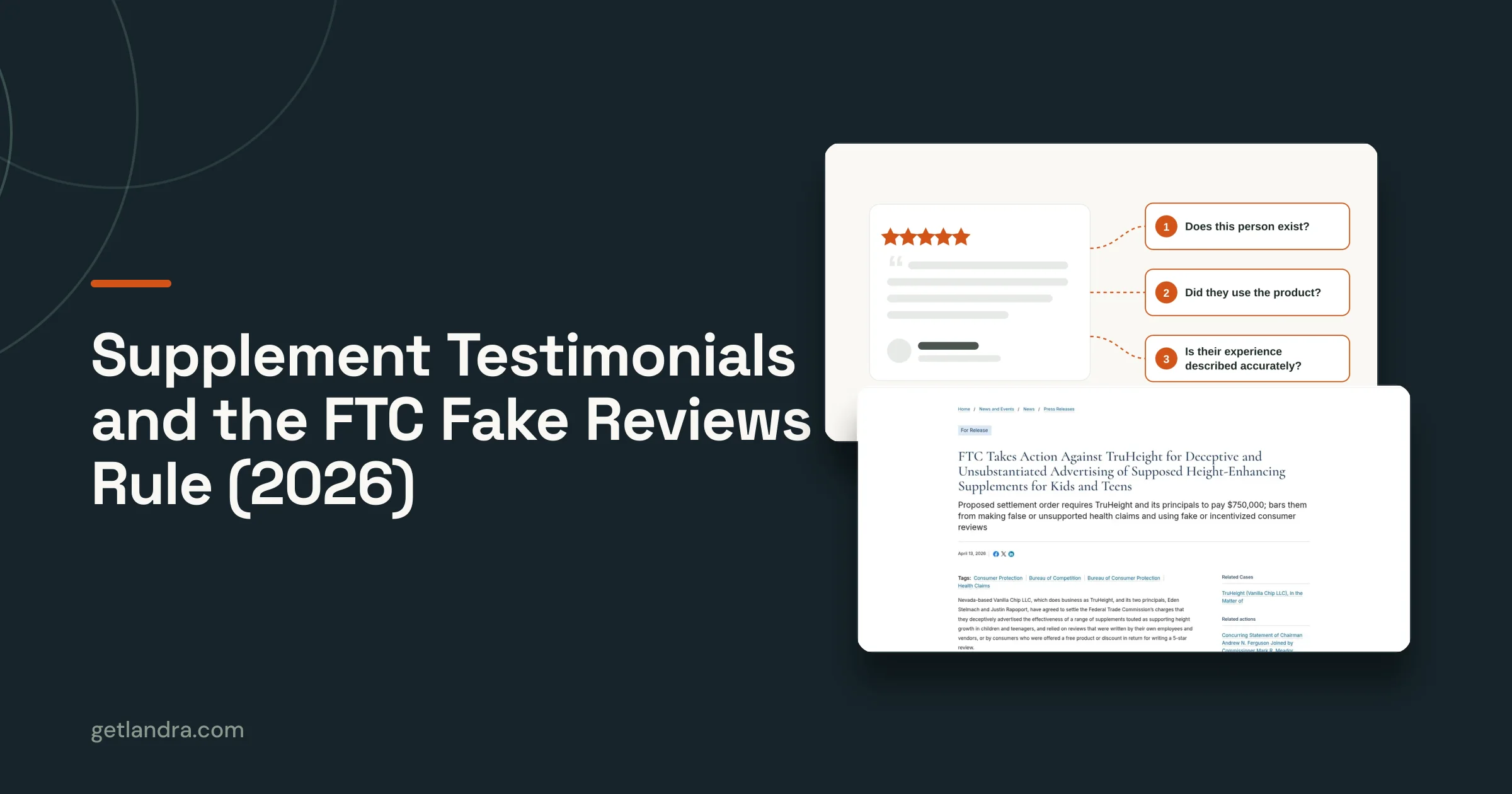
On the FTC side, two rules matter. First, an advertorial must be visibly labeled as advertising: the FTC's native advertising guidance requires paid content not to masquerade as independent editorial, with disclosure that's clear, conspicuous, and placed where readers see it early. Our advertorial disclosure guide covers placement and wording in depth. Second, and this is the AI-specific line, the Fake Reviews Rule, effective October 21, 2024, bans fake consumer reviews, testimonials, and endorsements, and explicitly covers AI-generated ones. As law firm Sidley Austin's analysis reports, the FTC noted that "AI tools make it easier for bad actors to pollute the review ecosystem by generating, quickly and cheaply, large numbers of realistic but fake reviews," and wrote the rule to cover exactly that.
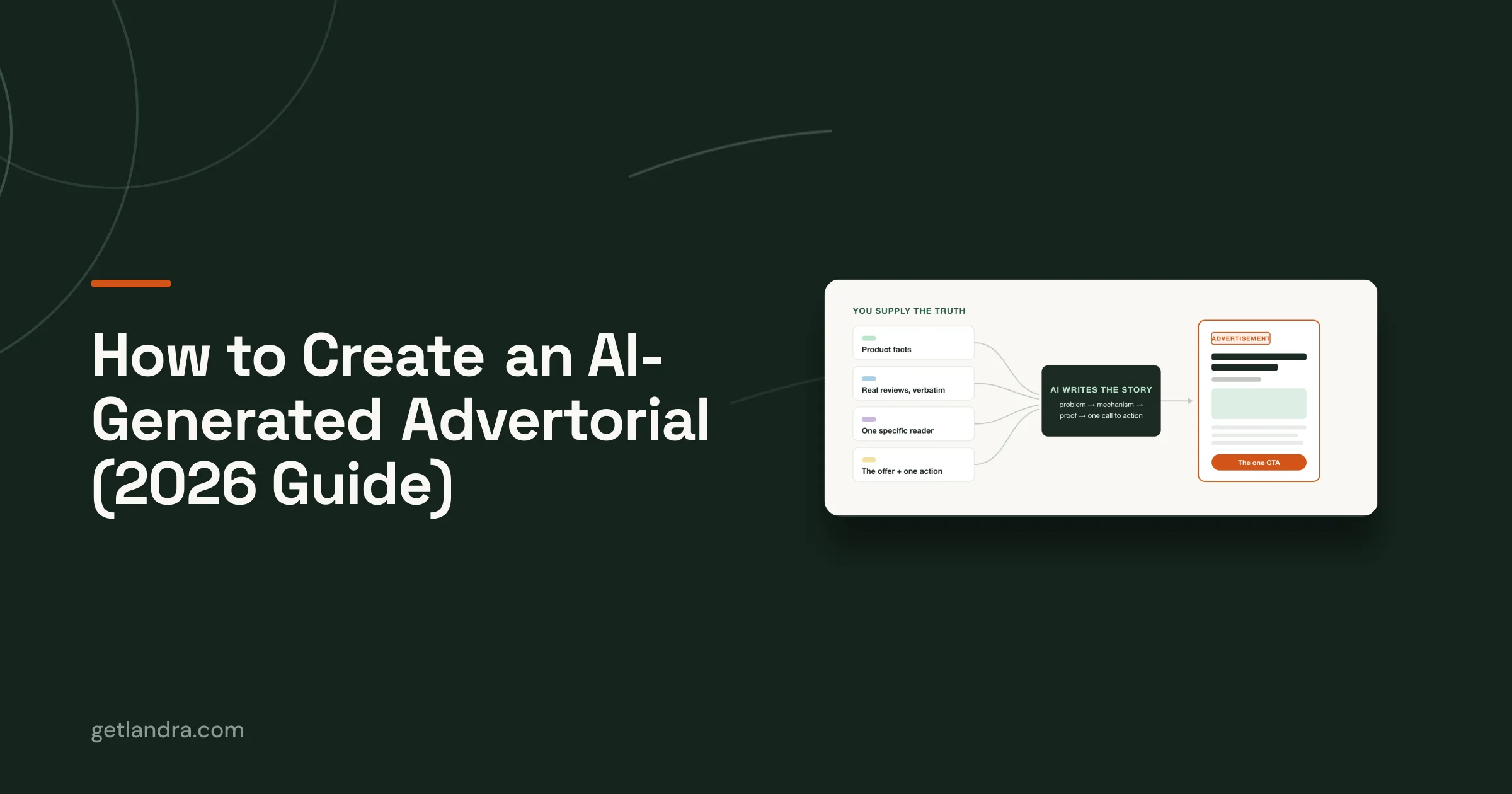
So the operating principle for everything below: AI writes the story; you supply the truth. Real facts in, real reviews quoted verbatim or none at all, and a visible "Advertisement" label on the page.
The pipeline, step by step
The workflow runs in six steps: gather the truth, brief the model, edit the draft, structure the page, generate the images, then label and publish. The order matters, because every downstream step consumes what the earlier ones produced, and the most common failure (generic AI copy) is caused by skipping step one.
1. Gather the truth before you prompt anything
Everything good in the final page enters the pipeline here. Before opening a chat window, collect into one document: your product facts (mechanism, ingredients or specs, price, guarantee — only things that are true and checkable), 20–50 real customer reviews pasted verbatim, the exact offer, and a one-sentence description of the reader. Not "people who want energy" but the specific person your ads target. If you know your reader's awareness stage, write it down; it will shape the entire structure.
If you use claude.ai, put all of it in a Project. Per Anthropic's documentation, a Project holds a persistent knowledge base plus standing instructions that apply to every chat inside it — set it up once and every draft, rewrite, and critique pass starts from your brand context instead of a blank slate. Projects are available on every plan, including free accounts (up to five).
2. Brief Claude like a copywriter, not a search box
The quality of the draft is decided by the brief, not the model. Tell the model who the reader is, where they're coming from (a paid ad — skeptical, one second from bouncing), what the format is (a labeled advertorial that educates before it sells), what the offer is, and the one action the page drives. Then let it draft long.
You are a direct-response copywriter writing an advertorial for cold
paid-social traffic.

Reader: [the specific person — segment, age, what they've tried, how the
problem shows up in their day]. They clicked an ad and are skeptical.

Format: a 1,200–1,500 word advertorial. It will be clearly labeled
"Advertisement." Its job is to make the reader feel understood, explain
the mechanism behind their problem, and only then introduce [product].
The product appears no earlier than halfway down.

Use only the facts and reviews provided below. Do not invent statistics,
testimonials, or expert endorsements.

One call to action, repeated: [the action + URL].

[paste your brand facts + reviews document]
The "do not invent" instruction is non-negotiable: it's the prompt-level enforcement of the Fake Reviews Rule from the previous section. For the full prompting toolkit — register matching, awareness-stage targeting, voice-of-customer grounding, banning the recognizable AI tells — see our 10 Claude prompts for advertorial copy. Working marketers run exactly these disciplines at scale: Conversion Factory founder Corey Haines maintains an open-source marketing skills library for LLM copy workflows that has drawn over 33,000 GitHub stars as of June 2026.
On model choice: any frontier model drafts competently, and the brief matters more. For long-form persuasive prose, Zapier's May 2026 comparison preferred Claude for writing tasks, finding its output more natural-sounding than the GPT-5 series. That's one reviewer's judgment, but consistent with why we built Landra on Claude. Anthropic's current flagship is Claude Fable 5, released June 9, 2026.
3. Edit the draft like a skeptical reader
Never publish a first draft. Run two passes, in this order. A specificity pass: flag every vague claim ("works fast," "thousands of happy customers") and either replace it with a checkable specific from your facts document or delete it. Then a critique pass: have the model re-read its own draft as a cold, skeptical visitor against a named checklist (problem clear in two sentences, mechanism present, product held back, claims traceable, one CTA). Both passes run as prompts, and both are in the prompts guide in full.
Read it yourself last. You're checking the two things a model can't: whether every claim is one your brand can actually stand behind, and whether the page sounds like you.
4. Structure it as an article, not a sales page
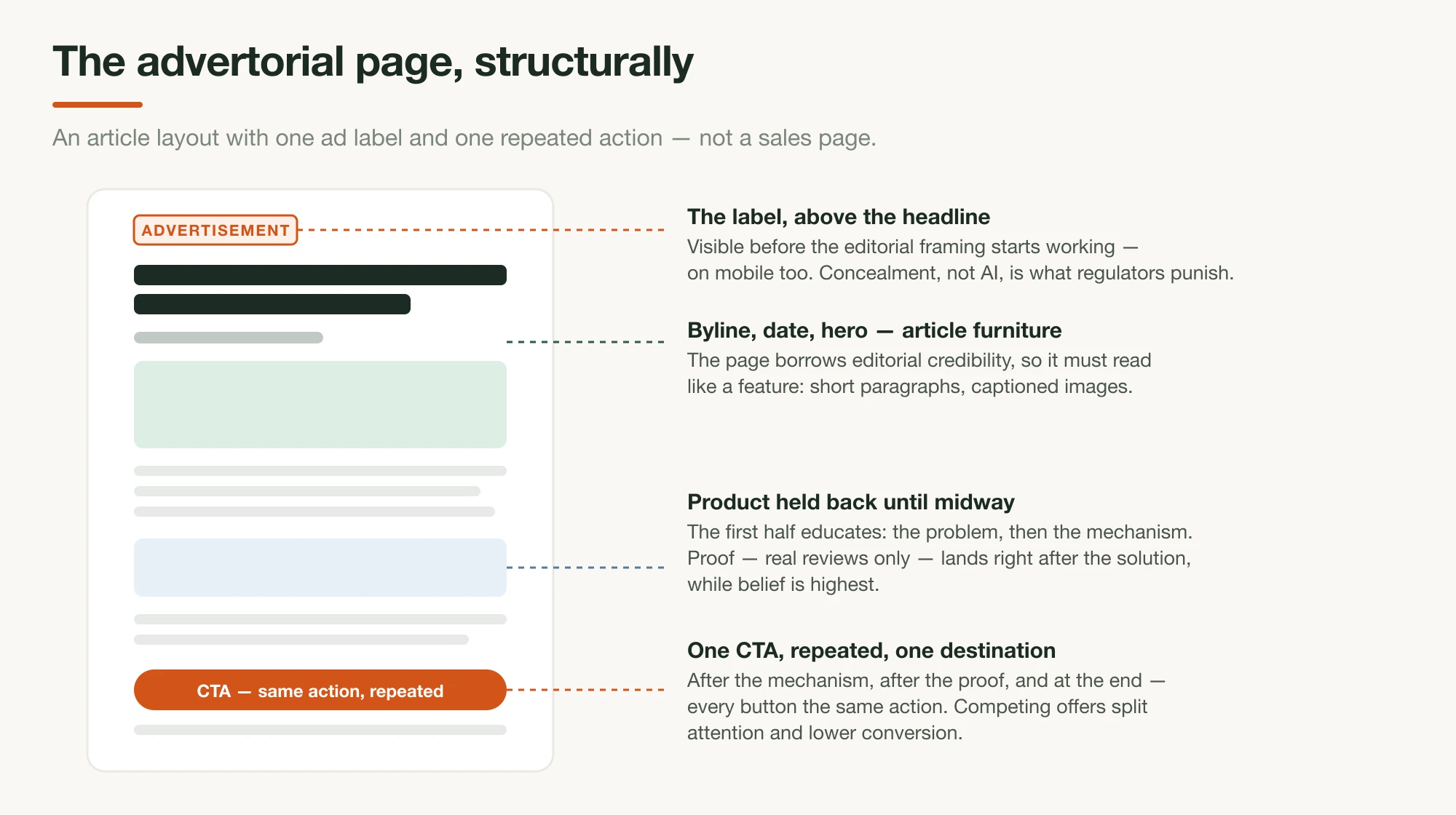
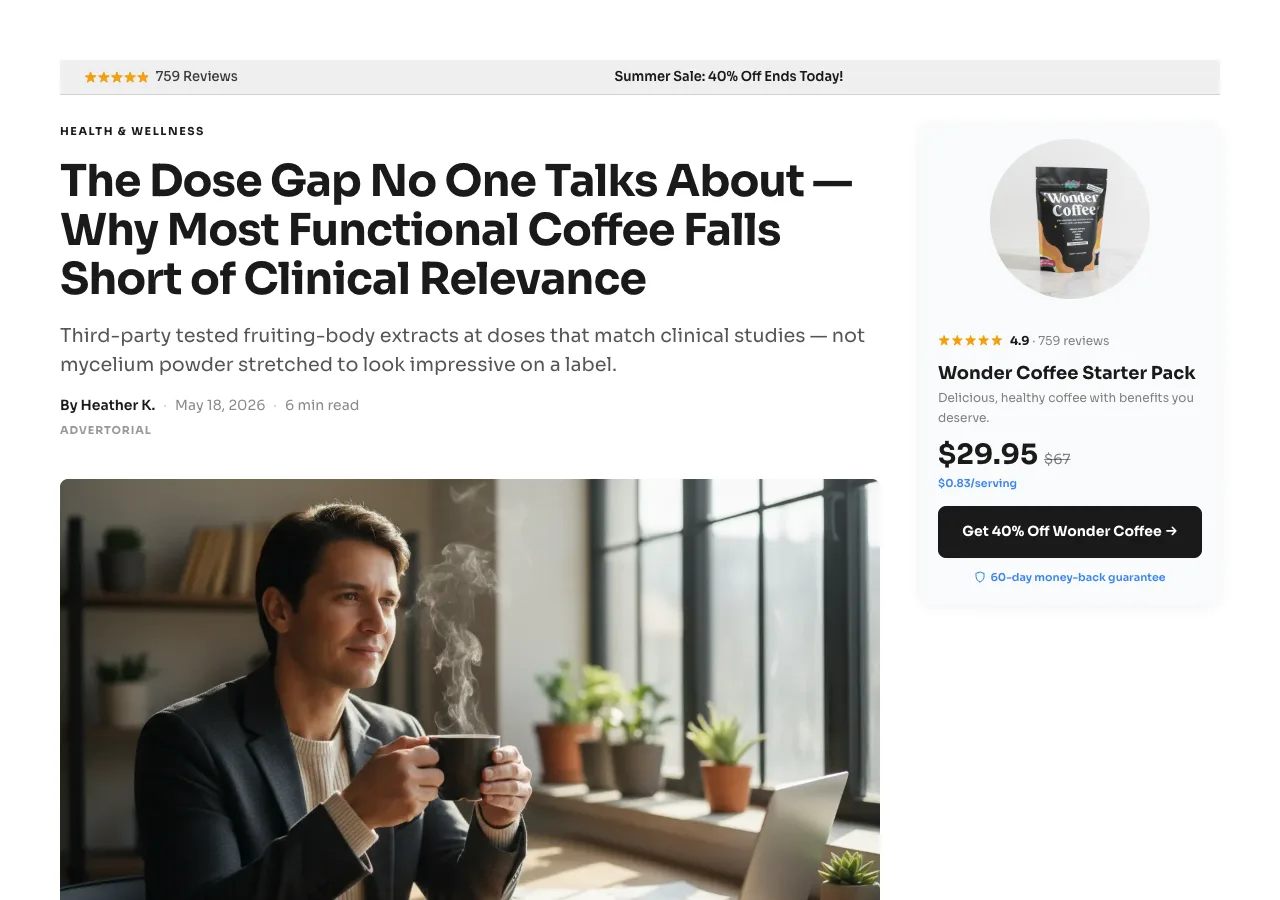
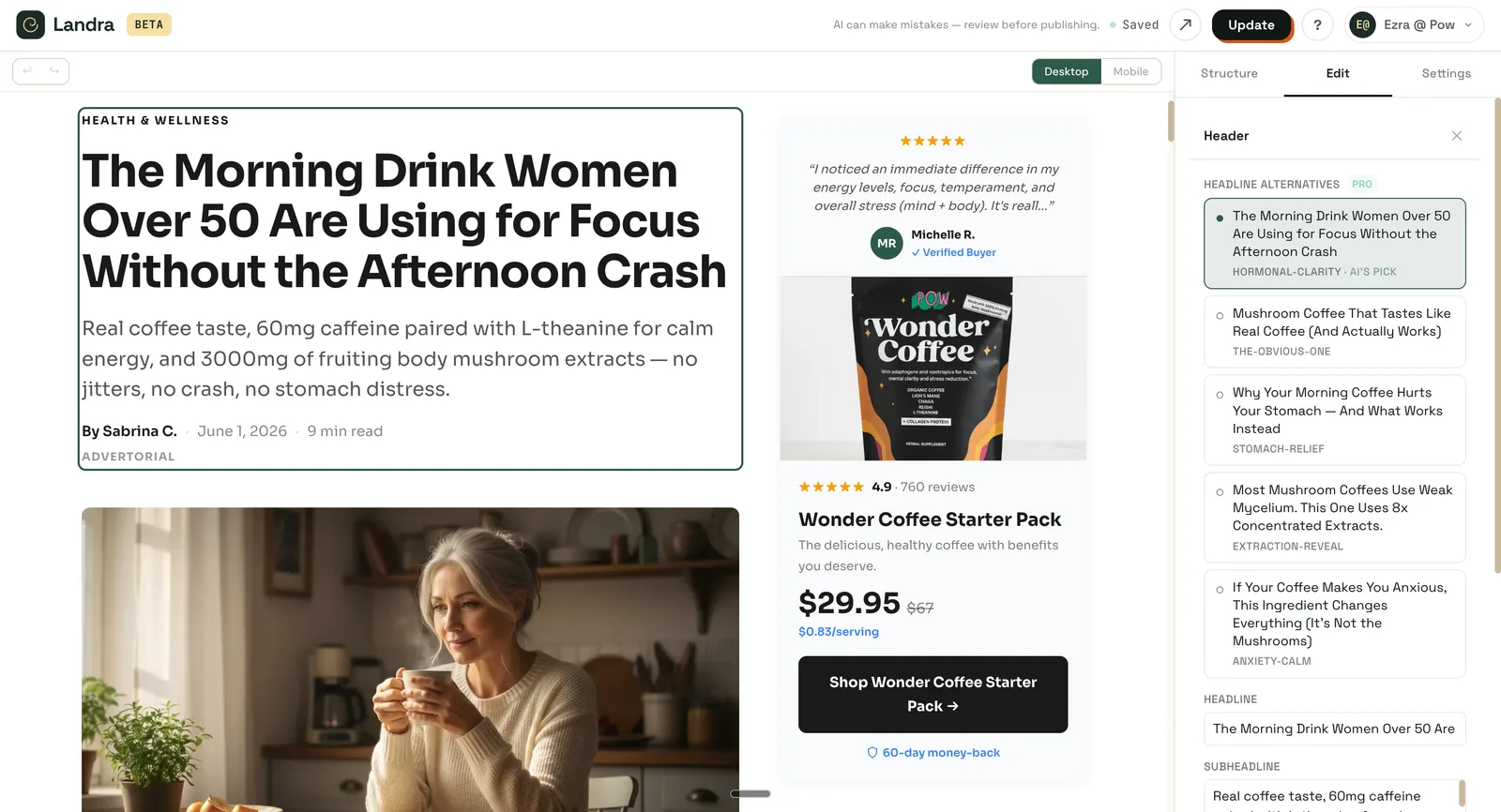
An advertorial converts because it reads like editorial, so the page structure has to deliver that: one headline, a byline and date, a hero image, short paragraphs, captioned images between sections, and a repeated single CTA, plus the ad label at the top. The fastest DIY route is to have Claude convert its own copy into clean semantic HTML, then drop it into whatever your store can host.
Convert the advertorial into a single clean HTML page:

- semantic structure: <article>, <header>, <section>, <figure>
- a visible "ADVERTISEMENT" label above the headline
- headline, then byline + date, then hero image placeholder
- short paragraphs (1–3 sentences), subheadings every 150–250 words
- <figure> placeholders with descriptive captions where images belong
- the same CTA button after the mechanism section, after the proof
  section, and at the end — all pointing to [URL]
- mobile-first: readable at 16px+ body size, buttons full-width on small
  screens
- no external CSS frameworks; one inline <style> block
This works, with honest caveats: you'll iterate on the styling, the result won't match your theme out of the box, details like a sticky mobile CTA or load-speed optimization are on you, and once the HTML is pasted into a Shopify theme, expect a few rounds of back-and-forth before it renders right on a phone. The craft rules for what goes in the structure — the five-step arc, proof placement, objection handling — are in how to write an advertorial.
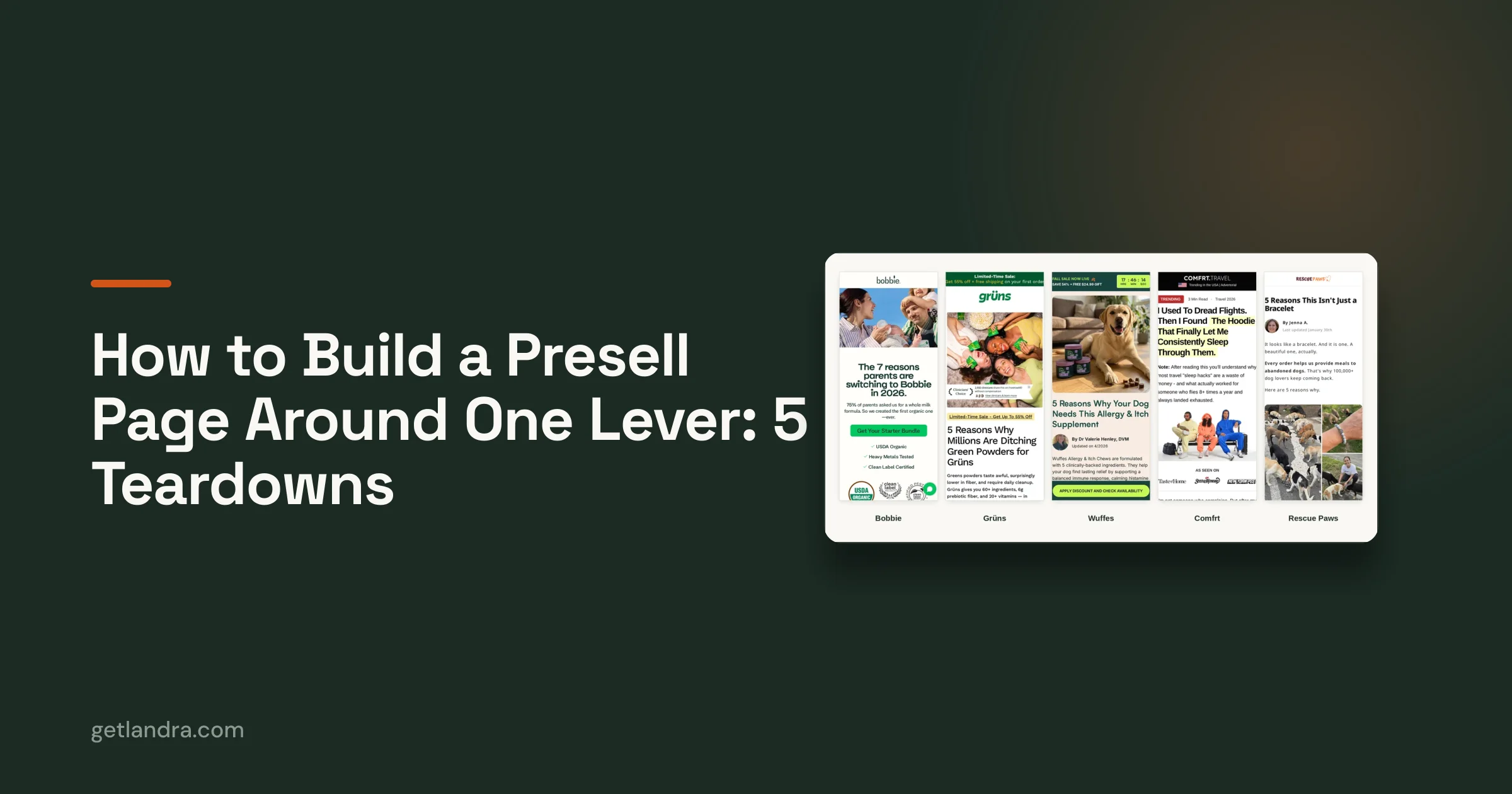
Here's the target structure live, on a page built this way:
5. Generate the images with Nano Banana
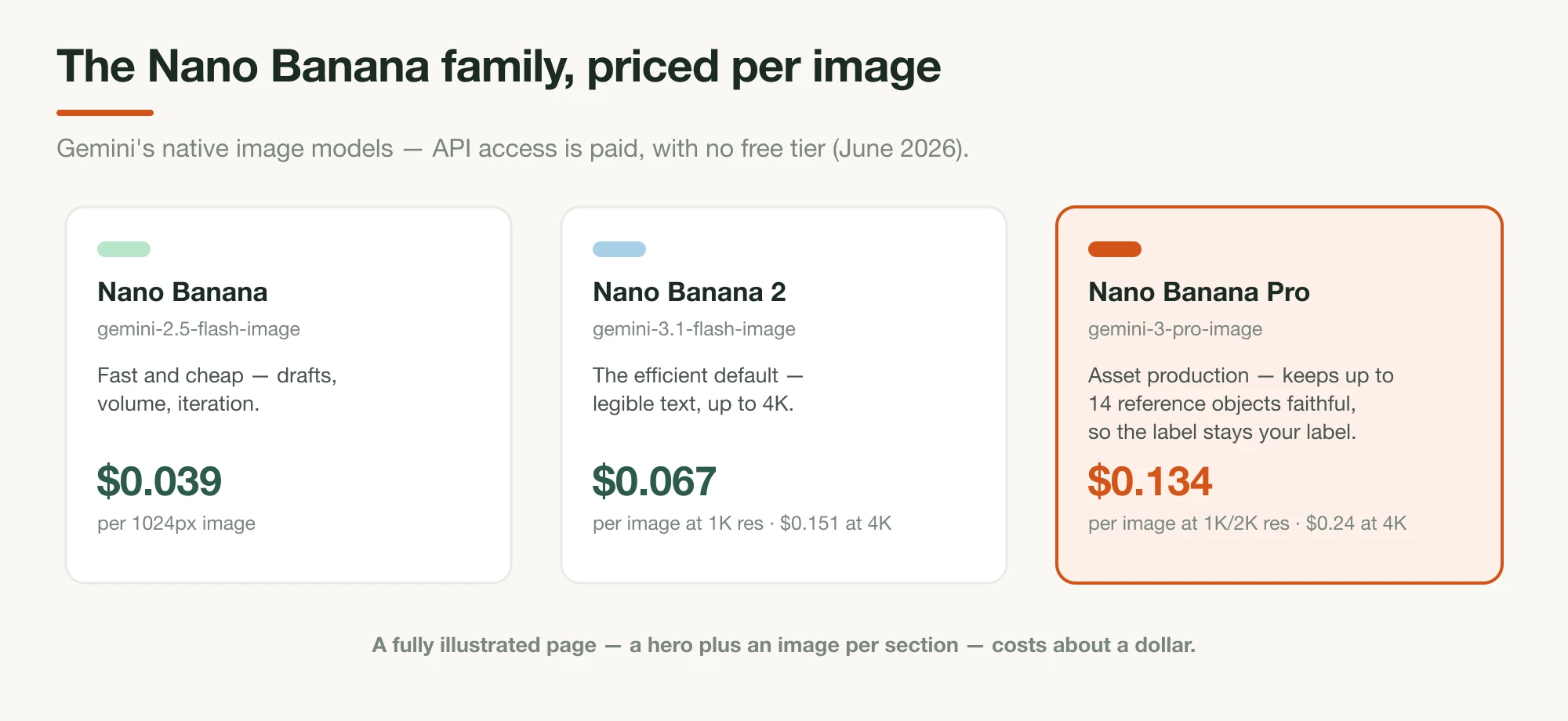
Advertorial images need to look editorial — lifestyle photography, the product in real contexts, maybe a labeled diagram of the mechanism — and this is where Google's image models earn their place. "Nano Banana" is Google's official name for Gemini's native image generation; as of June 2026 the family is Nano Banana (gemini-2.5-flash-image, fast and cheap), Nano Banana Pro (gemini-3-pro-image, professional asset production with high-fidelity text rendering), and Nano Banana 2 (gemini-3.1-flash-image, announced February 2026). You can use them in the Gemini app, Google AI Studio, or the API.
The capability that matters most for an advertorial is reference-image consistency: per Google DeepMind's model page, Nano Banana Pro maintains "the fidelity of up to fourteen objects in a single workflow," meaning you upload real photos of your product and generate lifestyle scenes where the bottle, label, and packaging stay your bottle, label, and packaging. Prompt pattern:
Using the attached product photos as reference, generate a warm,
editorial lifestyle photo: [the scene — e.g. "the product on a kitchen
counter beside a French press, soft morning window light, shallow depth
of field"]. Keep the product label exactly as shown in the reference.
Photorealistic, no text overlays, no logos other than the product's own.
Two practical notes. First, cost: the API is paid with no free tier. Current pricing per generated image runs $0.039 on Nano Banana, about $0.067 at 1K resolution on Nano Banana 2, and $0.134 on Pro, so a fully illustrated advertorial's image bill is under a couple of dollars:
| Model | API model ID | Per image (June 2026) | Best for |
|---|---|---|---|
| Nano Banana | gemini-2.5-flash-image | $0.039 (1024px) | Drafts, volume, iteration |
| Nano Banana 2 | gemini-3.1-flash-image | $0.067 at 1K · $0.151 at 4K | The efficient default; legible text |
| Nano Banana Pro | gemini-3-pro-image | $0.134 at 1K/2K · $0.24 at 4K | Product fidelity (up to 14 reference objects) |
Second, the truthfulness line from earlier extends to images: generated lifestyle scenes are fine; fabricated "real people" testimonial portraits, fake before/afters, and invented press screenshots are not. For the image craft on its own (sourcing a sharp reference shot, the two-part prompt, lighting, and the fidelity check) see how to make high-quality AI product photos.
6. Label it, then publish it on your own domain
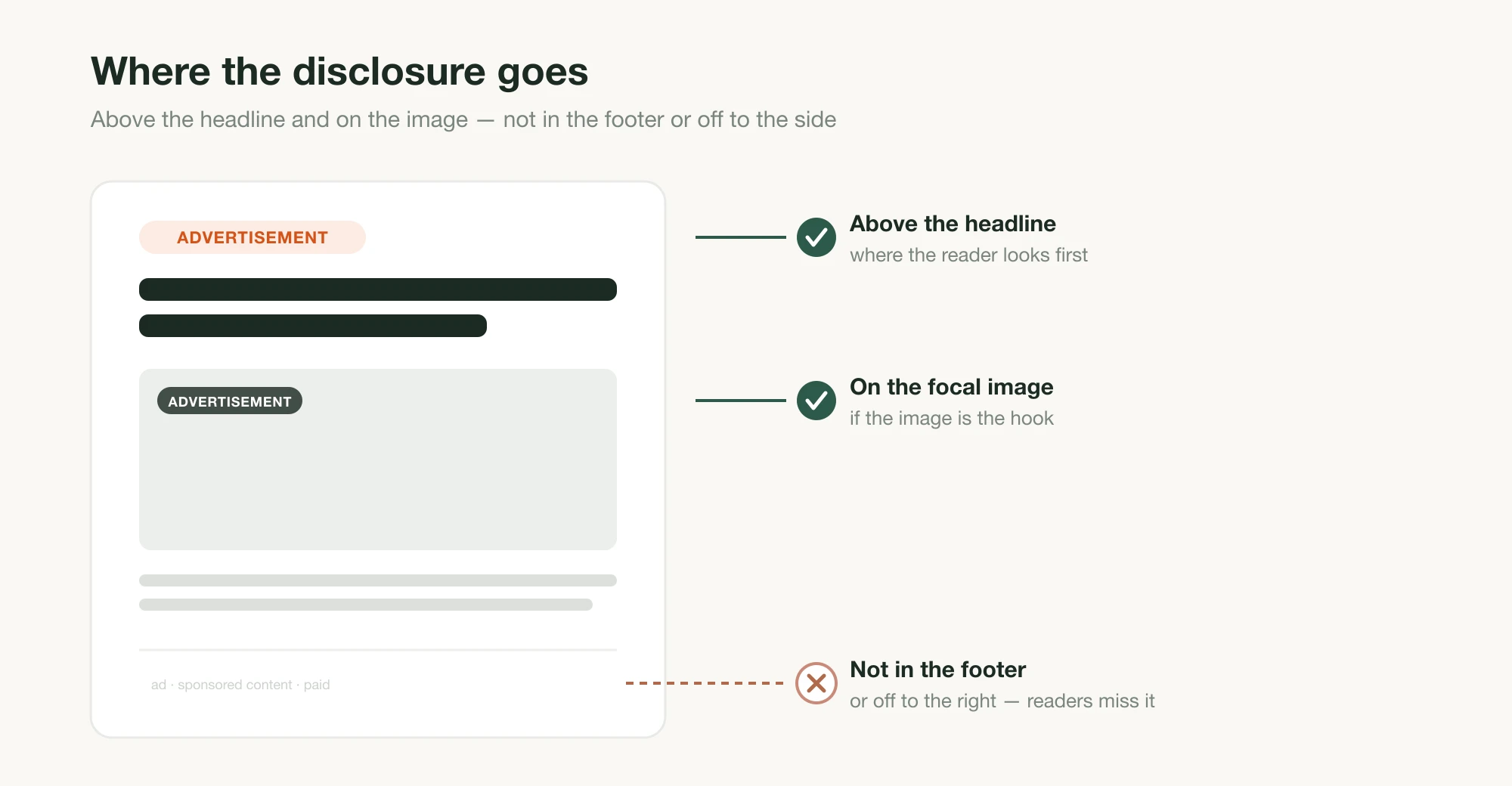
Before traffic touches the page: the "Advertisement" label goes near the top, above the headline, where the reader sees it before the editorial framing starts working. Then publish where your ads can point. For most DTC brands that means a page on your own Shopify domain rather than a third-party subdomain, which keeps analytics, retargeting, and trust signals consolidated. Run the page on a fast host, check it on a phone (that's where the traffic is), and point a small test budget at it before scaling spend.
What the DIY pipeline honestly costs you
The tooling is cheap; the time and the polish aren't. Claude's consumer plans run free to $20/month (Pro is $17/month billed annually) and the image API bill for one page is pocket change. But the first pass through this pipeline — gathering inputs, briefing, two edit passes, HTML structure, image generation and placement, disclosure, publishing — is a focused day of work, the second angle costs most of that again, and the HTML you paste out of a chat needs real back-and-forth before it behaves inside a Shopify theme. That's the honest trade: full control, minimal tool spend, your time as the budget, and a page that's only as conversion-optimized as your own expertise.
Both halves of that trade are what Landra was built to remove. It runs this same pipeline end to end as software: it reads your brand and real customer voice from your URL, writes the advertorial to the audience and angle you name, lays it out in proprietary DTC components built to convert, generates the images, injects the compliance pieces, and publishes straight to your Shopify domain (or a Landra URL, or clean HTML export), in minutes, mobile-responsive out of the box, with a click-anything visual editor for refinements. No copying between tools, no theme wrestling. Plans from $19/month with a 14-day free trial; the pricing page has the full toolkit, from AI image generation and section rewriting to headline alternatives and saved brand context.
Before you ship it: the pre-publish checklist
Run the final page against this list. It's the condensed version of everything above:
- The label: a visible "Advertisement" marker above the headline, present on mobile.
- The claims: every number, mechanism, and result traceable to your facts document — nothing the model invented survived the edit.
- The testimonials: real customers, quoted verbatim, or none. No AI-written reviews, no generated "customer" portraits.
- The structure: product held back until the problem and mechanism have done their work; one CTA, repeated, one destination.
- The read: headings alone tell the story; paragraphs are short; it sounds like your brand, not like a model.
- The page: loads fast, reads at phone width, images look editorial rather than stocky.
A page that passes all six is a real advertorial that happens to have been drafted by AI, which is the entire point. For the listicle version of this same pipeline, see how to create an AI-generated listicle.
Frequently asked questions
Will Google penalize an AI-generated advertorial?
Not for being AI-generated. Google's spam policies target content produced 'for the primary purpose of manipulating search rankings… no matter how it's created.' An advertorial built as a paid-traffic landing page, grounded in real product facts, is not a search-manipulation play at all — the policy concern barely applies. What does get punished is pumping out hundreds of thin AI pages for rankings.
Is it legal to publish an AI-written advertorial?
Yes, with the same obligations as a human-written one: the page must be clearly labeled as advertising (the FTC treats hidden ad content as deceptive regardless of author), and every claim and testimonial must be real. The FTC's 2024 Fake Reviews Rule explicitly covers AI-generated fake reviews and testimonials — never let the model invent social proof.
What is the best AI for writing an advertorial?
A frontier general-purpose model with a strong long-form writing reputation. As of June 2026 that means Claude (Anthropic's flagship is Claude Fable 5, released June 9, 2026) or ChatGPT (GPT-5.5). Zapier's May 2026 hands-on comparison preferred Claude's voice for writing tasks, calling Sonnet 4.6 more natural-sounding than the GPT-5 series — but the brief you write matters far more than the model you pick.
How much does it cost to create an advertorial with AI?
Surprisingly little in tooling: claude.ai has a free tier (Pro is $17/month billed annually, $20 monthly), and Gemini image generation runs roughly $0.04–$0.24 per image through the API depending on the model and resolution. The real cost is your time — expect a focused day of work the first time through the pipeline. Done-for-you software like Landra compresses that to minutes from $19/month.
Can AI write the testimonials for my advertorial?
No — this is the bright legal line. The FTC's Fake Reviews Rule (effective October 21, 2024) bans fake consumer reviews, testimonials, and endorsements that misrepresent the reviewer's existence or experience, and the FTC has said directly that AI-generated reviews are covered. Quote real customers verbatim, or run the page without testimonials.
What is Nano Banana?
Google's official name for Gemini's native image-generation models. As of June 2026 there are three: Nano Banana (gemini-2.5-flash-image, fast and cheap), Nano Banana Pro (gemini-3-pro-image, professional asset production with high-fidelity text rendering), and Nano Banana 2 (gemini-3.1-flash-image). They're available in the Gemini app, Google AI Studio, and the paid Gemini API.
Does an AI advertorial still need an ad disclosure?
Yes, always. Disclosure obligations attach to the page being paid advertising, not to who wrote it. Put a clear "Advertisement" label where the reader sees it before the editorial framing does its work — near the top of the page — and keep it visible on mobile.